
Your app did not really launch when the store approved it. It launched when real people, on real devices and with zero context, tried to understand your promise, get through onboarding, and reach value before they got distracted. The first 48 hours are where you find what is breaking vs what is noise, so you can focus the next week of work without thrashing.
Early proof: a 48-hour signal map (and how to use it)
| 48-hour signal (keep it simple) | Where you see it | What it often means (directionally) |
|---|---|---|
| Store page visits vs install conversion | App Store Connect, Google Play Console | Visits with weak conversion usually points to listing/targeting mismatch more than product failure |
| Onboarding completion | Product analytics | If users do not finish onboarding, your "aha" is too late, too confusing, or blocked |
| Crash-free sessions | Crash reporting | Repeatable crashes on common devices are a stop-the-line risk, even with small samples |
| Day-1 retention (next-day open) | Product analytics | Early value and expectation match; treat small numbers as directional, not definitive |
| How to use this map | What to do in practice |
|---|---|
| Explanation | Each signal maps to a different risk: promise (listing), activation (onboarding), stability (crashes), and early value (D1). |
| Interpretation | Do not try to "win" every metric. Find the biggest leak, fix it, then re-measure. |
| Reader impact | You protect ratings, reduce support chaos, and keep paid data cleaner. Store systems may react to early outcomes, but it varies by category and volume, so treat this as risk management, not a guaranteed ranking lever. |
How to Get Your First 1,000 Users for Your iOS App goes deeper on the ideas above and adds concrete next steps.
What do the first 48 hours decide after app launch?
Category: Retention
Statistic: ≈26.5%
Label: Average day‑1 retention
Context: Use as a rough benchmark while tracking your D1 closely
Category: Window
Statistic: 48 hrs
Label: Critical signal window
Context: Early performance signals shape visibility and momentum
Category: Activation
Statistic: ≤60 sec
Label: Reach the “aha moment”
Context: Faster time-to-value reduces early churn in onboarding
Treat the first 48 hours like an operating window, not a marketing event. It is one of the only times where store-page conversion, install quality, onboarding completion, and stability show up together.
Here is the thing: mismatches get expensive fast. If your screenshots sell one thing but the first session delivers another, every channel looks "bad" and you end up fixing the wrong lever.
Speed helps, but it is not free. Plan on 2 to 4 hours per day from a founder or PM for the first two days, plus one engineer on-call and someone who can ship store metadata changes. Also expect dependencies: review delays, phased rollout settings, attribution lag, and analytics event lag can all slow your feedback loop.
When you move from outline to execution, App Store vs Google Play: Where Should You Launch First helps close common gaps teams hit here.
What should you do in the first 48 hours after app launch?
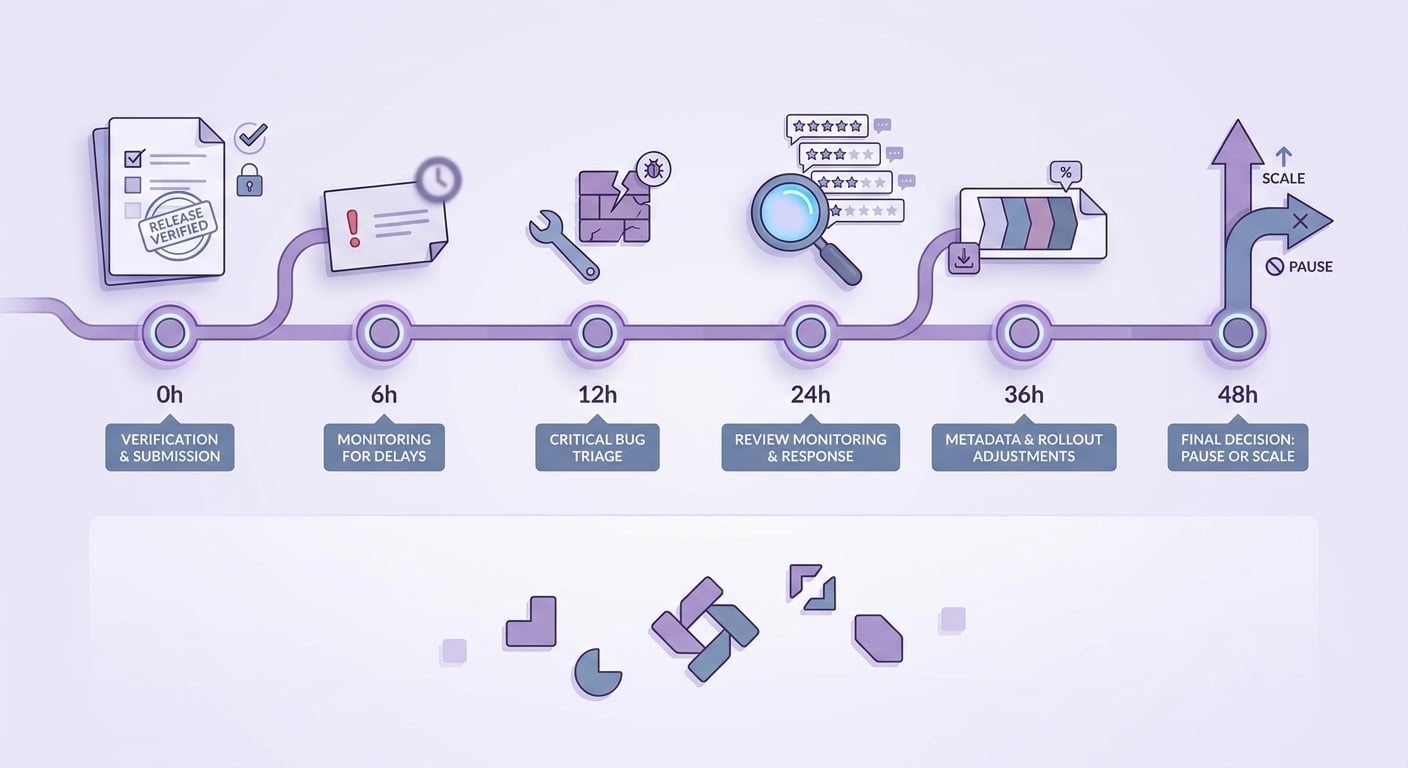
A simple 0 - 48 hour timeline that maps launch checks, bug triage, review monitoring, and decision points for App Store and Google Play after the app goes live.
0 to 6 hours: confirm the release is real and healthy
Assume you will find at least one surprise. Also assume some dashboards will be wrong for a few hours due to reporting lag.
Confirm the live build and listing match
Install from the store on at least two real devices. Verify version number, screenshots, first-run flow, paywall, and permission prompts match the promise.
Watch crashes and blockers first
Check crash-free sessions, top devices, and top OS versions. If you see startup crashes, login loops, blank screens, or purchase failures, treat it as a stop-the-line incident.
Test the full conversion path end to end
Run the critical flows yourself: install, signup, verification, paywall or purchase, and the first core action. Manual testing catches things analytics may miss early on (missing consent, delayed events, bad configs).
Validate deep links and attribution basics
Click your website links, social profile links, and campaign URLs. Broken deep links can look like low-intent traffic when it is actually routing failure.
Set up a triage channel and one owner
Decide who owns intake, severity, and what goes into the first patch. Without an owner, teams tend to chase the loudest message.
One thing worth noting: hotfixes can be blocked by app review, and rushed fixes can break instrumentation. If you rename events or reorder onboarding steps, you can lose comparability right when you need it most, so keep a short change log.
6 to 24 hours: separate signal from noise
Early numbers are usually small and lumpy. One influencer mention, one country spike, or one device-specific bug can skew everything.
Focus on a few cuts that actually change decisions:
- Split by source (organic, referrals, paid) and by platform/version.
- Bucket feedback into:
- Hard bugs (crashes, broken signup, broken purchase)
- Usability friction (cannot find feature, confusing copy)
- Expectation mismatch (listing promised something else)
- Pricing friction (trial confusion, paywall surprise)
- Read reviews for repeated phrases, not just star counts.
24 to 48 hours: pick what to fix, pause, or amplify
You cannot fix everything in 48 hours, and pushing too many changes can introduce new bugs or invalidate your learning.
| Decision | Do this when... | Practical move | Tradeoff |
|---|---|---|---|
| Fix | Users cannot reach value reliably | Patch login/signup/purchase, unblock the first core action, address repeatable crashes | Faster shipping raises regression risk, so keep scope tight and test manually |
| Pause or throttle | Funnel is untrustworthy or support is overwhelmed | Reduce budgets, narrow targeting, or pause one channel for 12 to 24 hours | If volume is tiny, pausing can slow learning; consider controlled spend instead of zero |
| Amplify | A segment converts and activates cleanly | Put more attention into the source/keyword/segment with better onboarding and fewer issues | Scaling changes your traffic mix; ramp gradually |
If you change the listing, make one change at a time when possible (first screenshot and first two lines first). Then wait long enough to see directional movement because console reporting and attribution can lag.
A complementary angle worth comparing lives in 72-Hour App Launch Checklist: Verify Before You Submit.
What can go wrong in the first 48 hours after launch?
Low volume creates uncertainty. In the first 48 hours, a handful of users can swing conversion and D1 wildly, so treat early charts as hypotheses, not verdicts.
Review and reporting delays are real. Crash reports can take time to cluster, attribution can lag, and App Store review can block a hotfix. Rushing a patch can also worsen crash rate or break analytics, which makes the next 24 hours harder to interpret.
For tradeoffs, checklists, and edge cases, How to Publish Your Dreamflow App: Store Submission Done Right rounds out this section.
What founders commonly get wrong in the first 48 hours
They treat vanity metrics as traction
Installs, impressions, or social spikes are not traction if activation is weak. Downloads without onboarding completion are often just unqualified demand.
If you pour fuel on the top of funnel too early, you can also drown out your own signal. Some store systems may react to outcomes like engagement and ratings, but the effect varies, so treat this as a reason to avoid self-inflicted noise, not a promise of better ranking.
They over-fix based on loud feedback
Overreacting is a common failure mode, especially with low volume.
- Do not rewrite onboarding based on a couple of reviews from one channel.
- Avoid shipping feature band-aids when the issue is expectation mismatch from the listing.
- Be cautious with pricing changes if you have not confirmed the paywall works and the value is clear.
A concrete triage example (what this looks like in real life)
We shipped a build that looked fine in aggregate, but Crashlytics showed a spike on iOS 17.5 tied to a new camera permission flow. We flipped the feature flag off for that flow, updated the store description to avoid promising the camera feature, then shipped a small patch after reproducing on a real device. The next day, crash-free sessions stabilized and support volume dropped, even though installs stayed flat.
How Solo Founders Can Navigate App Publishing Without Losing Weeks reframes the same problem with a slightly different lens - useful before you finalize.
The 48-hour launch checklist I would use
Your minimum monitoring stack
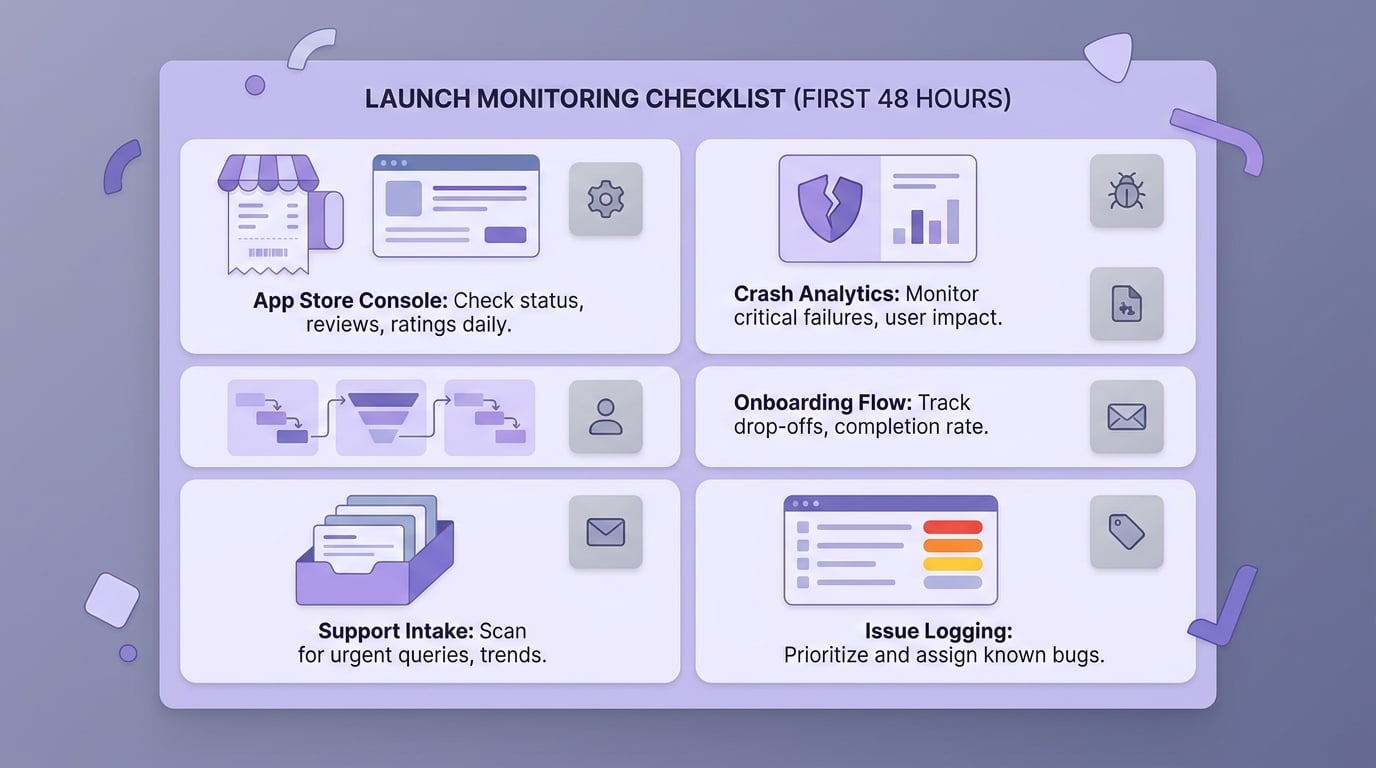
A checklist block for the founder's launch monitoring stack, including app store console, crash analytics, support inbox, onboarding flow checks, and issue logging.
| Need | Minimum tool | What to set up (before launch if possible) |
|---|---|---|
| Store funnel | App Store Connect, Google Play Console | Page views, conversion, search terms, reviews |
| Stability | Crashlytics, Sentry, Bugsnag | Alerts for new crashes and crash-free sessions |
| Activation | Amplitude, Mixpanel, PostHog, Firebase | Onboarding completion, time to first key action, paywall to purchase |
| Support intake | Zendesk, Intercom, Help Scout, shared inbox | Tags matching your triage buckets, saved replies for common issues |
| Issue tracking | Doc/sheet/Linear/Jira | Issue, repro steps, severity, owner, ship target |
Decision rules that keep the team calm
- Patch immediately if it blocks login, signup, purchase, or the core loop.
- Wait for a second data point if it is a preference or niche complaint (especially at low volume).
- Scale only when these align for at least a day:
- listing conversion is not collapsing
- onboarding completion is stable (or improving)
- crash-free sessions are acceptable for your category and traffic mix


