In January 2026, I had to decide whether our next iOS release would be a SwiftUI rebuild or a UIKit hardening pass, with a two-person team, six weeks on the clock, and an App Store rating sliding because checkout kept breaking on older devices. The problem was not ideology, it was risk: ship visible change fast without losing the control and performance we already paid for. This case study shows how we chose SwiftUI or UIKit screen by screen, what it cost in real effort, and a framework you can use to pick a sane default for your app in 2026.
Early proof: what happened in our first 30 days (and what it means)
| Proof (what we observed) | Interpretation (what it likely means) | Reader impact (how it changes your decision) |
|---|---|---|
| New SwiftUI screens took about 30-40% less cycle time from spec to PR merge (internal estimate from sprint tickets: fewer review iterations, faster layout changes). | SwiftUI can reduce iteration overhead when the UI is mostly layout plus straightforward state. It is not a universal speedup. | If your next milestone includes onboarding, offers, or settings, SwiftUI can save time in your case if you also budget for integration and QA. |
| Seam work (navigation + shared state + test IDs) added 1-3 engineer-days per new screen family once flows crossed frameworks. | Hybrid ships, but the seams are real engineering work, not just "wrap it in a hosting controller." | Plan capacity for seams, or your "quick SwiftUI win" becomes schedule debt. |
| Keeping checkout and account in UIKit reduced regression risk under a fixed ship date, but limited how much UI modernization we could do in one cycle. | UIKit tends to win when you have brittle legacy paths and you cannot afford a debugging week right before release. | If ratings or revenue hinge on one or two flows, stabilize those first, even if the app looks less modern this sprint. |
Net impact for us: we stopped betting the sprint on a full rewrite and instead shipped visible improvements while keeping the highest-risk flows stable.
Best Free Resources to Learn iOS Development in 2026 goes deeper on the ideas above and adds concrete next steps.
Why is the SwiftUI vs UIKit choice harder in 2026?
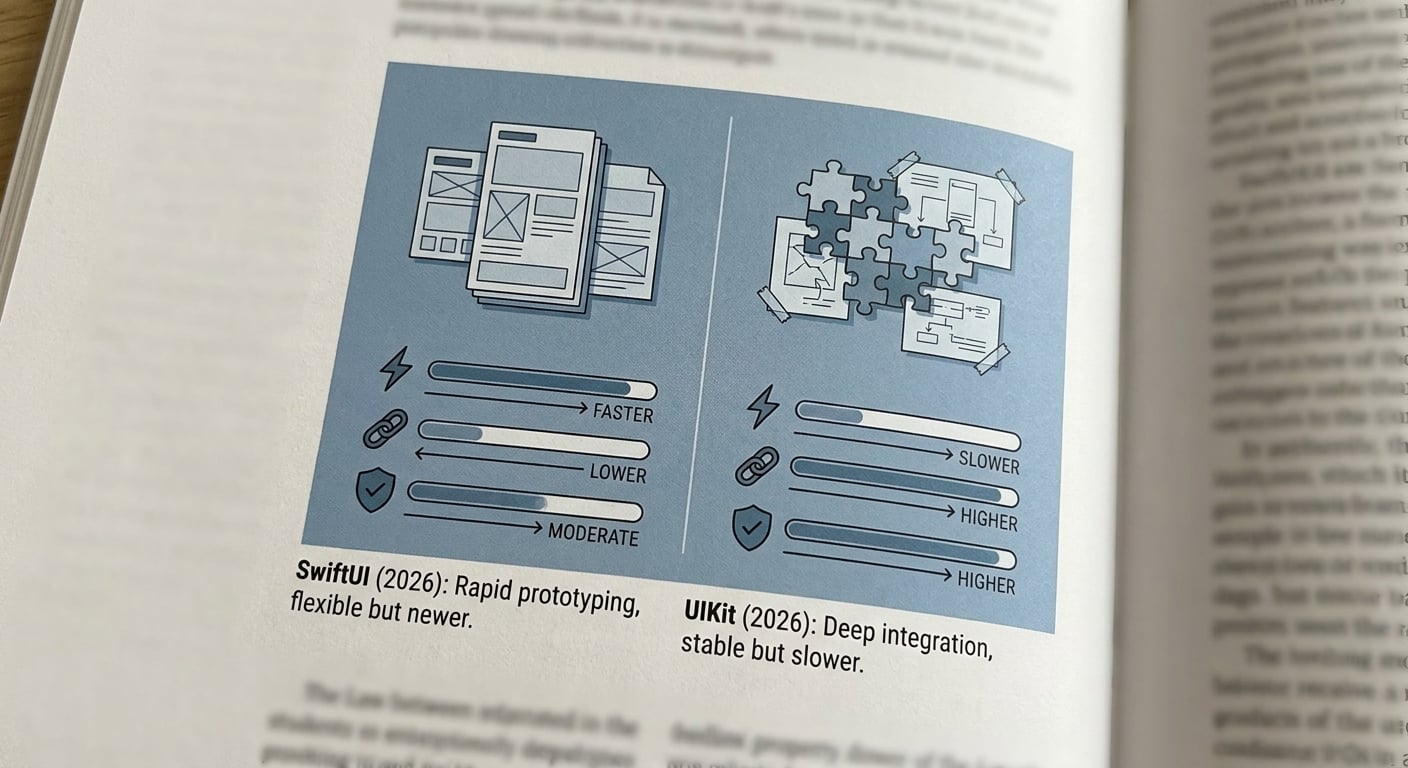
A compact before/after comparison card showing SwiftUI vs UIKit across prototype speed, legacy integration effort, and release risk for a 2026 iPhone app update.
What SwiftUI now handles well
- Onboarding, upsells, settings, and empty states where the UI is mostly layout plus straightforward state
- Fast iteration when copy, spacing, and requirements change mid-sprint (previews help, but still plan real device checks)
- Feature-light screens that need to ship cleanly across iPhone sizes without custom layout math
- Small teams that benefit from fewer files and faster layout changes, assuming someone owns architecture, code review, and a11y basics
One constraint to acknowledge: SwiftUI still has a skill ramp, and debugging state and navigation issues can take longer than expected, especially across iOS versions where behaviors differ subtly.
Where UIKit still earns its place
- Performance-sensitive flows like custom gestures and highly tuned scrolling (often validated with Xcode Instruments for scroll hitching)
- Existing view controllers with hard-won fixes: analytics hooks, deep-link routing, accessibility patches, and edge-case state handling
- Third-party SDKs that assume UIKit lifecycle and delegation patterns
- Release pressure: when the ship date is fixed and the flow already works, UIKit often lowers change risk compared to a broad rewrite
The hybrid reality most teams actually live with
Hybrid is a shipping strategy, but it is also an operational commitment. Someone has to own navigation rules, state boundaries, analytics events, and test conventions across two UI systems.
If you do not document and enforce those seams, the failure mode is slow drift: duplicated logic, inconsistent back behavior, and brittle UI tests.
CTA
Want a quick screen-by-screen recommendation?
Audit your next release
When you move from outline to execution, Best Cross-Platform App Development Tools Ranked 2026 helps close common gaps teams hit here.
How do you choose SwiftUI vs UIKit screen by screen?
Our screen-by-screen decision matrix
Score each screen on three axes
We ranked (a) change frequency, (b) animation or gesture complexity, and (c) dependence on existing UIKit pieces (custom navigation, SDK delegates, legacy layout). High churn with low UIKit dependency went to SwiftUI first.
Apply one simple rule per bucket
New features defaulted to SwiftUI, stable money paths stayed UIKit, and performance-critical surfaces became hybrid only if we could prove parity in a small spike (usually 0.5-1 day) before committing.
Plan releases by blast radius, not ambition
We shipped by screen families (onboarding, settings, checkout) and avoided changes that required re-plumbing core navigation in the same release. The constraint was not taste, it was time and QA capacity.
Integration issues we hit (and how we contained them)
- Navigation ownership: decide whether UIKit or SwiftUI is the source of truth for pushes, modals, and back behavior
- State divergence: prevent "two sources of truth" when UIKit and SwiftUI observe the same model differently
- Lifecycle mismatches: appearance events and task cancellation do not always line up; verify on your supported iOS versions
- Test flakiness: seams got better only after we standardized accessibility identifiers and explicit wait conditions
- Rollback criteria: define thresholds like crash-free session drop or checkout completion anomalies, then actually watch them
Dependency note: this is much easier if you already have consistent analytics naming and a clear navigation architecture. If those are messy, expect extra time up front just to agree on conventions.
The practical playbook we ended up using
| Area | Default | Effort note |
|---|---|---|
| New, high-churn screens | SwiftUI | Often faster to iterate, but budget time to wire analytics, routing, and a11y. |
| Stable, high-risk flows (checkout, account) | UIKit | Tends to reduce regressions, but slower to modernize visually. |
| Shared components (payment sheet, complex picker) | Wrap, do not rewrite | Wrappers are usually cheaper if the component already works and is tested. |
| Release gating | Feature flag + staged rollout | Adds process overhead, but limits impact when seam bugs slip through. |
Release process we used: feature flag, internal TestFlight for 48 hours, then staged rollout with crash monitoring and a quick navigation smoke test checklist. Even after it was written down, that checklist took about 30-60 minutes per build to run well.
A complementary angle worth comparing lives in Kotlin Multiplatform vs Flutter - Which Is Better for 2026?.
What changed after the mixed stack release, and what is the 2026 decision framework?
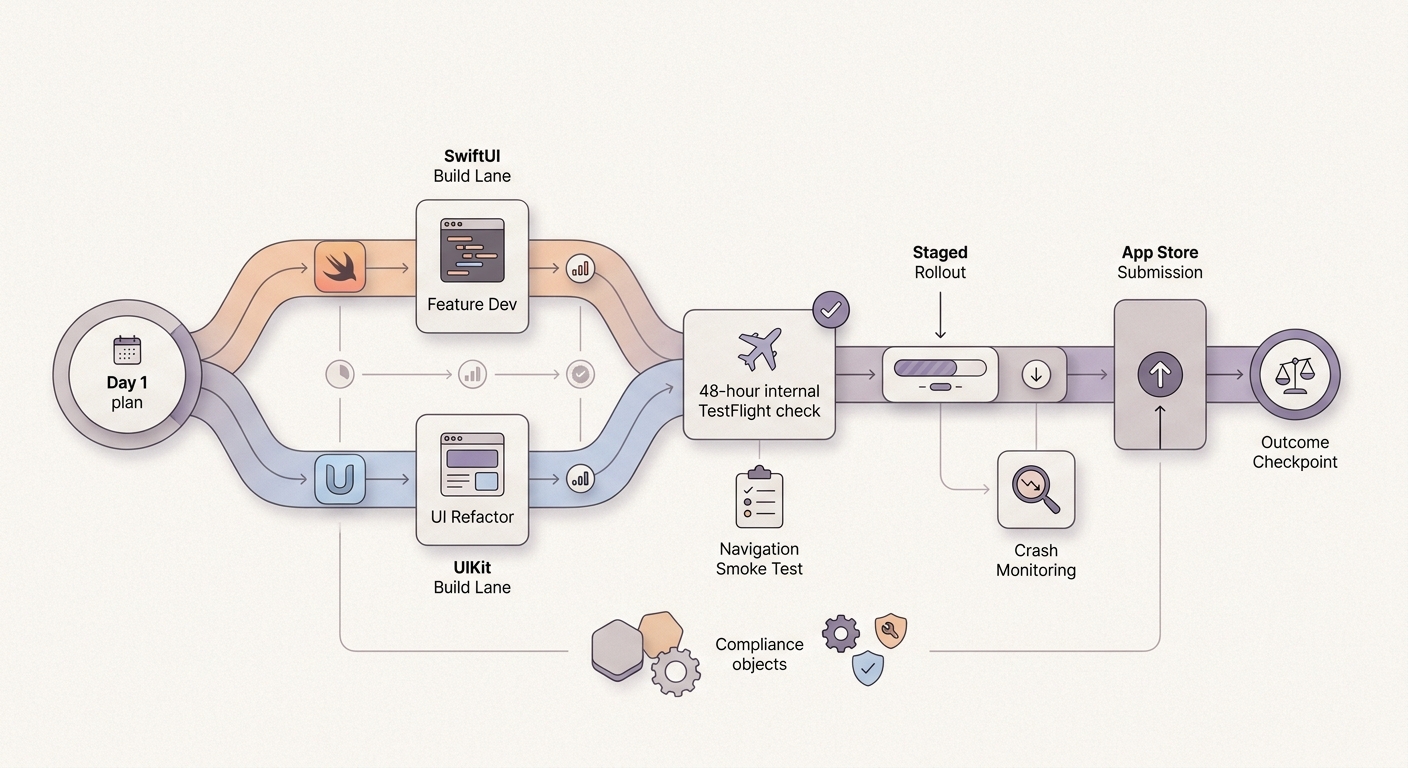
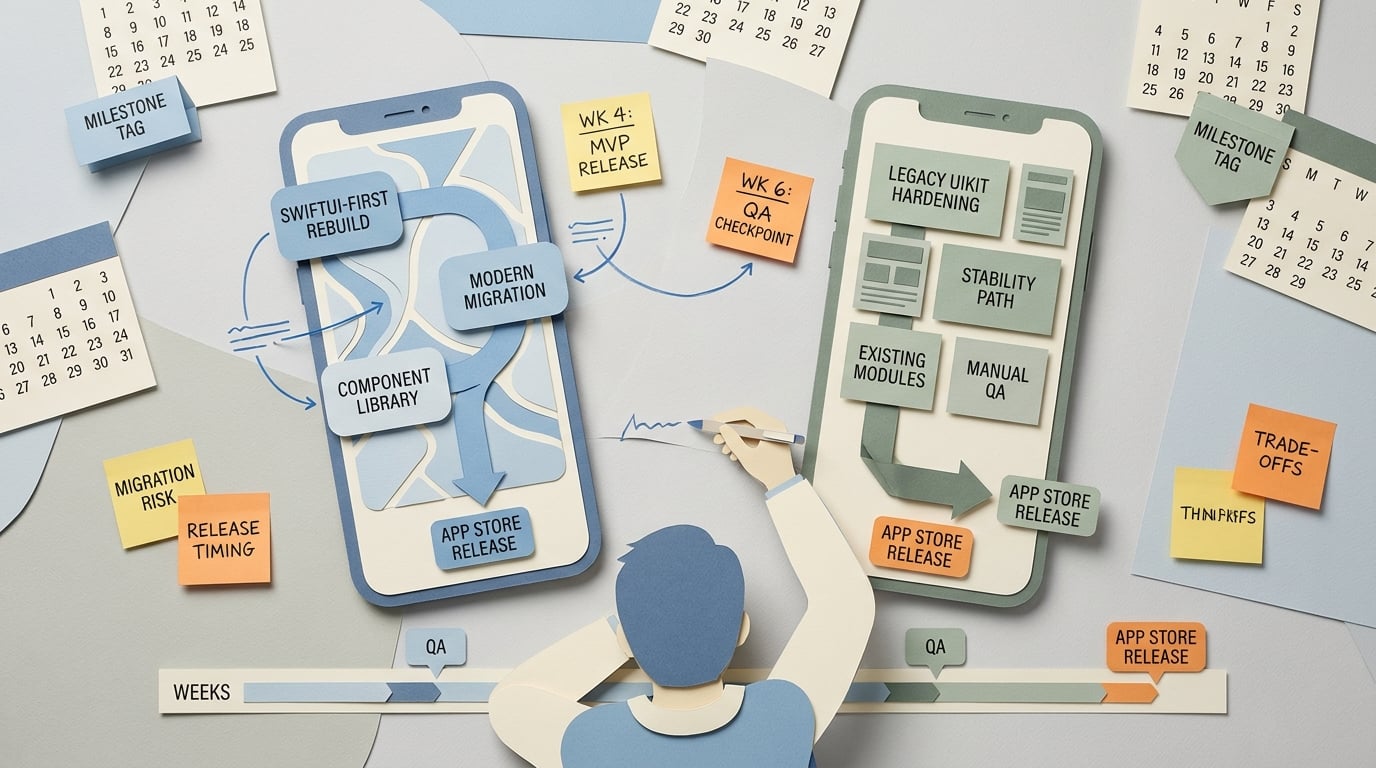
A timeline block mapping the 30-day release window, the mixed-stack build phase, test pass, and App Store submission, with outcome markers for faster iteration and reduced migration risk.
Measured outcomes after the mixed-stack release
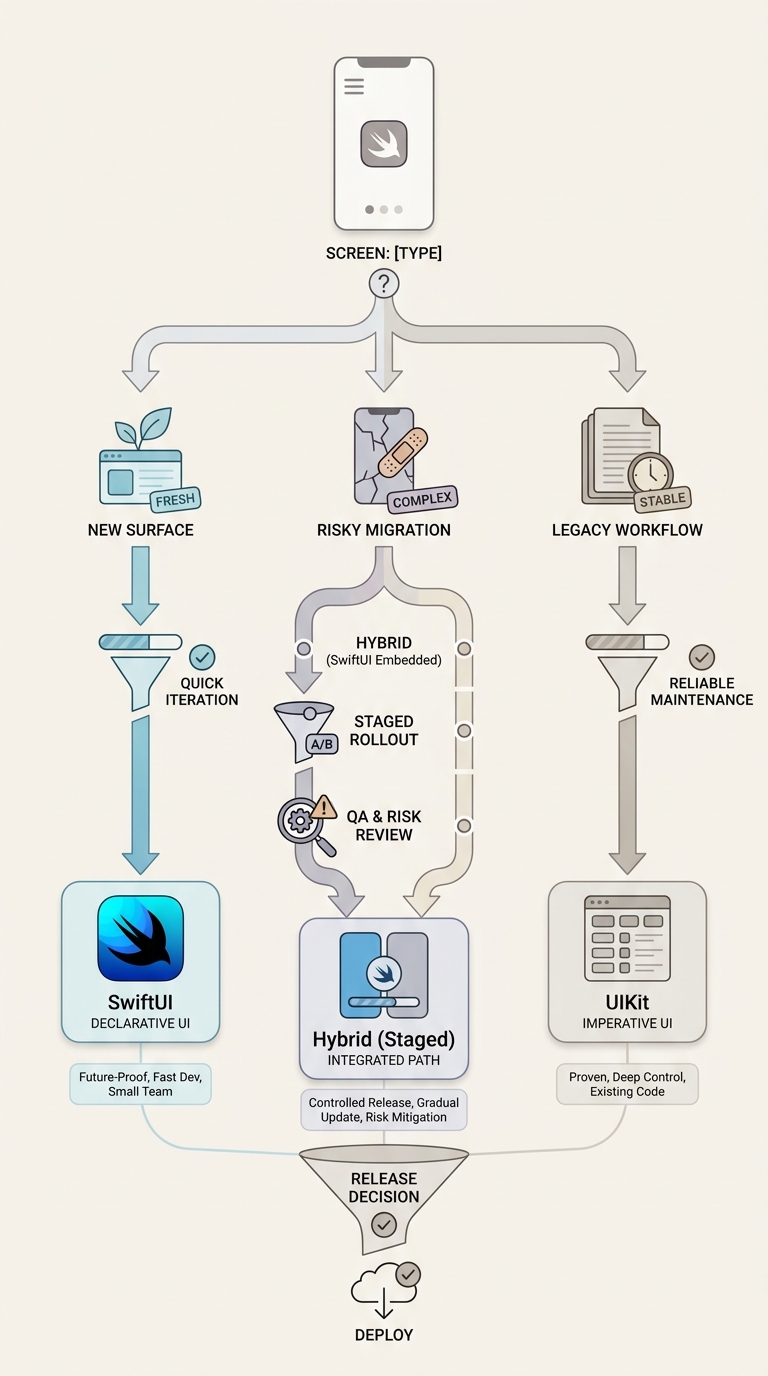
A process diagram showing how a founder team routes each iOS screen through a decision path: new surface to SwiftUI, legacy workflow to UIKit, risky migration to hybrid with staged release checks.
We saw ~30-40% faster iteration on new SwiftUI screens (measured as cycle time from spec to merged PR and number of design-review loops). UIKit kept our riskiest flows predictable, which mattered more than raw speed that month.
The tax was real: seam debugging and cross-framework UI tests cost us a few late nights, mostly around navigation and modal state. If your team is newer to SwiftUI state patterns, expect those costs to show up earlier, and plan for extra QA across your iOS version spread and older devices.
Directional 30-day timeline we could actually hit with a two-person team (assuming your backend and designs are not blocked):
- Week 1: scope, seam design, one spike to de-risk navigation (plus agree on rollback thresholds)
- Week 2: build one screen family end-to-end
- Week 3: test pass, fix seam bugs, add accessibility identifiers, align analytics events
- Week 4: staged rollout, monitor crash-free sessions and key funnel events, then App Store submit
The 2026 rule of thumb for choosing one
- SwiftUI: new screens, high UI churn, simpler interactions, and you can invest in architecture and testing
- UIKit: complex legacy surfaces, brittle revenue paths, heavy customization, or deep SDK dependencies
- Hybrid: large codebase under deadline where rewrite is not realistic, and you can assign clear ownership for seams
One thing worth noting: hybrid is only sustainable if you treat it like a maintained surface. Expect ongoing costs per new cross-stack flow: documentation, regression tests, and occasional navigation edge cases across iOS versions.
CTA
Map your next milestone into SwiftUI-first, UIKit-only, or hybrid buckets.
Audit your next release
For tradeoffs, checklists, and edge cases, Top 7 Vibe Coding Tools for Building iOS Apps Fast rounds out this section.