
Shipping a beta with TestFlight is easy until it is not. Once you are running multi-week cycles, inviting large cohorts, or shipping iOS and Android in parallel, friction shows up as delays, fragmented feedback, and extra release coordination. This write-up compares three practical alternatives to TestFlight based on how they hold up in real beta operations week after week.
TestFlight and Google Play Testing: Using Beta Tracks goes deeper on the ideas above and adds concrete next steps.
Why teams look beyond TestFlight
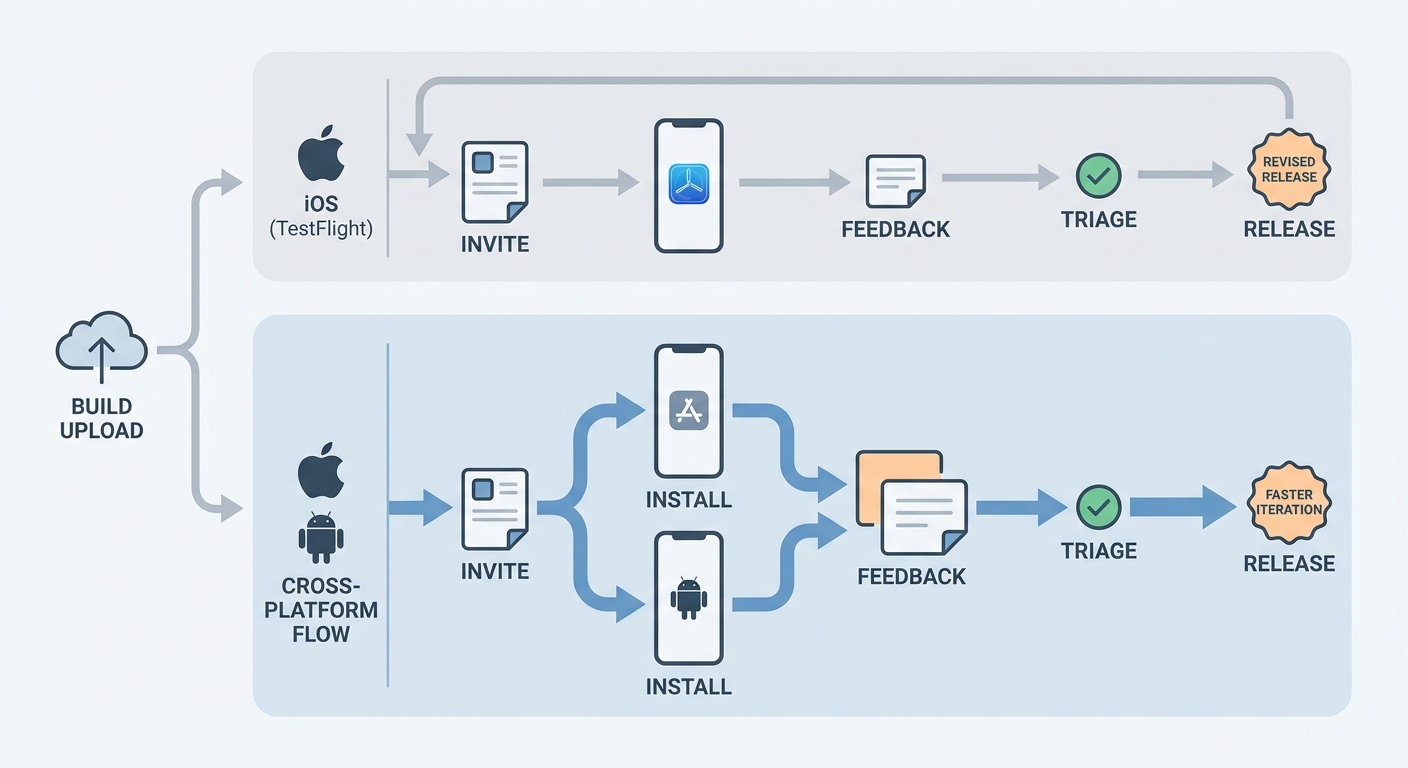
A process diagram mapping a beta release from build upload to tester invite, install, feedback capture, and revised release for both iOS and Android. The diagram should show the operational advantage of a cross-platform distribution flow versus a TestFlight-only path.
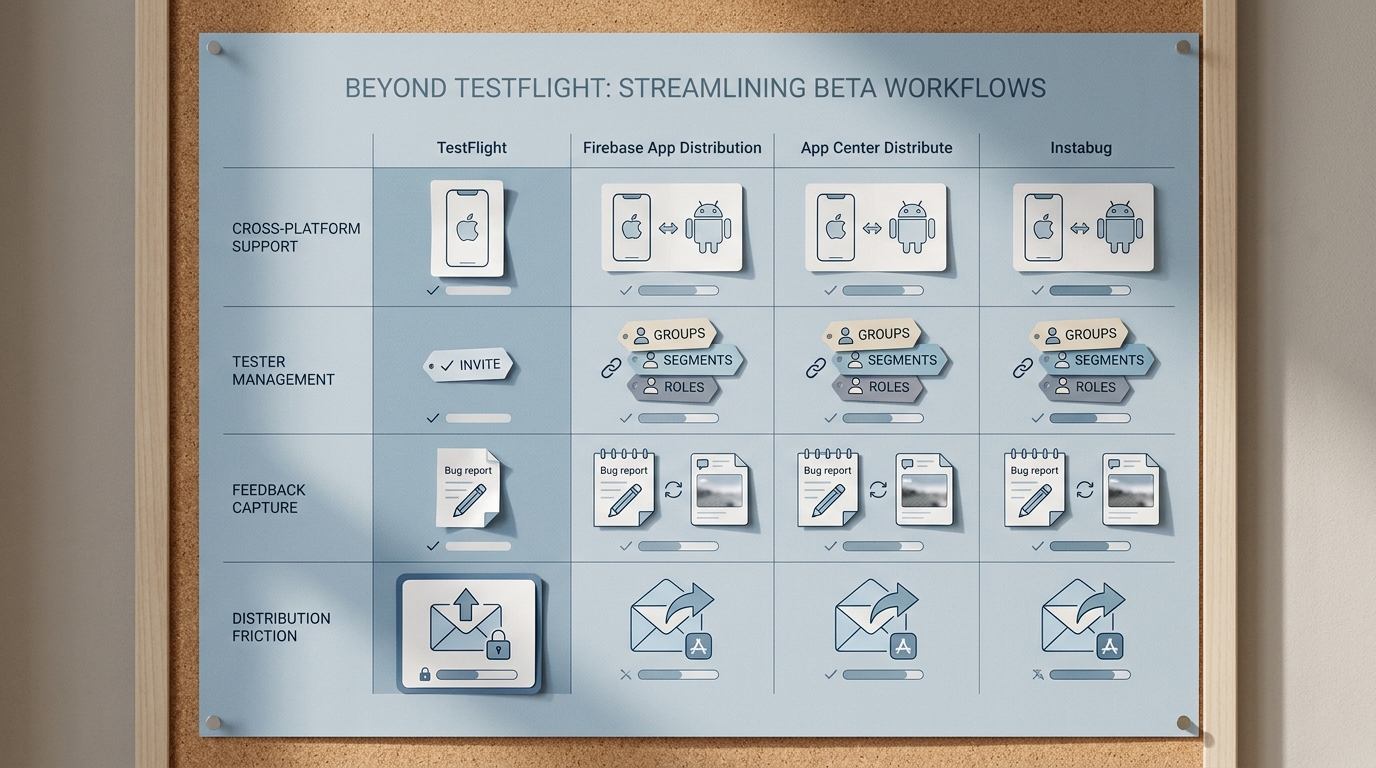
A compact comparison table showing TestFlight alongside the three alternatives across cross-platform support, tester management, feedback capture, and distribution friction. The table should visually reinforce why teams move away from iOS-only beta workflows.
| Option | Platforms | What it is strongest at | Likely best fit |
|---|---|---|---|
| Firebase App Distribution | iOS, Android | Cross-platform build distribution with tester lists and release notes (docs) | Teams that want one distribution workflow across iOS and Android |
| App Center Distribute | iOS, Android | Tester groups and release visibility for organized distribution (docs) | Teams that need tighter group and version hygiene |
| Instabug | iOS, Android (SDK layer) | In-app bug reports and contextual feedback capture (Instabug guidance) | Feedback-heavy betas where report quality matters more than install flow |
| Metric to track | How to measure (lightweight) |
|---|---|
| Median invite to first session | Compare invite timestamps (tool or email logs) to first-launch events in analytics or Crashlytics |
| Percent of testers on latest build after 48 hours | Pull version adoption from analytics or crash reporting and check the tail of outdated versions |
- Explanation: teams tend to outgrow TestFlight when cycles get longer (expiry and re-invites become disruptive), cohorts grow (more access control and segmentation), or Android enters the mix (two beta systems and two sets of comms).
- Interpretation: these tools solve different bottlenecks: distribution consistency, tester and version hygiene, or higher-quality reporting. The practical constraint is that tooling does not replace basic release discipline and triage ownership.
- Impact: tracking one or two metrics for 2 to 3 releases usually reveals whether the limiting factor is onboarding friction, version drift, or low-signal feedback. That is often more actionable than debating features on paper.
When you move from outline to execution, Test Builds Without Chaos: Clean Beta Process Guide helps close common gaps teams hit here.
Firebase App Distribution (ranked 1): cross-platform release control
Rankings here are situational: this one tends to come out ahead when your primary need is cross-platform distribution and simple tester access. If your biggest pain is qualitative feedback, the order can flip.
One workflow for iOS and Android distribution
Firebase App Distribution supports prerelease builds across iOS and Android with invites and release notes (docs). It can reduce platform drift, but it still depends on good signing and CI hygiene. For many teams, initial setup is a half-day to two days depending on how automated your build pipeline already is.
Onboarding and release communication that scales
Email invites plus release notes help when you ship weekly or run multiple cohorts. You will still need an onboarding script (what to test, how to update, where to report) and a habit of pruning inactive testers. In practice, expect 30 to 90 minutes a week of list and comms upkeep during active betas.
Tradeoff: feedback depth is lighter unless you pair it
App Distribution is distribution-first. If your beta depends on rich qualitative feedback, plan for a second intake path (form, inbox, or an in-app SDK) and time to reconcile reports into one system of record. The upside is smoother installs; the cost is more moving parts and clearer ownership requirements.
A complementary angle worth comparing lives in TestFlight Guide - How to Beta Test Your App Before Launch.
App Center Distribute (ranked 2): tester management and build visibility
App Center can be a strong fit when your pain is group and version hygiene. It is less compelling if you are mainly trying to improve feedback quality or if you cannot commit to maintaining groups.
Structure for groups, access, and release visibility
App Center Distribute centers on distributing builds to users and groups and keeping releases visible to the right audiences (docs). The benefit shows up when you actively maintain groups and remove stale testers. If you do not, group sprawl becomes its own source of confusion within a few cycles.
Where the value shows up (and when it does not)
Group-based distribution helps reduce common beta waste: testers on old builds, stakeholders reviewing the wrong version, and outdated links circulating in chat threads. The payoff is often incremental per release, but meaningful over a quarter if your org has lots of stakeholders. One thing worth noting: if testers ignore the official link or do not update promptly, tooling alone will not fix adoption.
Dependency risk: plan for policy, access, and change management
Before committing, validate current support, constraints, and any relevant updates in Microsoft documentation and release notes for your use case (docs). The operational risk is usually a workflow change that triggers migration work, tester access interruptions, or compliance reviews.
A practical mitigation is to pilot with one cohort for 1 to 2 releases, document a rollback path, and keep your previous lane available for a short overlap. This adds parallel work up front, but it limits disruption if assumptions change.
Instabug (ranked 3): feedback-rich beta testing
Instabug tends to win when the bottleneck is low-signal feedback, not distribution. It is best evaluated as a layer you add to your beta program, not as your only release channel.
A feedback layer that increases report quality
Instabug focuses on actionable in-app feedback with context. Their guidance emphasizes structured reports and contextual signals to reduce ambiguity (Instabug guidance). The main dependencies are SDK integration and privacy review, which can take days in small teams and longer in regulated environments.
Better triage, but only with clear ownership
In-app reporting can reduce back-and-forth by capturing steps, device context, and screenshots at the moment of failure. This tends to work when you have a triage owner, a severity scheme, and realistic response expectations with testers. In active betas, budget a few hours per week for triage, routing, and closing the loop.
Tradeoff: you still need distribution and access control
Instabug does not replace a distribution workflow. You still need a path for installs across iOS and Android, plus agreement on where official bugs live (Jira, Linear, GitHub, or another system). The upside is higher-quality feedback; the cost is another integration to maintain and govern.
Which TestFlight alternative is best for your team?
Best fit by team scenario
- Shipping iOS and Android on one cadence: Firebase App Distribution is often the simplest operational swap because it unifies distribution across platforms (docs).
- You need tighter cohorts and version hygiene: App Center can fit when your recurring issues are wrong builds, messy groups, and unclear release visibility, and you will maintain group hygiene (docs).
- Your beta is feedback-heavy: Instabug is strongest when the goal is richer, contextual in-app reporting and you can support the triage workload (Instabug guidance).
When TestFlight is still enough
How to choose the right beta testing tool
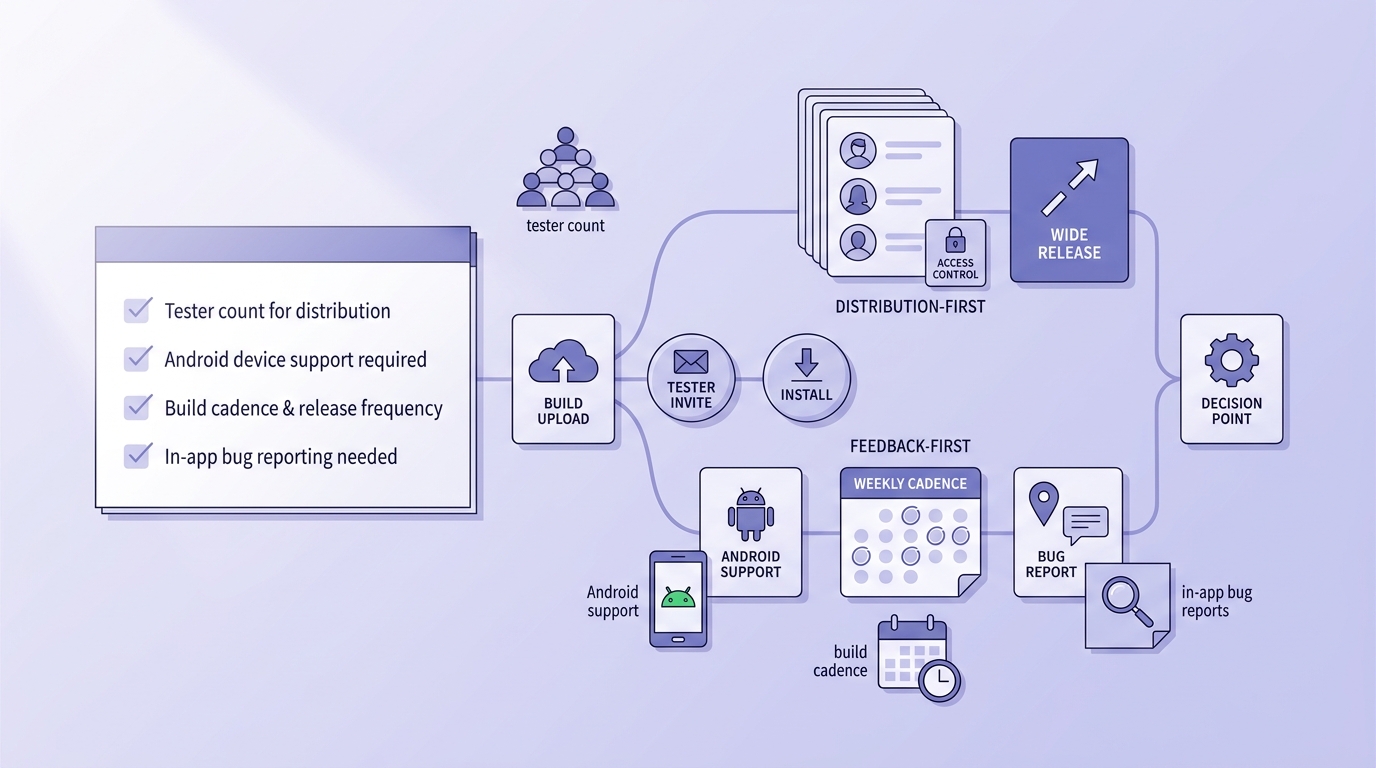
A concise checklist block for choosing between distribution-first and feedback-first beta tools, with prompts about tester count, Android support, build cadence, and the need for in-app bug reports. The block should help readers apply the ranking to their own beta program.
A defensible approach is to pick the bottleneck that is costing you the most time, then run a small trial on one real release. Keep it controlled, but real enough that it reflects your actual testers, devices, and comms habits.
If your biggest cost is fragmented distribution
Standardize on one cross-platform distribution path, then track one adoption metric for 2 to 3 releases (for example, median invite to first session). Expect 1 to 2 days of setup if CI and signing are already stable, plus ongoing list maintenance.
If your biggest cost is low-quality feedback
Add an in-app feedback layer and define a minimum report bar (steps to reproduce, expected vs actual, and a screenshot when possible). Gains are uneven at first and depend on consistent triage and response, usually a few hours a week during active beta windows.
If your biggest cost is release coordination
Prioritize tooling that supports groups, visibility, and repeatable release hygiene. The upside is fewer mistakes and less re-explaining, but it depends on stakeholder discipline (testing the right build, using the right link, respecting cutoffs).


