
Your app can be feature-complete, fully tested, and still fail to appear in the App Store or Google Play because the last mile of publishing is governed more by policy, metadata, account state, and release configuration than by code. In practice, teams lose days or weeks to ambiguous console statuses like Ready for Review, Waiting for Review, Pending Developer Release, or even Ready for Sale that mask a non-technical blocker. This write-up separates what the stores mean by "ready" from what it takes to ship, then gives you a practical triage path to identify the gate you are stuck behind and reduce avoidable commercial risk.
Step-by-Step Guide to Publishing Your First Mobile App goes deeper on the ideas above and adds concrete next steps.
Why is my app ready but not published?
Category: Risk
Statistic: 29%
Label: Avoidable rejections
Context: Tied to metadata or policy gaps
Category: Overview
Statistic: 4 buckets
Label: Non-code release blockers
Context: Policy, metadata, account, packaging can block launch
Category: Process
Statistic: 5+ statuses
Label: Pre-publish states exist
Context: “Ready” can still mean waiting, pending, or queued
Teams usually call an app "ready" when it is code-complete, QA-passed, and stable enough to ship. Storefronts use a different definition: "approved to be distributed under current policies, metadata rules, and account controls." Apple formalizes this via App Store Connect submission statuses like Ready for Review, Waiting for Review, Pending Developer Release, and Ready for Sale (Apple status reference). Google Play similarly separates upload, review, and rollout steps in Play Console publishing flows (Google Play publishing).
One thing worth noting: this is operational guidance grounded in platform docs and common release workflows, not a measured ranking of top rejection reasons. Review timing and scrutiny vary by category, region, account history, and seasonality (for example, holiday backlog).
When you move from outline to execution, Why Publishing Certainty Is More Valuable Than Faster Builds helps close common gaps teams hit here.
What usually blocks app publication?
Compact blocker snapshot (operational checklist)
| Blocker group | Typical "ready but not published" signal | Common non-code fix |
|---|---|---|
| Policy and compliance | Rejected, or queued with unanswered questions | Privacy disclosures, data use answers, age rating, restricted content flags |
| Metadata and assets | Cannot submit, or repeat rejections on listing | Screenshots, descriptions, localization, claims not supported in-app |
| Account and release controls | Approved but not visible, or stuck on a release state | Manual release toggle, region availability, tax or banking verification |
| Technical submission | Build accepted but processing stalls | Signing, versioning, packaging mismatches |
Explanation: these groups mirror how Apple and Google separate submission, review, and distribution steps, and they reflect where teams commonly get stuck in the last mile. They are not a quantified frequency table.
Interpretation: the practical friction is often paperwork and configuration, not app functionality. Reader impact: if you plan only for QA time and ignore store gates, your launch calendar will be fragile even when the build is stable.
Concrete artifact example: a lightweight release readiness checklist can be as small as ~12 fields (privacy policy URL, data collection summary, age rating, export compliance, territories, manual release, tax/banking status, reviewer notes, test credentials, IAP status, build versioning, support URL). A single owner (often PM or release manager) can usually run it in ~30-45 minutes per submission once the team gets used to it, but first setup often takes longer because inputs come from legal, design, and engineering.
Common failure modes worth planning for: SDK data collection does not match disclosures, missing reviewer credentials or demo flows, and staged rollout settings that unintentionally limit who can see the app. Also, repeated resubmits have a real cost: the review clock often resets, marketing dates slip, and you lose signal on what actually fixed the issue.
Title: Triage your "ready but not live" status
Map your current App Store Connect or Play Console status to the gate it represents, then check the specific fields and toggles that commonly block release. If your account is under verification or review asks follow-ups, expect this to take longer than a quick pass.
Start triage
A complementary angle worth comparing lives in The Last Step AI App Builders Don't Solve: Publishing.
Key data points: why apps are ready but still unpublished
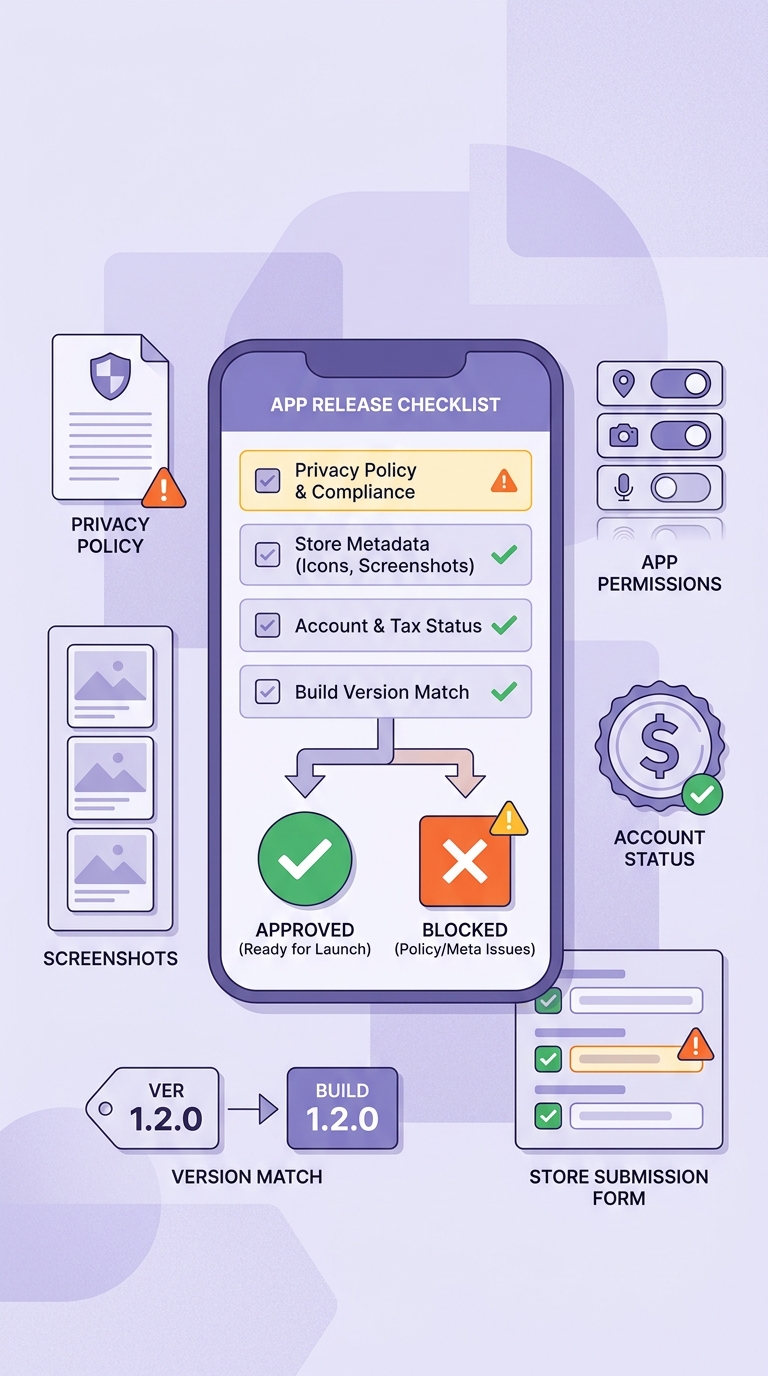
A mobile-friendly pre-submission checklist block for App Store and Google Play readiness, covering privacy policy, screenshots, permissions, account status, and version matching. The visual should reinforce the final takeaway that launch blockers are usually preventable with a disciplined release gate.
Policy and compliance gaps that stop approval
- Missing or inaccessible privacy policy URL, or disclosures that do not match in-app data collection and SDK behavior.
- Data use, permissions, and age rating mismatches: declaring one thing in the form while requesting broader device access at runtime.
- Higher-scrutiny categories that can increase review cycles: payments and subscriptions, health, finance, and user-generated content (often requiring extra notices, moderation, or eligibility checks).
- Single-answer blockers: one unresolved compliance question can prevent submission completion or move you into a wait state (per Apple and Google documentation).
Effort note: a first-pass compliance and disclosure review is often 1-2 hours for a PM or release owner. It can stretch to multiple days if legal review, updated SDK documentation, or changes to in-app consent flows are required.
Submission and metadata errors that look minor but fail review
- Non-compliant screenshots and preview assets (wrong device sizes, missing required elements, or marketing claims not supported in-app).
- Operational mismatches: bundle identifier or package name issues, build number or version conflicts, and stale release notes.
- Storefront consistency problems: app icon mismatches, incomplete product page fields, or unintended regional availability.
Tradeoff: listing changes are often quick to edit, but each resubmission can reset the review clock. If you batch many edits at once, it is harder to isolate the true rejection driver.
Effort note: a metadata cleanup pass is often 60-120 minutes if assets already exist. New localized screenshots or compliant copy rewrites can take half a day or more, especially with design and localization dependencies.
Account and verification blockers outside the app build
- Developer account verification and identity checks, plus tax, banking, or payments profile setup required before publishing can complete.
- Admin blockers: overdue agreements, organization status checks, or missing required contacts can pause submissions regardless of build quality.
- Team mechanics: wrong role, missing owner permissions, or internal approval gates that prevent a release from moving forward.
Dependency caveat: these steps can be the slowest because they depend on Apple/Google verification timelines and sometimes bank or tax authority matching. Plan for days, not hours, and expect variability by country, business type, and whether this is a new developer account.
For tradeoffs, checklists, and edge cases, Submitting vs Publishing an App: What's Different rounds out this section.
How do you clear the publishing block?
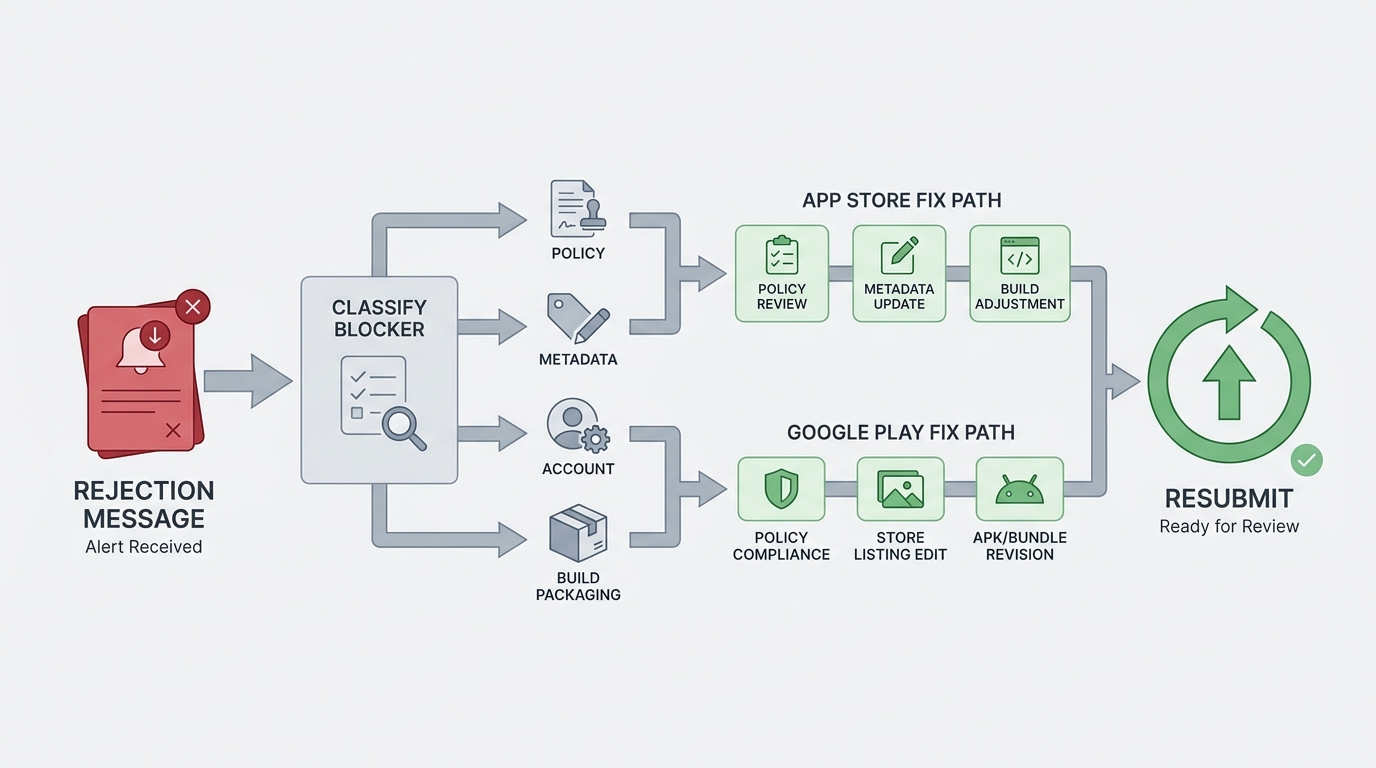
A simple process diagram showing the triage route from rejection message to blocker classification, then to the correct fix path for App Store or Google Play, and finally to resubmission. The diagram should make the decision logic feel operational, not abstract.
A 3-step triage path for App Store and Google Play
Classify the blocker
Tag it as policy, metadata, account, or build packaging based on the first hard failure you can verify in the console.
Anchor on the exact console status and screen
Use the platform status definitions, then confirm the specific page that owns the gate:
Change one thing, then verify before resubmitting
Confirm the exact field, file, permission, or toggle is fixed both in the console and in the uploaded artifact. This reduces repeat loops caused by inconsistent disclosures across SDKs, manifests, and forms. It does not guarantee approval, but it usually improves iteration speed and clarity.
Mini decision checklist (status to check, where to look, what to change)
| If you see this | Where to check | What to change or verify |
|---|---|---|
| Approved but not visible | Apple: Pricing and Availability, Release Options | Territories enabled, manual release not holding, correct version selected |
| Google: Publishing overview, target Track | Track is production (if intended), rollout percentage, listing visibility | |
| Reviewer waiting on you | Apple: App Review - Resolution Center | Answer questions, attach required docs, provide test credentials and steps |
| Google: policy status prompts tied to release | Complete declarations, fix referenced policy item, re-upload if required | |
| Live to some users only | Google: Track, Countries/regions, Device catalog | Rollout %, country targeting, device exclusions, test vs production confusion |
| Looks live but discovery is slow | Apple: after Ready for Sale | Allow propagation time, confirm territories, check for phased release settings |
Expected outcomes, timing, and failure modes to plan for
- Backlog variability: queue time can change with seasonality, major OS releases, and weekends. You can do everything correctly and still wait.
- Propagation delay after approval: even with "Ready for Sale" or "Published", storefront search and regional caches can lag. Plan a buffer before public announcements.
- Resubmission cost: each round can reset review timing and introduce launch slip, so prioritize fixes that address the reviewer message or the clearest gate first.
- When triage will not be enough: policy interpretation disputes, sensitive categories, or accounts under heightened scrutiny may require an appeal and additional evidence. Budget extra time and keep a rollback plan for marketing commitments.
Practical takeaway: treat store approval as a release dependency with lead time. If you have a fixed campaign date, plan either a buffer or a staged launch that can absorb delays.
Title: Build a lightweight pre-submission release gate
Run a short checklist for policy, metadata, account access, and build integrity before every submission to reduce avoidable resubmits and launch slippage.
Create your gate
Why Mobile Apps Don’t Go Live on Time reframes the same problem with a slightly different lens - useful before you finalize.


