
Most AI personal stylist apps look convincing in screenshots, but the real question is simpler: will it help you pick a wearable outfit faster, with fewer wrong buys and fewer abandoned carts? This write-up defines what "actually works" using measurable, trackable outcomes, then shows the product signals that separate usable outfit planning from generic inspiration. You will leave with a practical scorecard for selecting, testing, or building an AI stylist without overclaiming fit accuracy or personalization.
5 AI Avatar and Profile Picture Apps Worth Trying goes deeper on the ideas above and adds concrete next steps.
What does an AI personal stylist app need to do to actually work?
What this article is measuring
- Outfit relevance: do suggested looks match the occasion, weather, and constraints, not just trend aesthetics? Practitioner comparisons of real outfit decisions are a useful sanity check (not proof of performance). Source: Beauty AI, TryDrobe
- Fit and size guidance: whether the app turns body, brand, and garment attributes into usable fit guidance. Research directions like OutfitAI score outfits from item signals, but consumer apps often have gaps in sizing data and brand-specific nuance. Source: OutfitAI paper
- Personalization depth: fewer decisions and clearer actions ("wear this with that," "swap shoes," "buy this gap-filler"), not just an inspiration feed.
- Actionability and transparency: the app should explain why it suggested something, and what uncertainty remains, especially when a chatbot layer is present. Source: TechCrunch on Style DNA
Scope and caveats of the review
- Evidence is a mix of trial usage, product documentation, and observable in-app behaviors, not a controlled study.
- The heuristic below comes from a small sample of consumer apps and repeated flows inside each app (onboarding, closet input, outfit generation, feedback, re-generation). Scores are directional, not a claim of "accuracy."
- Availability, catalogs, paywalls, and region access vary by season; model updates can also change behavior with little notice.
- Sizing advice is a known weak point unless the product has brand-specific sizing and garment-level attributes (cut, stretch, rise, inseam). Treat confident sizing claims as a risk signal unless the app shows its basis.
- Effort is non-trivial: wardrobe-aware output usually takes multiple sessions. Plan time accordingly, or you will end up judging a closet-first product before it has enough data to work.
When you move from outline to execution, AI Music Apps Are Exploding - 5 Worth Trying in June 2026 helps close common gaps teams hit here.
Early proof: the fast benchmark that separates useful stylists from flashy ones
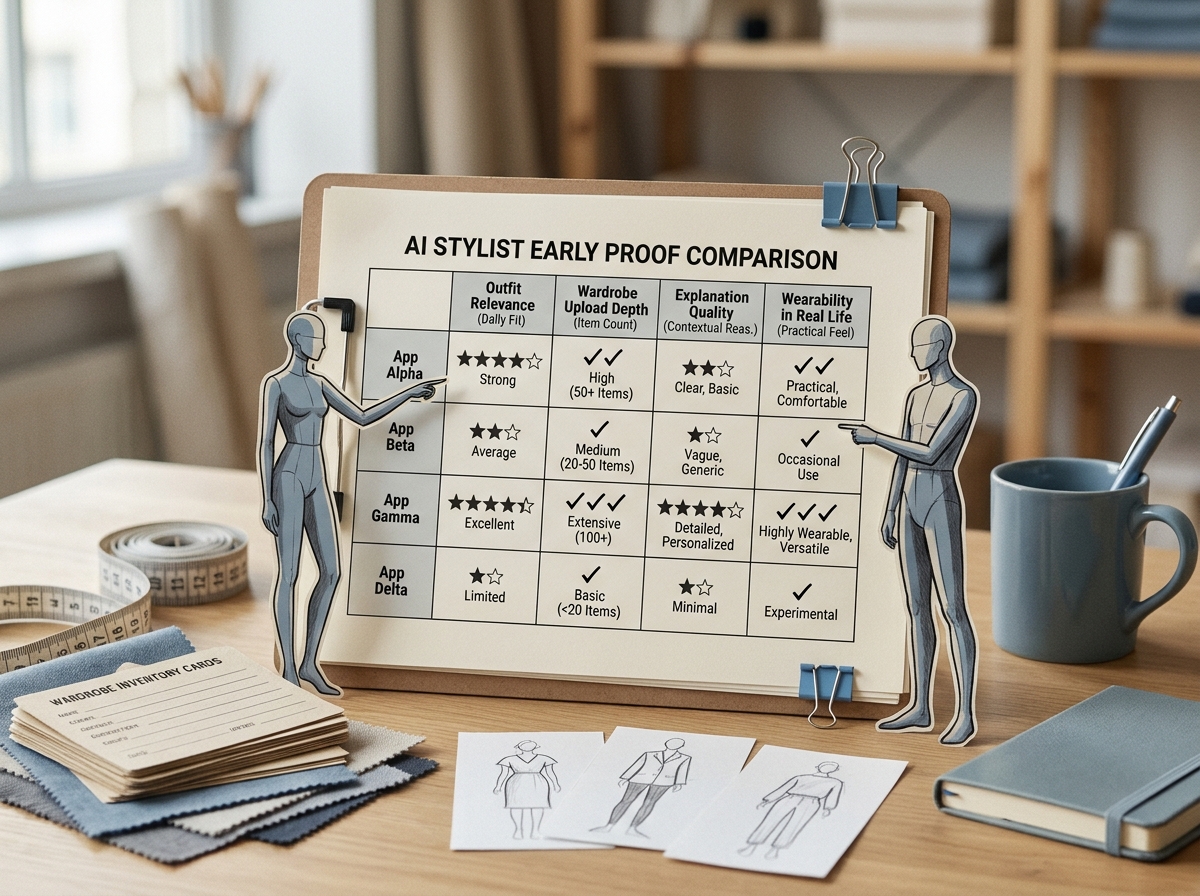
A compact comparison table showing how several AI personal stylist apps differ on outfit relevance, wardrobe upload depth, explanation quality, and whether the suggestions feel wearable in real life.
This is a heuristic scorecard, not an app-by-app league table. It groups common product patterns and scores them based on observable behaviors (wardrobe capture, fit handling, explanation quality, feedback loops) plus trial usage. Practitioner roundups were used only to cross-check feature claims where possible, not as measured proof (Beauty AI, TryDrobe).
| App or pattern (examples) | Outfit relevance | Wardrobe sync depth | Shopping usefulness | Why this matters |
|---|---|---|---|---|
| Wardrobe-first stylists (closet upload + feedback loop) | Strong | Strong | Mixed | More wearable, but higher setup and ongoing maintenance |
| Hybrid stylists (some closet input, some catalog) | Mixed | Mixed | Strong | Better for purchase decisions than daily outfits |
| Feed-first recommenders (browse and buy) | Weak | Weak | Strong | Polished suggestions, but often not buildable from your closet |
- Explanation (how to read the table): the score reflects whether the product can take real constraints, ingest items, explain choices, and change after feedback. It is designed to avoid judging by screenshots.
- Interpretation (what tends to drive results): time savings is usually conditional on constraint handling (occasion, weather, footwear, comfort rules) and a feedback loop, not on "creative" generation alone. If you keep re-typing rules every session, the app is not learning much.
- Reader impact (what to do next): if your goal is fewer "nothing to wear" moments and fewer regret buys, prioritize (1) explicit rejection reasons, (2) fit uncertainty handling, and (3) a realistic onboarding plan. The tradeoff is clear: deeper personalization typically means more setup, and results can regress when seasons change or catalogs rotate.
One thing worth noting: apps that capture sizes, closet coverage, and specific rejection reasons ("too warm," "too formal") often improve after a few sessions, but speed depends on closet completeness, how consistently you give feedback, and whether the product actually uses those signals (some store them but do not model them well).
A complementary angle worth comparing lives in Top 5 AI Tools to Generate App UI Without a Designer.
How to use this scorecard
Use it as a 7-day acceptance test, not a one-session demo. In practice, you are checking two things: can it produce wearable outfits with your constraints, and does it adapt measurably after feedback. If either fails, the product may still be fine for browsing or shopping, but it is unlikely to reduce daily decision effort.
For tradeoffs, checklists, and edge cases, Best Single-Purpose Apps for Getting Things Done in 2026 rounds out this section.
What features predict whether an AI stylist will be useful?
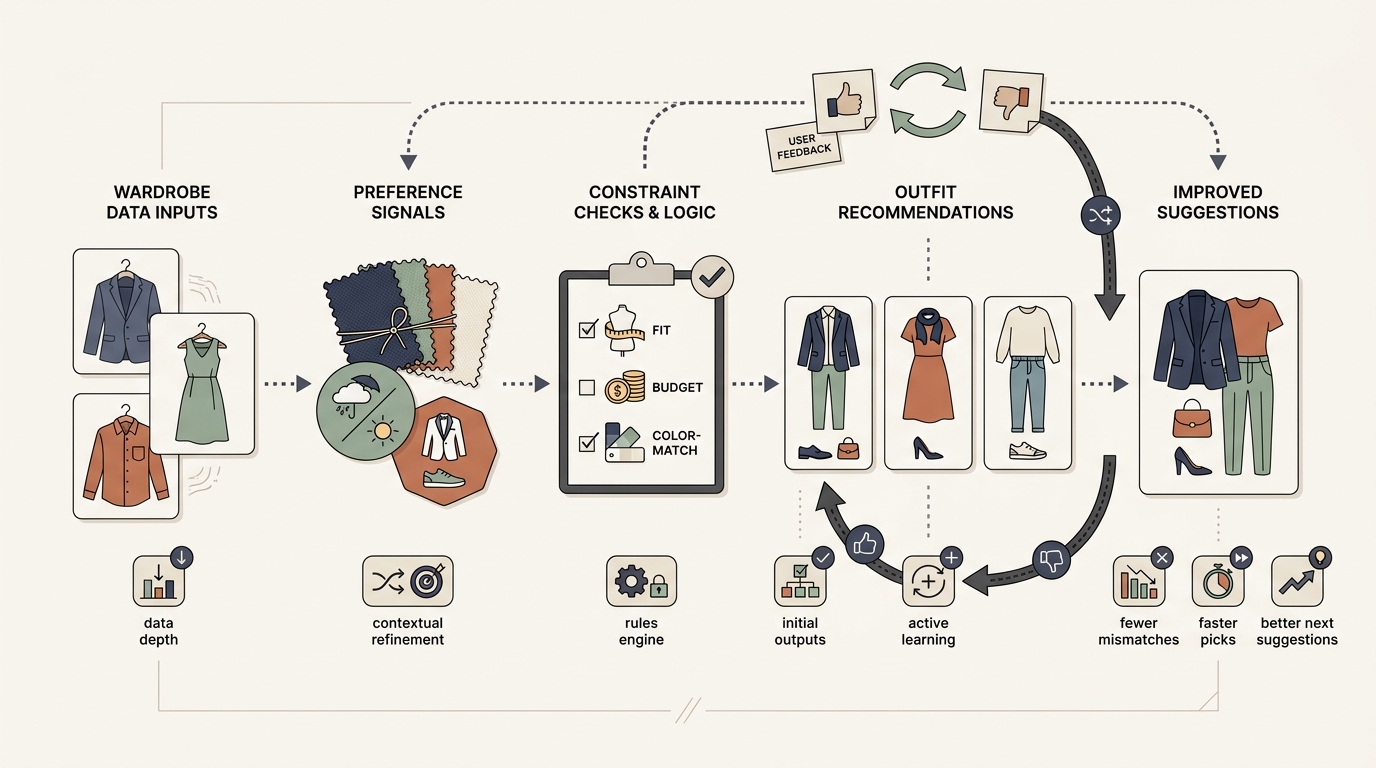
A simple flow diagram showing how wardrobe photos, preference inputs, and feedback loops turn into outfit recommendations, edits, and better suggestions over time.
The practical difference is whether the app can eliminate non-starters quickly. That depends on input quality, learning loops, and how the product handles fit and context.
Wardrobe capture method (and the real time cost)
Auto-tagging can work, but closet coverage takes real time. In small-sample trials, getting to "usable" coverage often takes 30-90 minutes spread over a few sessions for people who want wardrobe-aware outfits, especially once footwear and outerwear are included. Manual fixes are common for edge cases (wide-leg vs straight, sheer fabrics, formality of shoes).
Time to first usable outfit (not just first output)
Prompt-only apps can output quickly, but generic output is common if the app has little context. Wardrobe-aware apps tend to take longer upfront because they need item data, and the first few outfits can miss on layering, shoes, or dress code. Measure "time to first wearable" over a couple sessions, not in the first 5 minutes.
Learning loop strength (does it adapt within a week?)
Look for explicit feedback signals (like, skip, save, "too warm," "too tight") and confirm they change the next session. If you must restate constraints every time, personalization is likely superficial. Also watch for overfitting: noisy early feedback can narrow recommendations too aggressively, especially in small closets.
Fit and sizing behavior (where trust is easiest to lose)
Fit advice is where an app can sound confident and still be wrong. If it cannot link guidance to brand sizing, garment cut, stretch, and your preferences, treat it as directional only. The operational risk is not just returns, it is trust decay: one bad "this will fit" can reduce repeat usage and conversion.
How to Make Your App Look Professional Without Hiring a Designer reframes the same problem with a slightly different lens - useful before you finalize.
How should you choose or test an AI personal stylist app?
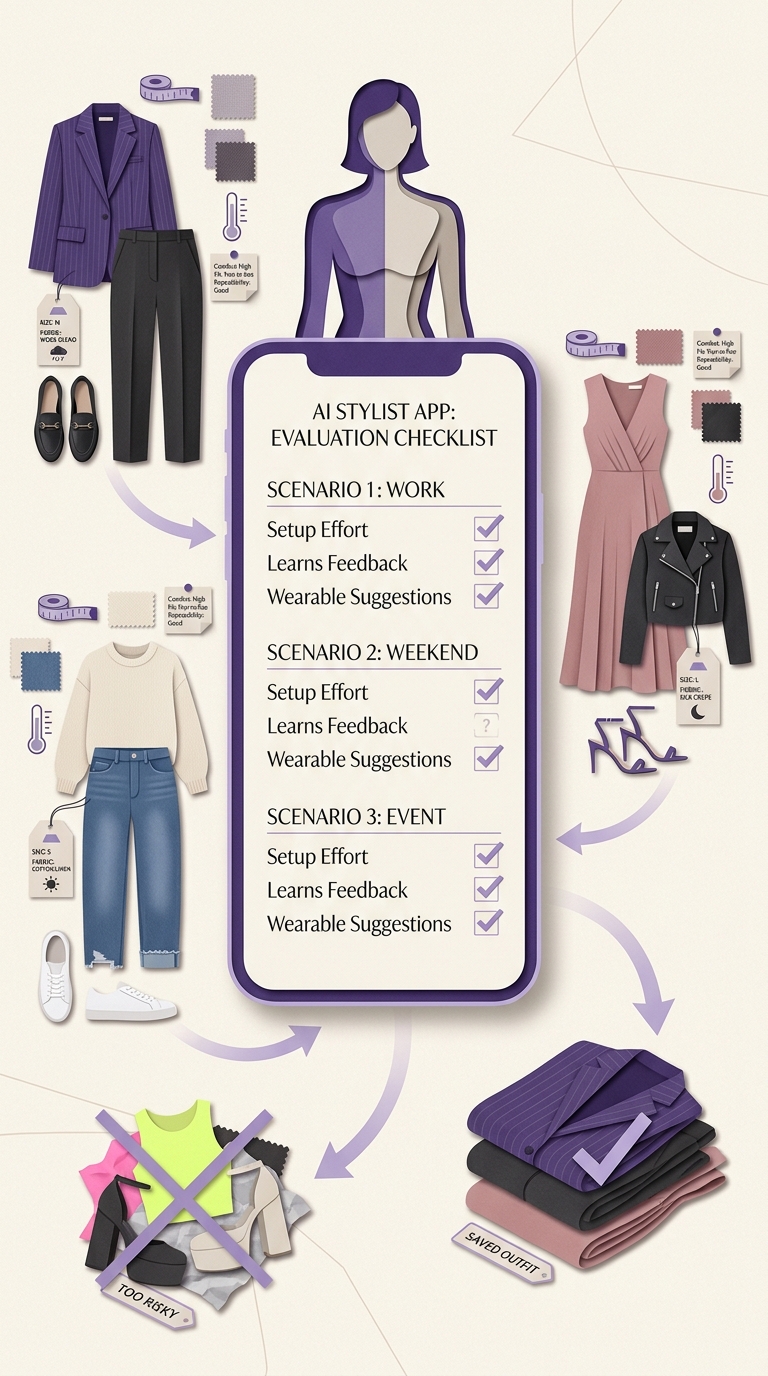
A mobile-friendly checklist for testing an AI personal stylist app with three real outfit scenarios, focusing on setup effort, feedback learning, and whether the app produces wearable results.
A simple evaluation checklist (users, buyers, product teams)
- Run the same 3 prompts: work, weekend, one event outfit, with real constraints (weather, dress code, footwear, comfort rules).
- Track acceptance: did you wear any suggestion within 48 hours, and did you save a repeatable combo?
- Track adaptation: after rejecting 3 suggestions with reasons, does it change silhouettes and layers, or recycle the same look?
- Budget maintenance: wardrobe apps are not set-and-forget. Plan 5-15 minutes per week to add new items, mark season changes, and fix tags. If you will not do this, choose a lighter-weight app and accept lower personalization.
Concrete example (simple, trackable): use Google Sheets (or Notion) with fields: Date, Prompt, Weather, Occasion, Outfit suggested, Worn? (Y/N), Saved? (Y/N), Reject reason, Fit issue?, Repeat within 7 days?. Define wear-rate = worn suggestions / total suggestions over 7 days. Prompts: "2 outfits for 65F rain + sneakers," "office casual with blazer, no heels," "wedding guest, no black, light layers."
| Check | Pass looks like | Common gotcha |
|---|---|---|
| Setup effort | First wearable outfit within a few sessions | Great first day, then repetitive due to thin closet coverage |
| Feedback loop | Saves and dislikes change next session | Feedback exists but does not influence results |
| Fit guidance | Mentions uncertainty or asks clarifying questions | Confident fit claims without measurements or brand context |
Common failure modes and why they matter to the business
- Generic recs from thin onboarding: looks good, does not get worn. Expect low saves, low repeat sessions, and weaker downstream conversion.
- Shopping-first sequencing: pushes links before solving outfit planning. This can help affiliate revenue, but can increase returns if fit and context are wrong or sizing data is thin.
- Weak occasion and climate logic: sandals in rain, linen in cold, overdressed looks for casual settings. The practical impact is fast churn and low trust.
- Style norm bias: systems can drift toward a narrow aesthetic. If your audience is broad, monitor exclusion signals in feedback, retention, and complaints.
- Hallucinated confidence: chat layers can sound certain without enough data. Treat explanation quality as a safety feature: it should admit uncertainty, cite the constraint it is optimizing for, and ask follow-ups.
- Operational burden (for teams): wardrobe taxonomies, moderation, catalog mapping, and sizing normalization take ongoing work. If those pipelines lag or regional catalog coverage is uneven, personalization degrades even if the model is strong.
CTA: Run a realistic 7-day trial
Compare 2 apps with the same 3 prompts for 7 days and track: wearable outfits, saves, repeats, and any fit-related regret.
Run the 3-prompt test
CTA: Get an evaluation scorecard for your use case
If you are buying or building, share your target audience, catalog coverage, and constraints and I will map the minimum viable inputs and the highest-risk failure modes to test first.
Request the scorecard