
Launching a B2B mobile app on the App Store is rarely blocked by code quality alone. More often, it slows down on distribution mechanics: getting the right organizations access, aligning with IT and procurement workflows, and driving team activation after approval. This guide lays out a practical publishing playbook so your app can reach named business accounts and scale beyond a single install.
Top 5 Ways to Monetize Your First iOS App goes deeper on the ideas above and adds concrete next steps.
Why B2B app launches work differently from consumer App Store publishing
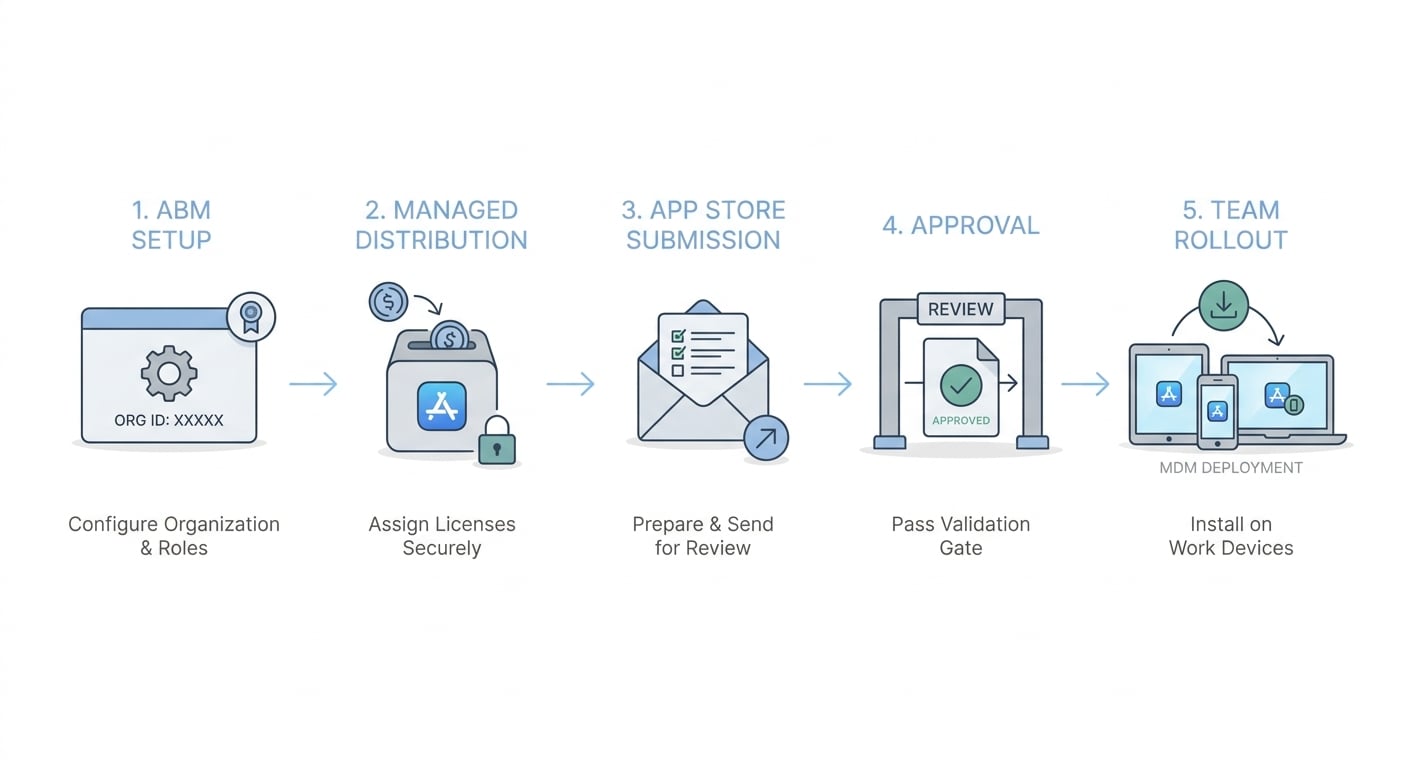
A step-by-step workflow diagram showing the path from Apple Business Manager setup to managed distribution, App Store submission, approval, and team rollout inside a business account.
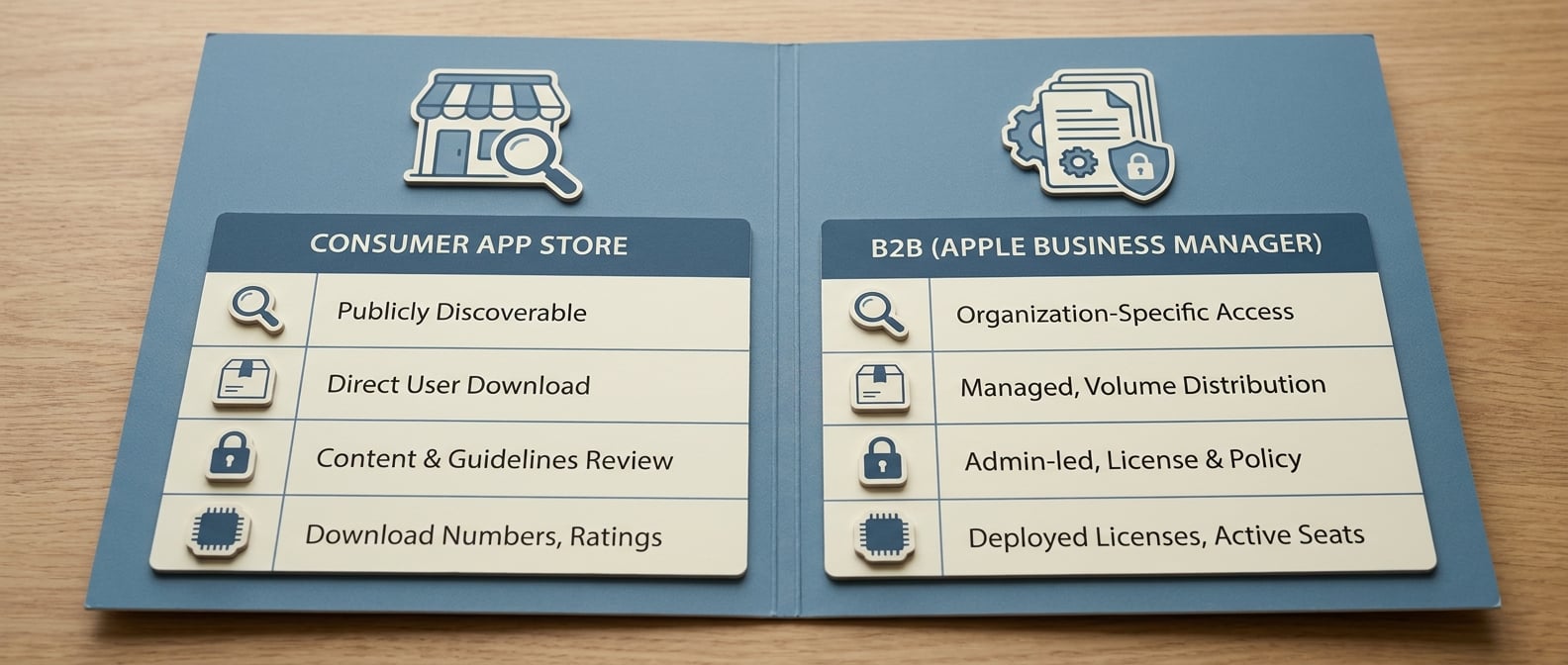
A compact comparison table showing consumer App Store publishing versus B2B App Store publishing through Apple Business Manager, with rows for discovery, distribution, approval focus, and success metrics.
Consumer vs B2B launch mechanics at a glance
| Launch dimension | Consumer App Store default | B2B App Store reality (ABM and managed distribution) |
|---|---|---|
| Discovery | Browse, search, charts, ads | Account-targeted distribution, direct linking, admin-led discovery |
| Distribution unit | Single user install | Organization licenses, assignment to users or devices, often via MDM |
| Access control | Public listing, broadly available | Custom app access can be limited to specific organizations in ABM (Apple custom apps) |
| Admin workflow | Minimal | Setup in ABM, Apps and Books, and sometimes MDM to control deployment (Apple Support) |
| "Success" metric | Downloads and ratings | Seat activation, time to first deployment, account-level retention |
| Scale constraint | Market competition and ASO | Rollout friction, procurement readiness, IT enablement |
Explanation: The table shows how Apple’s consumer publishing defaults differ from the operational reality of B2B rollouts (ABM, Apps and Books, and often MDM).
Interpretation: In B2B, distribution choices (public vs custom, user vs device assignment, admin steps) become part of the product experience, not just a launch task.
Reader impact: Planning for these mechanics early can reduce "approved but cannot deploy" situations. It will not eliminate delays that sit with the customer (ABM enrollment, managed Apple ID policy, MDM change windows, VPN/network approvals, procurement).
When you move from outline to execution, Step-by-Step Guide to Publishing Your First Mobile App helps close common gaps teams hit here.
Why is distribution the biggest gatekeeper for B2B App Store launches?
What this article is measuring
The goal is practical: get a B2B app approved, distributed to specific organizations, and adopted by teams, not just downloaded once by an individual. The workflow centers on Apple Business Manager (ABM), managed distribution, and onboarding patterns because these often decide whether you can roll out beyond a pilot.
This is an operational, directional write-up rather than a benchmark study. It interprets what Apple documents about custom app distribution and Apps and Books licensing, then translates it into launch decisions a commercial team can execute.
Why consumer app tactics fail here
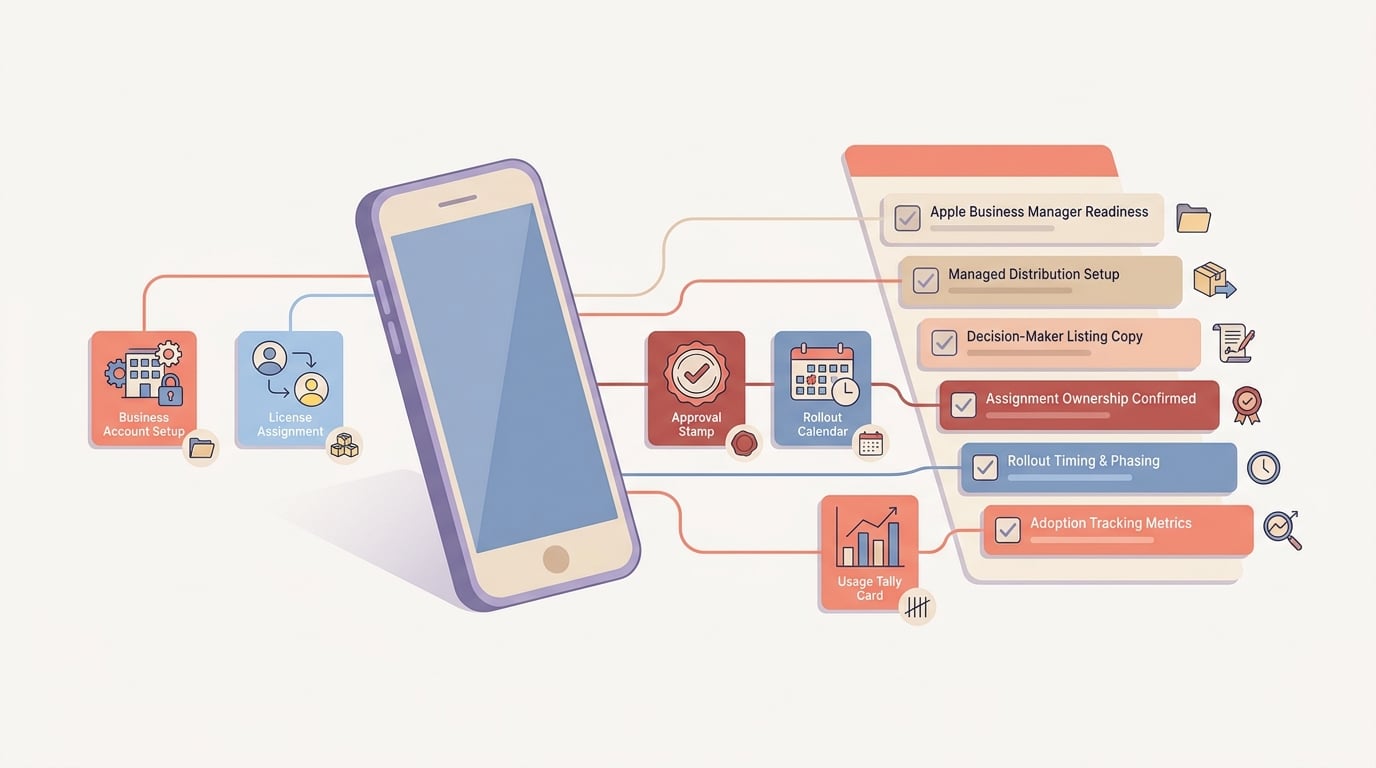
A mobile-friendly checklist block covering Apple Business Manager readiness, listing copy for decision makers, assignment ownership, rollout timing, and post-launch adoption metrics.
- B2B buyers and admins evaluate apps through deployment, security, and supportability, not just feature appeal.
- A successful B2B install is often not an individual tap on "Get." It is a managed rollout where licenses can be assigned, reassigned, or revoked as teams change.
- Review risk and rollout risk go up when your app handles business data, identity, payments, regulated workflows, or sensitive device permissions. Your listing and submission materials should reflect those constraints.
Scope, assumptions, and limits
This playbook assumes you are selling to companies, departments, or field teams, and that your customer has an org structure (admins, users, devices) you can map to a deployment model. Approval time, rollout speed, and adoption vary widely by region, device posture, buyer environment, and customer IT maturity. Treat examples as implementation patterns, not universal metrics.
A complementary angle worth comparing lives in Everything You Need to Know About Apple and Google Developer Accounts.
How do you publish a B2B app on the App Store and drive adoption?
Set up the business distribution path first
If this is your first ABM-managed launch, expect coordination time. A common range in practice is a few days to a few weeks, depending on customer-side factors like ABM enrollment status, legal and procurement review, MDM change windows, and whether the customer can dedicate an admin to the rollout.
Decide how customers will receive the app
For B2B, the key decision is whether the app is public, custom (restricted to specific organizations), or a mix. Apple positions custom apps as a way to distribute privately to specific organizations through ABM (Apple custom apps).
Practical tradeoff: public apps reduce admin friction but complicate access control; custom apps tighten access but add ABM prerequisites, admin steps, and more customer coordination.Align ABM, licensing, and admin roles
ABM supports Apps and Books distribution and licensing designed for organizations, not individuals (Apple Support). Define who at the customer is the ABM admin, how they will acquire licenses, and how assignments will be managed.
Dependency note: if the customer is not already using ABM (or has regional procurement constraints), enrollment and internal approvals can take time and your timeline will inherit that delay.Confirm assignment and control model (user vs device)
Many organizations assign apps to managed Apple IDs or to devices through an MDM tool, because it reduces churn when staff rotate. If you do not know which assignment model customers use, onboarding and support docs often fail under real IT rollout.
Risk: identity and SSO behavior can differ across models, so a smooth single-user pilot does not automatically translate into a smooth managed deployment.Validate revocation and reassignment expectations
ABM licensing supports reassignment and revocation, which matters for seat management and offboarding (Apple licenses guidance). Treat this as an expected control for admins.
Constraint: revocation can be operationally correct but still painful if your app’s account model cannot handle device sharing, role changes, or offline data cleanly.
Workflow snapshot (what "good" looks like):
- Customer admin has ABM access and Apps and Books enabled
- You confirm whether the rollout is user-based or device-based
- MDM (if used) can push the app and required configuration payloads
- Your team has a one-page admin checklist and a known activation milestone
A concrete operational example: minimal ABM to MDM deployment flow
Here is a common pattern when a customer uses Jamf or Intune. The exact screens differ by tool and tenant policy, but the dependencies are consistent.
Customer acquires licenses in ABM (Apps and Books)
Admin purchases or assigns licenses to the org. If the app is custom, the org must be explicitly entitled to see it in ABM (Apple custom apps).
ABM is connected to MDM
Customer links ABM to Jamf/Intune (or another MDM) so licenses and apps can sync. This can be blocked by change freezes or by ABM admin permissions.
MDM scopes the app to users or devices
Admin chooses user-based assignment (managed Apple IDs) or device-based assignment (shared devices). This decision affects onboarding, sign-in flow, and support scripts.
MDM pushes configuration (optional but common)
If your app needs environment URLs, tenant IDs, VPN settings, or per-app VPN, admins may push these via MDM profiles. Network/VPN and certificate dependencies can become the real critical path.
Build the App Store listing for decision makers
In B2B, your listing is often forwarded internally and read out of context. Clarity beats clever, and credibility beats broad promises.
- Lead with operational value in the first line: time saved per workflow, reduced errors, faster reporting, audit readiness, improved SLA compliance.
- Make security and admin signals easy to find: authentication method (SSO or not), data handling, device requirements, and any admin controls.
- Use screenshots as procurement proof: show real workflows and outcomes (for example, "Approve job", "Assign task", "Export report"), not abstract slides.
- State prerequisites: integrations, identity requirements, and what a successful first week looks like.
One thing worth noting: a detailed listing can reduce support load and speed internal approval, but it can lower conversion from casual browsers. That tradeoff is often acceptable if your success metric is rollout quality, not raw downloads.
Plan the approval and rollout sequence
Approval timing and rollout timing are different problems. Apple review is a gate, but customer enablement (IT, MDM, identity, procurement) often determines when the first team can actually use the app.
Map submission and release to customer onboarding windows
Work backwards from the customer’s pilot start date. Review outcomes and timing are not fully predictable, so plan a range (often measured in business days) and have a communication plan if timelines slip.
Risk: if you tie contract milestones to a specific App Store approval date, you take on external variability you do not control.Ship an admin-ready deployment checklist
Admins need steps for acquiring licenses in ABM, assigning the app, and confirming it is installed on target devices. Apple’s documentation on distributing content through Apps and Books is the baseline many admins will follow (Apple Support).
Realistic effort: a usable checklist is usually a few hours for a first draft, plus at least one iteration after your first real deployment reveals missing steps.Define the first activation milestone per seat
Pick one observable moment that signals real adoption: first login, first task completed, first record synced, or first seat assigned and used. This becomes your rollout dashboard metric and your customer success script.
Constraint: if the milestone depends on integrations, network access, or SSO configuration, time-to-value is partly owned by the customer’s IT team, not just your product.
Metrics that reflect real B2B launch success
If you want a repeatable deployment motion, measure rollout mechanics, not just downloads.
| Metric | What it tells you | Typical dependency |
|---|---|---|
| Time from approval to first org deployment | Rollout friction and customer readiness | ABM, MDM change windows, procurement |
| Licenses acquired per org | Commercial intent and admin follow-through | Customer admin ownership |
| Seats assigned vs acquired | Whether deployment is actually happening | MDM workflow, admin time |
| Time to first activation milestone | Time-to-value under real constraints | SSO, integration, network access |
| Support tickets per rollout | Hidden friction in docs and setup | Your onboarding quality and customer IT maturity |
The practical takeaway: these KPIs help you see whether you have a repeatable deployment motion. Downloads and ratings can still matter, but in many B2B contexts they are lagging or noisy signals.
Common B2B launch mistakes
The most expensive mistake is treating the App Store listing as the launch. In B2B, approval is usually the start of rollout work, not the finish line.
Common failure modes:
- Delaying ABM decisions until after review, then discovering customers cannot access or deploy.
- Writing copy for casual browsers instead of admins and buyers, which increases internal objections and slows procurement.
- Underestimating identity and MDM friction, then absorbing avoidable support load during rollout.
- Overcommitting on launch dates without buffers for review variability and customer-side dependencies.
Execution checklist and next step
Use this as a pre-submit audit. If you cannot answer an item in one sentence, treat it as a risk to timeline or adoption.
| Item | Owner | Realistic SLA to prepare |
|---|---|---|
| Distribution path defined (public vs custom vs mix) | Product + Sales | 1-2 working sessions |
| ABM readiness (admin identified, licensing flow documented) | Customer IT + CS | Depends on customer ABM status |
| MDM and identity dependencies captured (user vs device, SSO prereqs) | Solutions/IT | 1-2 days to validate with a design partner |
| Listing ready for decision makers (outcomes, security, prerequisites) | Marketing + Product | 1-2 drafts plus review |
| Activation milestone defined and instrumented | Product + Data | 0.5-2 days, more if analytics is immature |
| Rollout ownership assigned (support path, escalation, comms) | CS + Support | 1 hour to align, then iterate after pilot |
For tradeoffs, checklists, and edge cases, Publishing Apps Built With Flutter, React Native, or Native rounds out this section.


