
Built your first mobile app, got a few users, and now you are staring at the hardest early question: how do you monetize without wrecking the experience? This guide helps you pick a model that fits your app’s usage pattern, ship it without overbuilding, and validate early revenue without sacrificing retention or ratings.
Early proof: a quick comparison of the four main monetization paths
This table is a directional cheat sheet for first releases, not a promise of outcomes. Results vary by category, geography, price point, traffic source, and how cleanly you implement billing, entitlements, and consent.
| Monetization path | Setup speed | Revenue predictability | Depends on scale? | Best fit for a first app |
|---|---|---|---|---|
| Ads | Fast | Low to medium | Yes | Free utility or content apps with frequent sessions and enough time in app |
| Subscriptions | Medium | Medium to high (if value recurs) | No | Ongoing value: content, coaching, productivity, storage, syncing |
| In-app purchases (IAP) | Medium | Medium | Not strictly | One-time unlocks, consumables, premium feature packs, games |
| Freemium upgrade (one time) | Medium | Medium | No | Simple apps where premium is easy to explain and does not require ongoing delivery |
Practical interpretation: subscriptions can work when you truly deliver ongoing value, but they add churn management, billing support, and more ways to earn 1-star reviews if anything breaks. Ads can be quick to add, but revenue is volatile, and policy, consent, and fill-rate changes can hurt results.
Reader impact: this helps you avoid the common trap of spending 1-2 weeks integrating a monetization stack that does not match your usage pattern, then blaming "users won’t pay" when the real issue is fit or timing (see mwm.ai and Rork).
Top 5 Ways to Monetize Your First iOS App goes deeper on the ideas above and adds concrete next steps.
What should you monetize first in a new mobile app?

A concise pre-launch checklist for a first app's monetization rollout, covering pricing tiers, purchase restoration, privacy disclosures, and ad policy review.
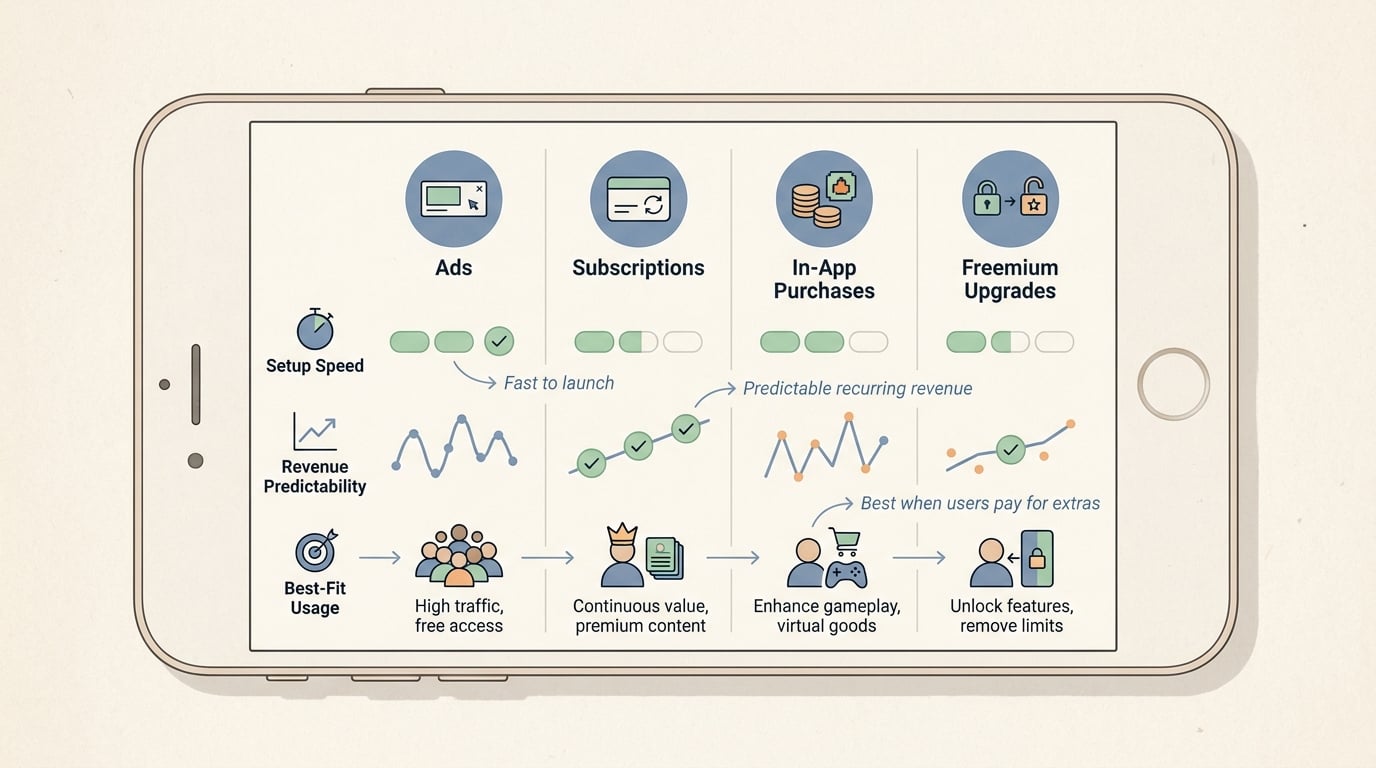
A compact comparison table showing ads, subscriptions, in-app purchases, and freemium upgrades across setup speed, revenue predictability, and fit for a first mobile app.
Most first apps struggle with monetization for two reasons: the model does not match user behavior, or the implementation interrupts the job the user came to do. You do not need a perfect setup on day one, but you do need one clear choice and a clean, testable execution.
One thing worth noting: early monetization data is noisy. With small traffic, expect 2-3 iterations on paywall timing, pricing, or messaging before patterns stabilize.
Why first-time app monetization is a product decision, not just a revenue decision
Monetization changes onboarding, trust, and whether users stick around long enough to pay. If the first session feels noisy (ads too early) or gated (hard paywall before value), users churn before you learn anything.
It also adds ongoing operational work. Subscriptions create entitlement edge cases and refund questions, and ads can add latency, SDK crashes, and compliance overhead.
A simple audience-and-app fit check before you pick a model
Use this quick screening pass:
- Is the job ongoing or one-time?
- Ongoing (learn, track, coach, plan, create) can support subscriptions if you can keep delivering.
- One-time (convert, scan, calculate, export) often fits a one-time upgrade.
- Do users return daily, weekly, or rarely?
- Daily or weekly habits can support subscriptions or ads (if sessions are long enough).
- Rare use usually struggles with ads and may do better with one-time or IAP.
- Is value delivered in chunks?
- Unlocks, packs, credits, levels, and add-ons point to IAP.
- Can free users still succeed?
- If a free tier can complete the core job, consider freemium with a premium upgrade.
- If free users cannot succeed, be careful with day-one paywalls. Trials can help, but they also add cancellation, refunds, and store-review risk.
The practical takeaway: pick the model that matches usage, not the model that looks best on a top-grossing chart (see Adapty for category patterns and tradeoffs).
When you move from outline to execution, Step-by-Step Guide to Publishing Your First Mobile App helps close common gaps teams hit here.
How do you choose the right monetization model for your app?
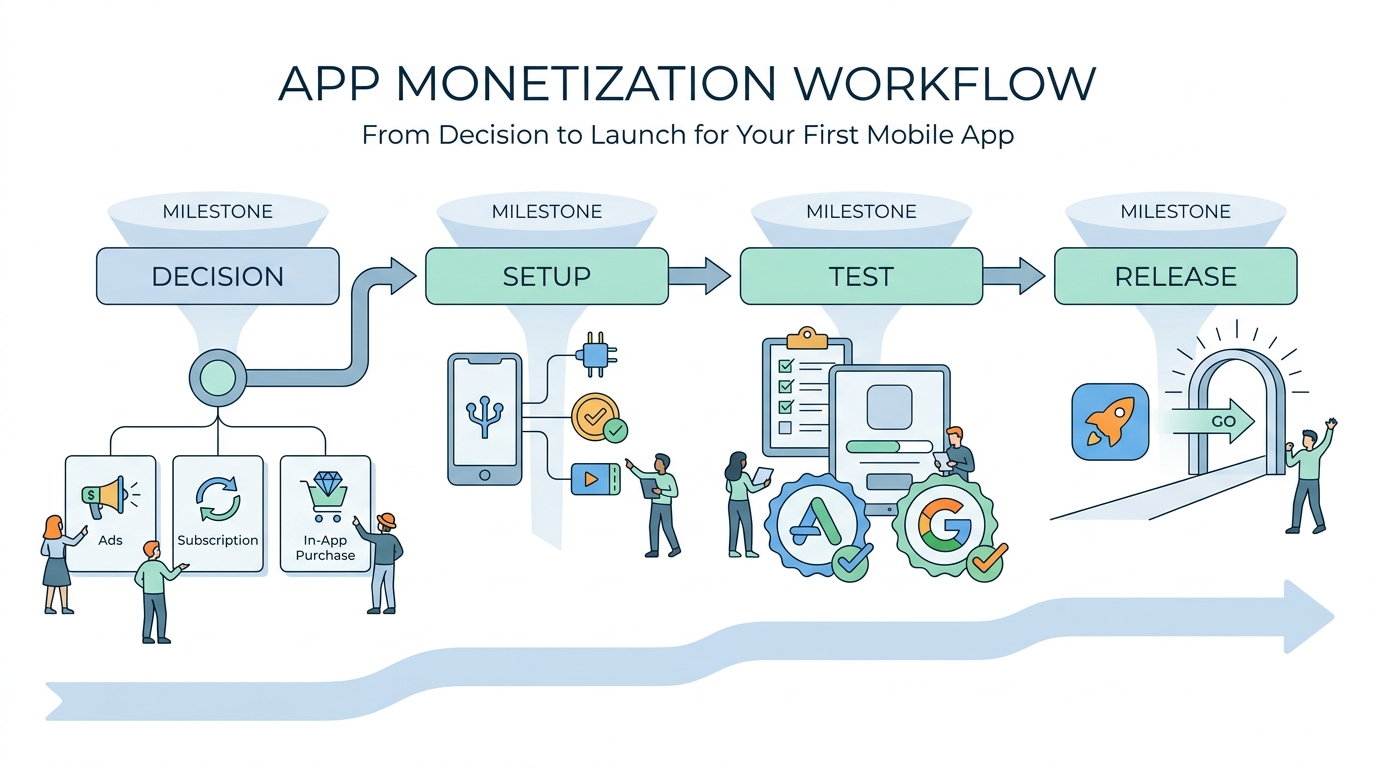
A simple workflow diagram showing the launch path from choosing a model to configuring billing or ad SDKs, then testing on App Store or Google Play before release.
This workflow is designed to be shippable for many solo builders and small teams, but it still takes real time. Plan on 2-5 focused days for a basic one-model implementation if you have done store setup before, and 1-2 weeks if billing, compliance, or edge cases are new (or you have limited QA/device coverage). Store review and product approval timing can also add a few days of waiting.
Step 1: define the value users get repeatedly or immediately
Map your app’s core value moment
Identify the moment a user would say, "this saved me time" or "I want this again." If you cannot name it in one sentence, monetization will be harder and you will likely need more user research first.
Decide if your value is recurring or transactional
Recurring value (fresh content, continuous tracking, ongoing coaching, cross-device sync, cloud storage) can justify subscriptions, but only if you can maintain that value and support it. Transactional value (export once, unlock pro tools, remove limits) usually fits one-time upgrades or IAP.
Choose what stays free without breaking trust
If you run ads, keep the first session clean so users reach the value moment before interruptions. If you use paywalls, let the user preview value or complete a small win first.
Common constraint: many first apps force subscriptions because they sound "best." If you do not have a real ongoing reason to pay, expect lower trial conversion, faster cancellations, and more support tickets.
Step 2: set up the minimum viable monetization stack (and analytics)
Create products and pricing in the stores
Set up product IDs, price tiers, and metadata in App Store Connect and Google Play Console. Keep it small at first: one subscription tier or one upgrade is enough to learn.
Implement entitlements and restore-purchase behavior
Your app needs a consistent internal rule for "is this user entitled to premium right now?" Test reinstall, device change, expired subscriptions, refunds, and spotty networks because these are common sources of 1-star reviews.
Instrument a simple event funnel you can trust
Example implementation: use RevenueCat (or StoreKit 2 + Play Billing) for purchases, and log events to Firebase Analytics or Amplitude.
Funnel step Example event What it tells you Paywall shown paywall_viewHow many users even see the offer Purchase intent trial_startorpurchase_startWhether pricing and messaging create action Success trial_convertorpurchase_successActual monetization, not taps Failure purchase_errorWhere bugs or store issues block revenue Finish compliance before you submit
Verify tax and payout details, privacy disclosures, and consent prompts (especially for tracking and ad personalization). Expect occasional review delays, and remember that review outcomes can vary by category and reviewer.
Step 3: test the first revenue version with a small audience
Before you drive traffic or spend money on acquisition, validate that monetization does not break the app. A realistic first test window is 7-14 days, depending on how often users naturally return.
- Track the right metric for your model
- Subscriptions: trial start rate, trial-to-paid conversion, early cancels
- IAP/upgrade: purchase rate, revenue per purchaser, restore success rate
- Ads: impressions per active user, ARPDAU, retention impact
- Watch retention around the monetization event
- Compare retention for users who hit the paywall vs users who never see it.
- Look for drop-offs right after an ad, pricing screen, or trial confirmation.
- Be careful with tests at low volume
- With small traffic, A/B tests can mislead you. Consider sequential tests (one approach for a week, then another) and focus on obvious failures like sharp retention drops.
Instead of a rigid pass/fail, set a practical threshold: users should still complete the main job, and monetization should not cause an obvious retention cliff or a spike in angry reviews. If it does, the fix is often timing, messaging, placement, or reliability, not a full rewrite.
A complementary angle worth comparing lives in Top 10 Productivity Apps Launched This Week on App Store.
What mistakes can sink first-app monetization?
Most failures are not "pricing is wrong." They are fit issues, broken edge cases, or too much friction in the first session.
Here are the common failure modes and the tradeoffs to plan for:
| Model | Common failure mode | Tradeoff to accept (or avoid) | Quick pre-launch check |
|---|---|---|---|
| Ads | Revenue too low, UX feels spammy | You trade experience and performance for uncertain revenue; privacy consent and policy changes can bite later | Ad frequency cap + measure retention impact after ad views |
| Subscriptions | Churn, angry billing reviews | You trade simplicity for ongoing delivery, support, and entitlement complexity | Restore works, renewal terms are clear, handle expired/refunded states |
| IAP / one-time | Confusing "what did I buy?" | You trade lower support load for more upfront clarity and entitlement consistency | Test purchases across reinstall, device change, and offline states |
| Hybrid | Hard to diagnose what works | You trade learning speed for complexity and review risk | Ship one primary model first, add hybrid only with a clear reason |
A practical rule: ship one primary model, then consider a hybrid only after you have stable baseline metrics and you know exactly what problem the extra model solves.
For tradeoffs, checklists, and edge cases, Web App or Mobile App? The Real Tradeoffs Founders Face in 2026 rounds out this section.


