
You can use Base44 to produce signed IPA and AAB files ready for upload; this guide explains the prerequisites, Base44 UI steps, upload flow, and common fixes so indie developers and small teams can publish with fewer surprises. Expect the hands-on happy path to be about 1 hour; plan an extra half day to several days for QA, metadata, and possible rework depending on scan failures or review rounds.
How to Create an App Store Connect API Key (Issuer ID, Key ID, .p8) goes deeper on the ideas above and adds concrete next steps.
Problem + Early proof: Can Base44 get your app into the stores?
Yes - Base44 will build signed IPA and AAB files but it does not submit builds to App Store Connect or Play Console, so you still need active Apple and Google developer accounts, API keys, and to perform the platform submissions yourself. This workflow suits teams that want repeatable, signed artifacts and can handle the platform submission and review work.
Early proof: quick workflow benchmark (directional estimates)
- App Scan in Base44: 2 - 5 minutes. Output: Readiness Score and checklist.
- Build store files: 5 - 15 minutes for each signed IPA or AAB on a clean run.
- Platform processing: App Store processing 15 - 60 minutes; Play Console 10 - 30 minutes. Full human review is separate and variable.
Explanation: these are hands-on and processing windows, not total calendar time. Practical interpretation: with correct keys and assets you can validate and generate files within roughly an hour of hands-on work, but realistic timelines include QA, metadata, screenshots, and fixes. Business impact: using Base44 cuts manual signing steps but does not remove the need for console submissions, test cycles, or potential rework from store review.
When you move from outline to execution, How to Publish a Replit App to the App Store and Google Play (2026) helps close common gaps teams hit here.
How do I build IPA and AAB in Base44 and upload them?
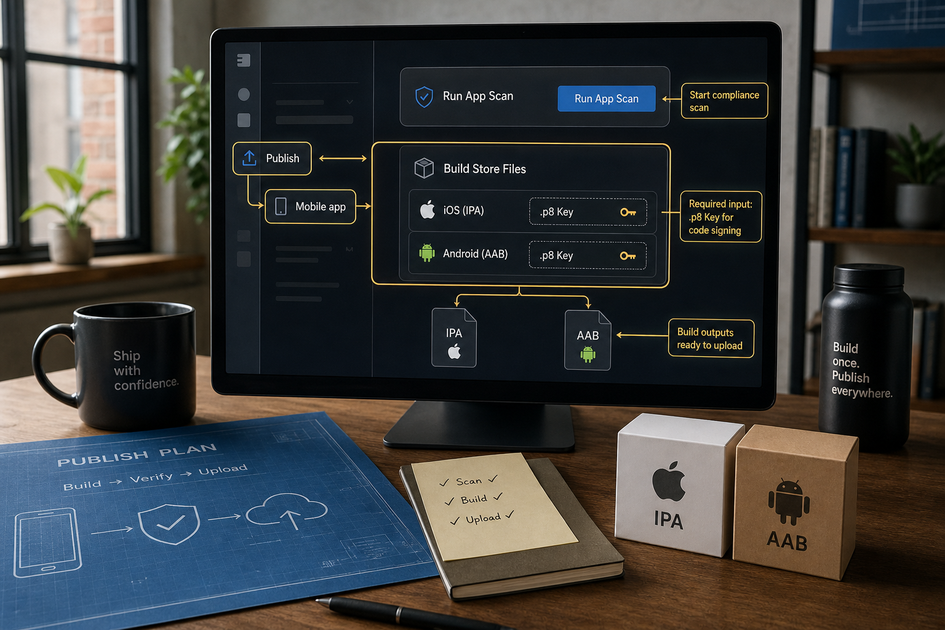
An annotated conceptual screenshot (no real UI text) that highlights the Publish → Mobile app flow, the 'Run App Scan' button, and the 'Build Store Files' area with callouts for required inputs: .p8 key, Issuer/Key/Team IDs, and Builder plan check.
Yes - you can produce signed IPA and AAB artifacts in Base44 and then upload them yourself; the short plan is prepare accounts and keys, run App Scan, generate store files, then upload and complete metadata in each console. Expect a few iterative cycles if scans or reviews surface problems.
Prerequisites to complete first
Accounts and plan
You need a Base44 Builder plan or higher to download store files and access signing features.
Apple requirements
Apple Developer Program account ($99/yr) plus an App Store Connect API key (.p8) with Issuer ID, Key ID, and your Team ID. Replacing an expired .p8 can take 30 minutes to a few hours.
Google requirements
Google Play Developer account ($25 one-time), a privacy policy URL, and required screenshots for your Play listing.
Assets and QA
Final icons, splash images, and a working demo account if your app requires login for review. Preparing demo credentials and reproduction steps reduces review cycles but takes extra QA time.
One thing worth noting: missing any of these blocks the build or delays review, so collect keys, IDs, and screenshots before you click Generate.
In Base44: run the App Scan and generate files
Run App Scan
Open your project, Publish -> Mobile app -> Check Your App -> Run App Scan; pick App Store and/or Google Play rules and resolve critical failures before building.
Create App Store files
Build Store Files -> Create App Store files. Enter Issuer ID, Key ID, Team ID and upload the .p8 key. Confirm icon and metadata, then Generate Files and download the IPA. Base44 signs the IPA and uses the build's bundle ID.
Create Google Play files
Build Store Files -> Create Google Play files. Confirm assets, Generate Files and download the AAB. Use the AAB for Play Console uploads; Base44 signs Android bundles during the build.
Common mistakes: expired or wrong .p8 key, incorrect Team ID, or skipping App Scan fixes. Each error forces repeat builds and costs time.
Upload and submit to App Store Connect (macOS Transporter recommended)
Create the app entry
In App Store Connect create a new app using the exact bundle ID Base44 used and fill required metadata except the build.
Upload the IPA
Use Apple Transporter on macOS to upload the IPA, then wait for App Store Connect processing to complete before attaching the build.
Complete metadata and submit
Attach the processed build to a version, upload screenshots, answer App Privacy questions, add support and marketing URLs, set age rating and content info, and include demo credentials for App Review when needed. Then Add for Review -> Submit.
The practical takeaway: review blockers are usually missing privacy answers, broken demo credentials, or failing key flows. Providing clear test accounts and reproduction steps reduces cycles but may still require multiple resubmissions and engineering fixes.
A complementary angle worth comparing lives in Google Play vs App Store Approval Process - What's Different in 2026.
What common rejections and Base44 limits should I expect and how do I fix them?
Most rejections are about missing functionality or metadata rather than the package format; focus on visible, testable flows, demo accounts, and privacy to reduce rejections. Expect a mix of quick fixes and longer engineering work depending on the issue.
Top App Store / Play rejections Base44 apps hit (and fixes)
- 4.2 Minimum Functionality - Fix: add basic native-feeling features and show them in screenshots (30 minutes to a day).
- 2.1 App Completeness - Fix: provide a working demo account and test on device (15 minutes to a few hours).
- 3.1.1 Payments - Fix: remove web-only digital purchases or implement native IAP and follow platform billing rules (days of work).
What this means: some fixes are quick documentation or test-account additions; others need engineering and can add several days to your timeline.
Base44 technical limitations you must plan around
- No native IAP/Billing - digital purchases may require re-architecture or server-side handling.
- No ad network support and portrait-only UI - ad monetization or landscape layouts may not work without custom development.
- Push notifications need extra keys and a rebuild - adding APNs .p8 and Firebase config requires rebuilding and re-uploading.
Plan takeaway: validate required native features and billing early. Rework for unsupported features often adds days and may require platform-specific engineering.
For tradeoffs, checklists, and edge cases, The Last Step AI App Builders Don't Solve: Publishing rounds out this section.


