
Adding Gemini to an Android app often breaks down at the same place: keys end up in the client, the first request works once, and then latency, errors, or unsafe outputs turn a promising demo into something that is hard to support. This guide gives you a practical path from clean setup to a Gemini call in your UI, with the Android wiring that usually matters most.
Early proof block: minimal integration checklist (typical v1)
| What you ship first | What you implement | How long it usually takes |
|---|---|---|
| 1 screen, 1 prompt, 1 response | Text field -> submit -> result panel | 1-3 hours |
| Basic reliability | Loading state, retry, timeouts, error mapping | 1-2 hours |
| Basic observability | Log requestId, status code, TTFT, total latency | 30-90 min |
| Safer key handling (beyond demos) | Backend or managed proxy, per-user auth, rate limits | 0.5-2 days |
These ranges assume you already have a buildable app, basic networking experience, and no major security or policy blockers. Interpretation: the fastest way to get a shippable baseline is to keep scope narrow and invest early in timeouts, errors, and logging. Impact: you get a feature you can debug on real devices and real networks, not a demo that only works on perfect Wi-Fi.
API Security for Mobile Apps goes deeper on the ideas above and adds concrete next steps.
What does Gemini API help you build in an Android app?

A compact comparison table showing a plain Android app flow versus a Gemini-powered flow for summarizing text or answering a prompt, with columns for setup effort, user steps, response speed, and maintenance burden.
Why Android teams reach for Gemini instead of custom AI
Gemini can add summarization, drafting, classification, in-app help chat, support triage, and smarter search without training a model. For many teams, it is a practical way to validate whether an AI feature is worth shipping before investing in heavier ML work.
Here is the thing: the hard part shifts, it does not disappear. You still own integration, prompt constraints, latency and cost management, safety, and policy compliance, and outcomes vary by model choice and user connectivity (official Android guidance: https://developer.android.com/ai/gemini/developer-api).
When you move from outline to execution, AI Music Apps Are Exploding - 5 Worth Trying in June 2026 helps close common gaps teams hit here.
How do you integrate Gemini API into an Android app step by step?
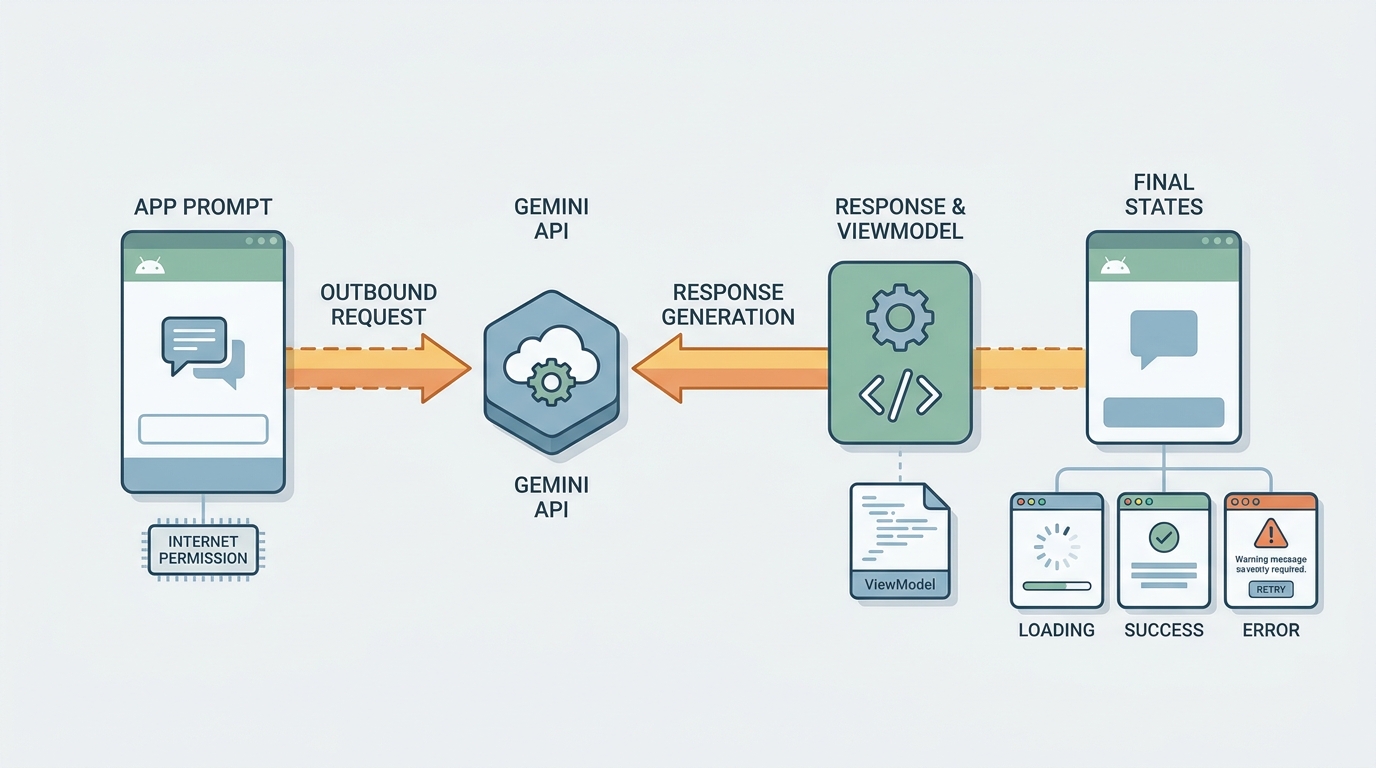
A simple request-response diagram showing an Android screen sending a prompt to Gemini API, receiving generated text, passing it through a parser or ViewModel, and rendering the result with loading and error states.
Step 1: Set up the Android project and Gemini access
Start with a Kotlin Android app and confirm
INTERNETis inAndroidManifest.xml, or you will chase confusing network failures. Get a Gemini API key for development, but decide early how production will work: for anything beyond a controlled prototype, assume the device is untrusted and plan a backend or managed proxy.Pick a request stack you can debug quickly (OkHttp plus Kotlinx Serialization is a common baseline). Budget 30-60 minutes for a green build and a test call if your environment is normal, and longer if you have strict Gradle, VPN, network security config, or proxy requirements.
Step 2: Send a first prompt and parse the response
Build a minimal request body and keep generation settings conservative (smaller max output, moderate temperature) so responses are easier to handle. Send the request, then extract returned text into ViewModel state so rotation and recomposition do not drop it.
Handle failure paths on day one: non-200 responses, timeouts, and "200 but empty or unexpected JSON" cases. Those show up quickly on real networks and during quota or billing changes.
Step 3: Shape the output for an Android screen
Treat model output like any other UI state. Clamp very long responses, support "copy", and show a clear loading and error state.
In practice, reliability usually comes more from state handling and network hygiene than from clever prompts.
Minimal operational details that save time later
Instead of scattering the same checklist across sections, here is one compact set to implement once and reuse.
| Area | What to do (v1) | Tradeoff or dependency |
|---|---|---|
| Timeouts | Set explicit connectTimeout (ex: 10s), readTimeout (ex: 30s), callTimeout (ex: 30s) | You may need different values for streaming, slow devices, or long prompts |
| Retry | Retry only clearly transient failures (timeouts, 429) with a small cap (1-2) | Retries can multiply cost and worsen load if you retry everything |
| Logging | Record requestId, statusCode, error body, TTFT, total latency, prompt and response length | Be careful not to log user data or secrets; privacy review may be required |
| UI guardrails | Disable submit while loading, clamp output length, show "AI unavailable" fallback | Clamping can reduce usefulness; you may need a "show more" affordance |
| Quotas and billing | Surface quota errors clearly and track 429/403 rates | Limits can change; release behavior depends on billing and project configuration |
One thing worth noting: adding a backend changes the work profile. You gain safer key handling and better control, but you also inherit auth, rate limits, deployments, incident response, and possibly a security review.
Add Gemini to one existing screen with a hard limit (chars or tokens), clear loading and failure UI, and basic logs.
Follow the minimal integration checklist
A complementary angle worth comparing lives in Everything You Need to Know About Apple and Google Developer Accounts.
What can go wrong when you use Gemini API in Android?
Do not hard-code the API key in a release build
Shipping a Gemini API key inside your APK is a common early mistake. Even with obfuscation, keys can often be extracted, which can lead to quota theft and unexpected cost.
For real users, route calls through your backend or a managed option like Firebase AI Logic so secrets stay server-side and you can enforce auth and rate limits. The tradeoff is extra infrastructure and a bit more latency, plus ownership of availability and maintenance.
Three failure patterns that make Gemini feel unreliable
- Overlong prompts - slower responses, higher cost, and a UI that feels laggy.
- Missing time budgets - users wait forever on flaky networks or captive portals.
- Unbounded output - unexpected length or content forces last-minute UI hacks and weak fallbacks.
What to test before you share the feature with users
- Test on real devices over LTE and flaky Wi-Fi, not only office Wi-Fi.
- Exercise empty prompts, quota errors, 401s, and malformed responses.
- Confirm graceful degradation: clear retry, helpful error text, and a fallback that does not block the rest of the screen.
For tradeoffs, checklists, and edge cases, Top 7 Tools to Build Your App Backend Without Code rounds out this section.
What should you verify before shipping a Gemini-powered Android feature?
Pre-flight checklist for a safer first release
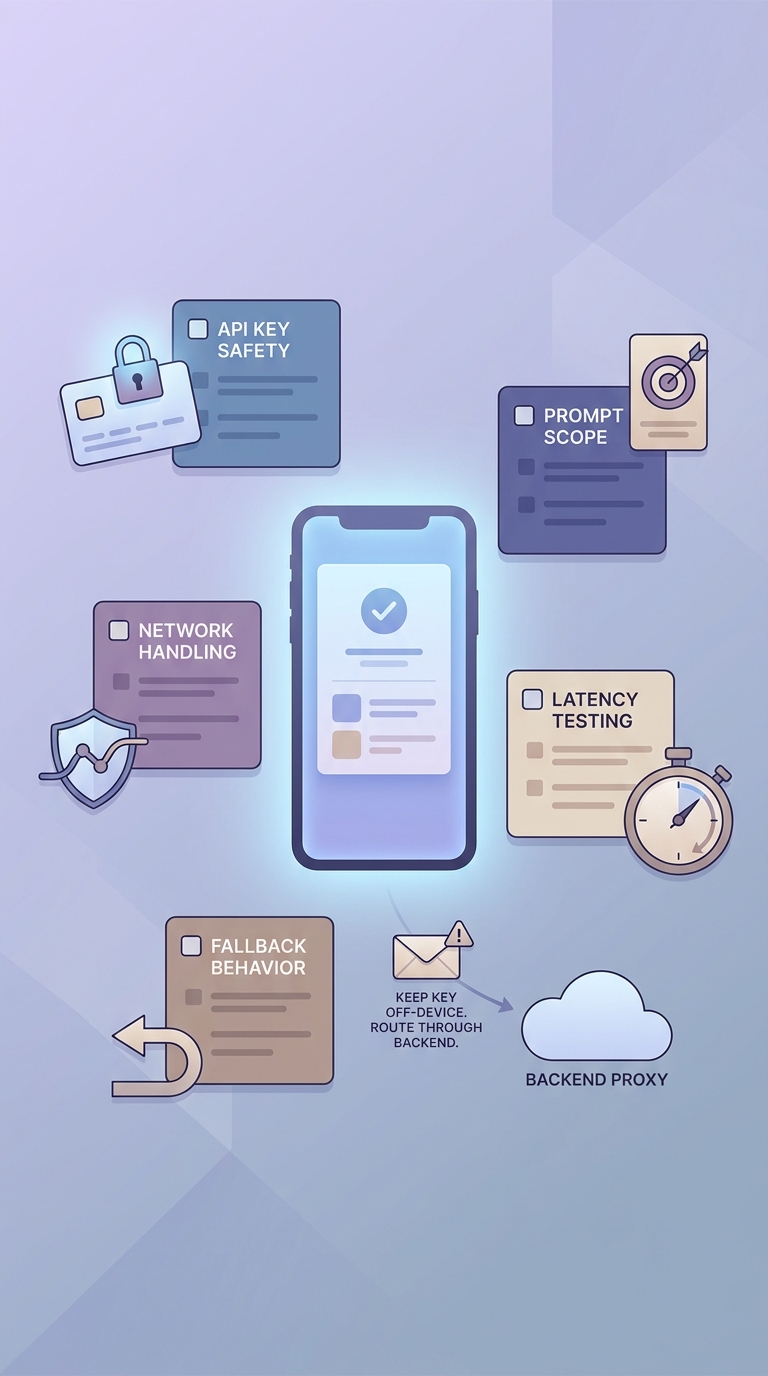
A mobile-friendly checklist of launch checks for a Gemini-powered Android feature, including API key safety, network handling, prompt scope, latency testing, and fallback behavior.
- Do not ship the API key in the production APK. Use a backend or a managed proxy path recommended in the Android guidance (https://developer.android.com/ai/gemini/developer-api).
- Make latency visible: track TTFT and total latency on real devices, and tune timeouts to match your UX tolerance.
- Keep v1 scope narrow: one prompt, one output shape, and a clear character limit with a fallback message.
A practical first feature to build next
- Build one screen, one job: note summarizer, draft reply helper, or classify a support message into 3-5 labels.
- Measure: completion rate, median latency, and retry rate.
- Roll out in stages: internal test (often 1-2 days), then a small cohort (often about a week), then expand if logs show stable behavior. Expect more time if you need backend work, security review, legal or policy approvals, or accessibility updates.
Want a low-risk first release plan (scope, rollout, and the "what if it fails" paths) for your app?
Choose a low-risk first flow
How to Publish a Cursor-Built Mobile App reframes the same problem with a slightly different lens - useful before you finalize.


