
If your mobile AI feature feels like a coin flip between Core ML and a cloud API, the real risk is not the model choice. It is shipping a user experience that breaks under weak connectivity, unpredictable latency, rising inference bills, or stricter privacy expectations. This helps you make a defensible call using measures you can usually collect in about a week of focused work, not opinions.
Adding Image Recognition to Your iOS App Guide goes deeper on the ideas above and adds concrete next steps.
Early proof: a tradeoff map you can validate in beta
Category: Reliability
Statistic: 0% vs variable
Label: Offline success rate gap
Context: On-device runs offline; cloud features can fail without a signal
Category: Latency
Statistic: <10 ms
Label: On-device inference latency
Context: Predictable for real-time UX (e.g., camera, typing)
Category: Latency
Statistic: 100 - 800+ ms
Label: Cloud round-trip delay
Context: Network adds jitter; can spike under weak connectivity
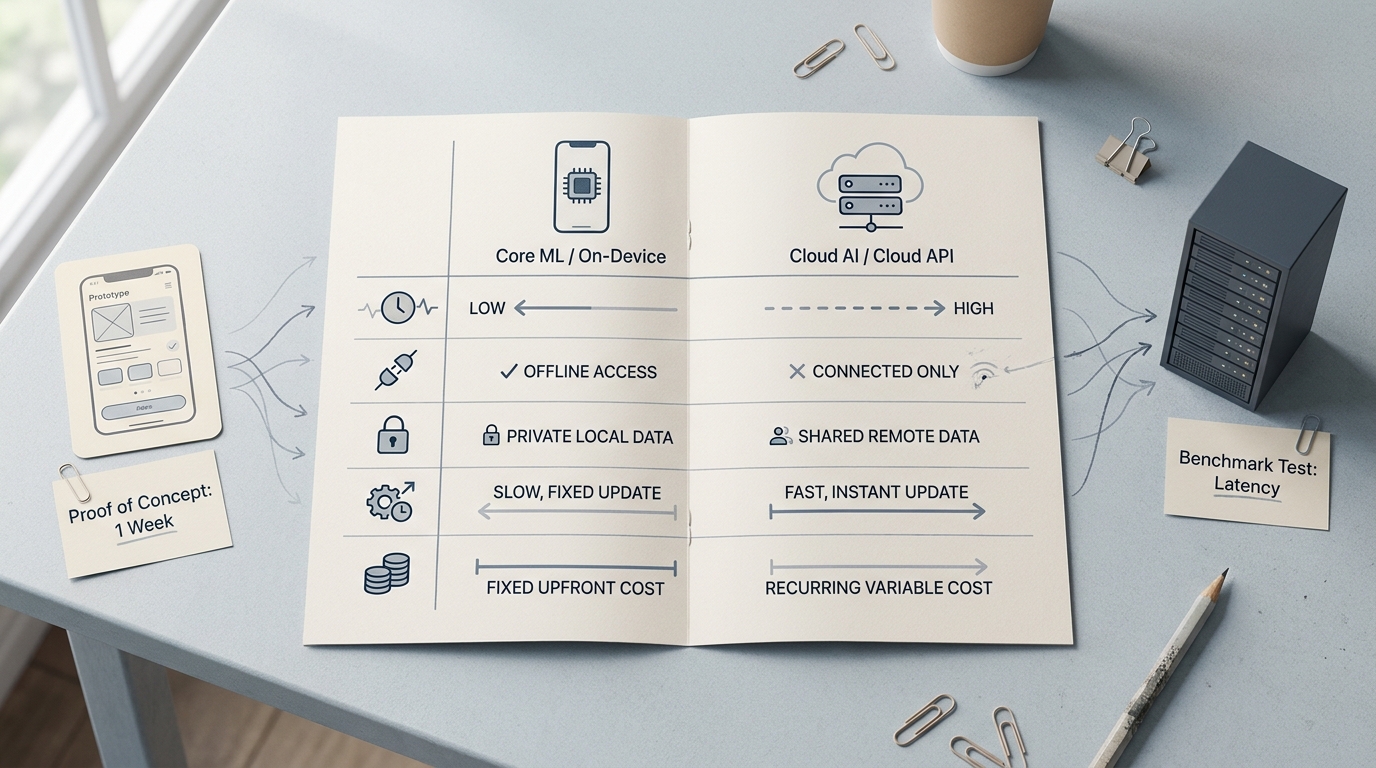
A clean comparison table contrasting Core ML and Cloud AI for mobile apps across latency, offline access, privacy, update speed, and recurring cost, with directional rather than exact benchmark framing.
| What you will measure | Core ML (on-device) tends to look like | Cloud AI (API) tends to look like | Why it changes the product decision |
|---|---|---|---|
| p95 end-to-end latency (ms) | Lower and steadier if the model fits the device | More variable by network, region, and backend load | If p95 breaks your UX budget, users feel lag even when p50 looks fine |
| Timeout rate (%) | Near zero unless the app is under device pressure | Can spike on bad networks or incidents | High timeouts force UX fallbacks and support costs |
| Cloud-fallback rate (%) in hybrid | You want this low and stable | You want this predictable and affordable | If fallback creeps up, costs and dependency risk creep up too |
| Cost per 1k requests (USD) | Mostly engineering and QA time | Direct variable cost plus retries, logging, and ops | If volume grows, per-call costs can become a real margin line item |
These are directional patterns, not guarantees. Results vary with device class, model size, thermal state, geography, and implementation details (PocketLLM, House of MVPs).
What this means in practice: pick a default path, then instrument p95 latency, timeout rate, fallback rate, and cost per 1k requests during a beta. The reader impact is simple: you can defend the decision with your own numbers, and you will catch predictable failure modes (old devices, poor networks, backend blips) before they become 1-star reviews.
When you move from outline to execution, What Are Agentic AI Apps and How Do You Build One helps close common gaps teams hit here.
Are you choosing user experience or operational reality?
Inference placement is product design. On-device can make camera effects, text suggestions, and live classification feel instant because there is no network round trip. That "instant" feel is not automatic though - model size, memory pressure, and thermal throttling can turn a good demo into UI jank on mid-tier phones (3nsofts).
Cloud flips the advantage when you need larger models, heavier reasoning, or centralized control across iOS and other clients. It can speed iteration because you can update behavior server-side, but you also inherit vendor availability, auth failures, rate limits, and incident response as part of the user experience.
Constraints worth naming up front:
- App releases and App Review can slow Core ML iteration (often days, sometimes longer depending on queue and QA scope).
- Cloud latency varies by geography and carrier, not just your server region.
- Privacy and consent work shows up either way (analytics, logging, debugging), not only in the cloud path.
A complementary angle worth comparing lives in Best Single-Purpose Apps for Getting Things Done in 2026.
A practical workflow you can run this week (no placeholders)
Write the UX budget and failure policy
Decide what "good" means before benchmarking. Example targets: p95 under 200 ms for inline suggestions, timeout rate under 0.5% for blocking flows, and a clear fallback UI when confidence is low.
Prototype both paths with real instrumentation
Build a thin vertical slice: one Core ML inference and one cloud call from the same UI entry point, with the same timing and error metrics. Budget 0.5-1 day if the model is already prepared, and 2-4 days if you need conversion, quantization, or API plumbing.
Test on a representative device set
Do not only test on the newest phone. Aim for 3-6 devices that match your user base (oldest supported, mid-tier, flagship). Plan 1-2 days to collect stable numbers because thermals and background load can skew early runs.
Exercise real network conditions
Test Wi-Fi, LTE/5G, and artificially poor networks (Network Link Conditioner or a real commute). Track p50/p95, timeouts, and retry counts. This is usually 0.5-1 day once the harness exists.
Run a quick cost model
Calculate cost per 1k requests: provider pricing + expected retries + logging/observability + any egress. Add a sensitivity range because retry rate and fallback rate often move after launch (new locales, older devices, provider incidents).
Decide: on-device, cloud, or hybrid with an explicit rule
Write the rule in plain language (confidence threshold, device class cutoff, or "only cloud for high-value actions") and log the decision. Expect to revisit thresholds after 1-2 releases as you see real distribution shifts.
Concrete example (hybrid): on-device runs first for photo categorization. If confidence < 0.7 or inference time > 250 ms on that device class, send a compressed thumbnail to cloud and show "refining..." with a cancellable state. Track cloud-fallback rate and compare completion rate vs the on-device-only variant.
CTA: Want a sanity check on your thresholds and device test plan?
Share your feature type (camera, text, audio), target devices, and a rough latency budget, and I can share a starting measurement checklist and a reasonable first-pass default (Core ML, cloud, or hybrid) to test.
Get the checklist
For tradeoffs, checklists, and edge cases, Top AI Coding Assistants for Mobile Developers in 2026 rounds out this section.
Which should you choose: Core ML, cloud AI, or hybrid?
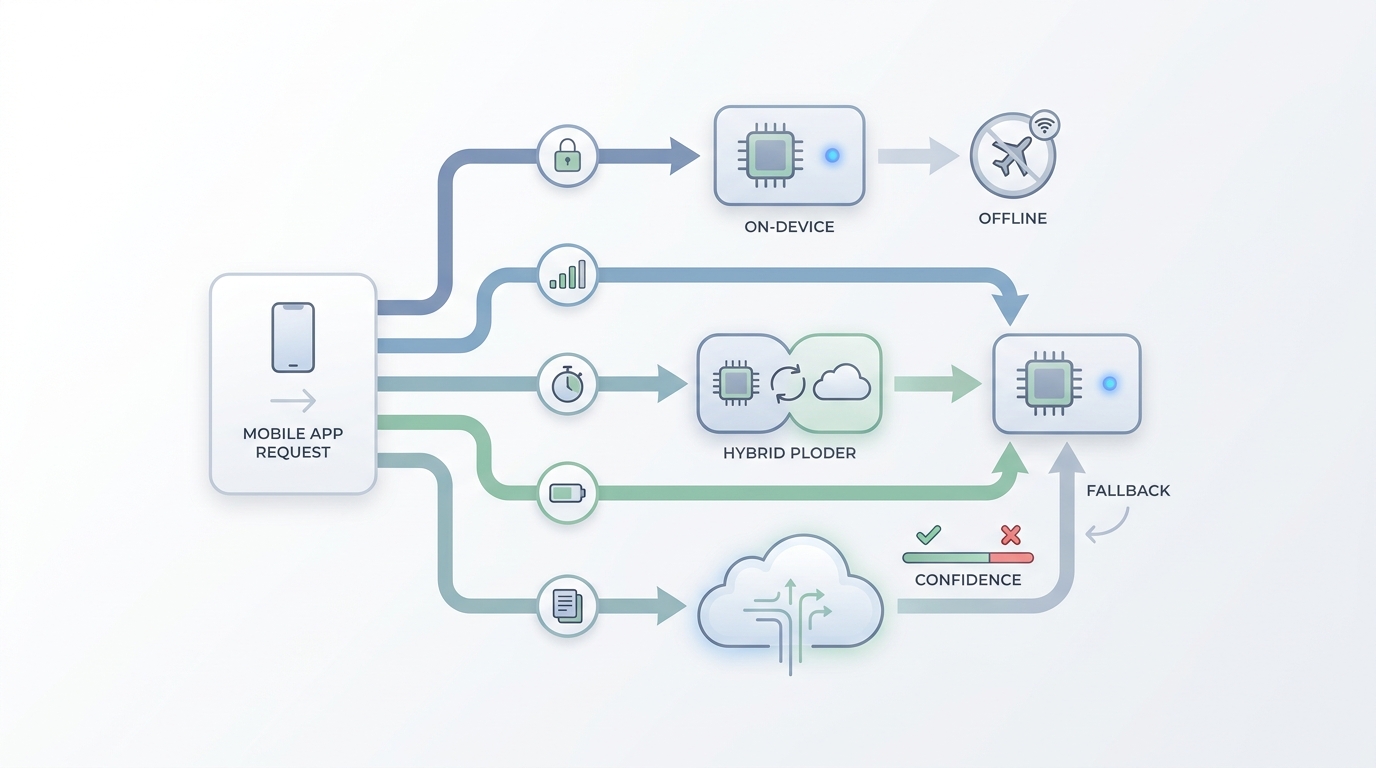
A decision-flow diagram showing how a mobile app can route quick, private, or offline-safe requests to Core ML and send heavier, ambiguous, or centrally managed tasks to Cloud AI based on confidence, connectivity, and request complexity.
| Approach | Best for | Tradeoffs | Common failure modes | Ops burden (realistic) |
|---|---|---|---|---|
| Core ML (on-device) | Low-latency UI, offline use, sensitive inputs, predictable marginal cost | Conversion and device QA time; model quality may drop after optimization; slower update loop | Thermal throttling, memory pressure on older devices, accuracy regressions after quantization | Mostly front-loaded: profiling, QA across devices, and occasional model refreshes (often days to 2 weeks depending on model and team) |
| Cloud AI (API) | Large models, fast iteration, cross-platform consistency | Network variability, vendor dependency, variable costs, policy considerations for user content | Auth/rate-limit errors, incidents, regional latency spikes, retry storms that inflate cost | Ongoing: auth and key management, rate limiting, observability, cost monitoring, and some form of incident ownership (even if the vendor is "at fault") |
| Hybrid | Mostly on-device with selective cloud escalation | More moving parts: thresholds, logging, and QA for two paths | Gating drift after updates, silent fallback creep, inconsistent results between paths | Medium: you still need cloud ops plus extra testing to keep the routing rule honest |
One thing worth noting: cloud can look "simpler" early, but the operational surface area shows up as soon as you have real users. On-device can look "hard" early, but it tends to stabilize once you have a model that fits your device targets.
Build an AI Recommendation Engine for Mobile reframes the same problem with a slightly different lens - useful before you finalize.
How do you make the decision ship successfully?
Decision points that save time:
- If the feature is blocking (user waits), prioritize p95 latency and timeout rate over raw model quality.
- If the feature is assistive (user can ignore it), you can accept slower paths and focus on accuracy and clear UI states.
- If you are unsure about volume, start cloud or hybrid, but add instrumentation on day one so you are not guessing later.
Pitfalls and edge cases to plan for:
- Device diversity is real: an on-device win on a flagship can be a loss on your median device. Budget at least one QA pass on older hardware.
- Cloud requires product-grade plumbing: timeouts, backoff, caching (sometimes), and a UX that does not block the whole screen on a flaky connection.
- Privacy is not binary: even on-device features can leak sensitive content through logs, crash reports, or analytics if you are not intentional.
CTA: If you are deciding between Core ML, cloud, or hybrid this month
Tell us what the feature is, what "bad" looks like (spinner, wrong output, offline), and your target devices. We can share how we would structure the test, what to instrument, and where teams usually underestimate effort.
Talk to us


