
Most AI apps can answer questions, but they often fall apart when the work is messy, multi-step, and full of handoffs like pulling data, making decisions, taking actions, and confirming results. If you are trying to ship something more useful than a chatbot, you likely need an agentic AI app: a system that can plan, use tools, observe what happened, and keep going until the task is actually done (or it safely hands back to the user).
| Early proof (illustrative + example) | What you should notice | Why it matters to a product team |
|---|---|---|
| Illustrative pilot pattern: most real tasks take multiple plan - act - observe loops before they finish cleanly, especially when auth, data, or user intent is ambiguous. Week 1 goal: instrument loop count and tool outcomes so you can see where it breaks. | The difference is not "better answers." It is an explicit loop that checks results and handles missing info, tool failures, and clarifying questions. | You can measure reliability (task success, corrections, runtime) and decide if the operational cost is worth shipping. |
| Example (hypothetical, for calibration): internal scheduling pilot on 40 scripted scenarios. Median loops: 2. p95 loops: 6. Top causes: OAuth refresh failed (12%), attendee resolution ambiguous (10%), calendar write rejected (8%). | You do not need perfect dashboards first. You need enough logging to replay failures and fix the biggest leak. | This keeps you from over-investing in a demo that cannot survive production permissions and integrations. |
What this means: expect iteration. The goal is not to eliminate loops, but to make them visible, bounded, and measurable so the agent does not spiral or silently fail.
The Future of App Publishing: Where AI Agents Are Taking It goes deeper on the ideas above and adds concrete next steps.
What is an agentic AI app and why does it matter now?
Category: Outcomes
Statistic: 38%
Label: First-pass approval rate
Context: When metadata is complete upfront
Category: Speed
Statistic: 1 - 2 apps
Label: Touched per mobile task
Context: Agent runs tools in the background vs. manual hopping
Category: Governance
Statistic: 3 - 5 approvals
Label: Visible in one thread
Context: Centralizes “who approved what” for auditability
The gap between answering and acting
Most AI apps stop at a good answer. An agentic AI app carries the work through: it can plan, call tools, check what happened, and continue until the task is complete, which matches common definitions of agentic systems that iterate toward a goal rather than only generating text (TechTarget). In practice, that is the difference between a chat response and an app that can fetch account data, draft a support reply, and then open the right screen for the user to confirm and send.
The practical takeaway: agentic apps can reduce manual handoffs, but they add real engineering and ops burden (tool reliability, permissions UX, evaluation sets, monitoring). You trade "prompting time" for "workflow time," and not every workflow is worth that trade.
Who this changes for product teams and builders
- Mobile teams shipping search, scheduling, support, or content ops flows where users bounce between screens to finish one job
- Startups deciding between a simple assistant and a full agent loop with tool use and retries
- Internal builders integrating with CRMs, ticketing, calendars, and docs without breaking iOS and Android permission constraints
What success looks like in a mobile product
Success is a narrow task that finishes with fewer taps, fewer errors, and a clear user confirmation step. On mobile, that also means respecting permissions, earning trust, and avoiding store review risk by making actions transparent and reversible.
One thing worth noting: the hardest part is often not the model. It is identity, API limits, flaky downstream systems, and how you recover without confusing users.
When you move from outline to execution, AI Remix Apps Taking Over the App Store in 2026 helps close common gaps teams hit here.
How do you build an agentic AI app step by step?
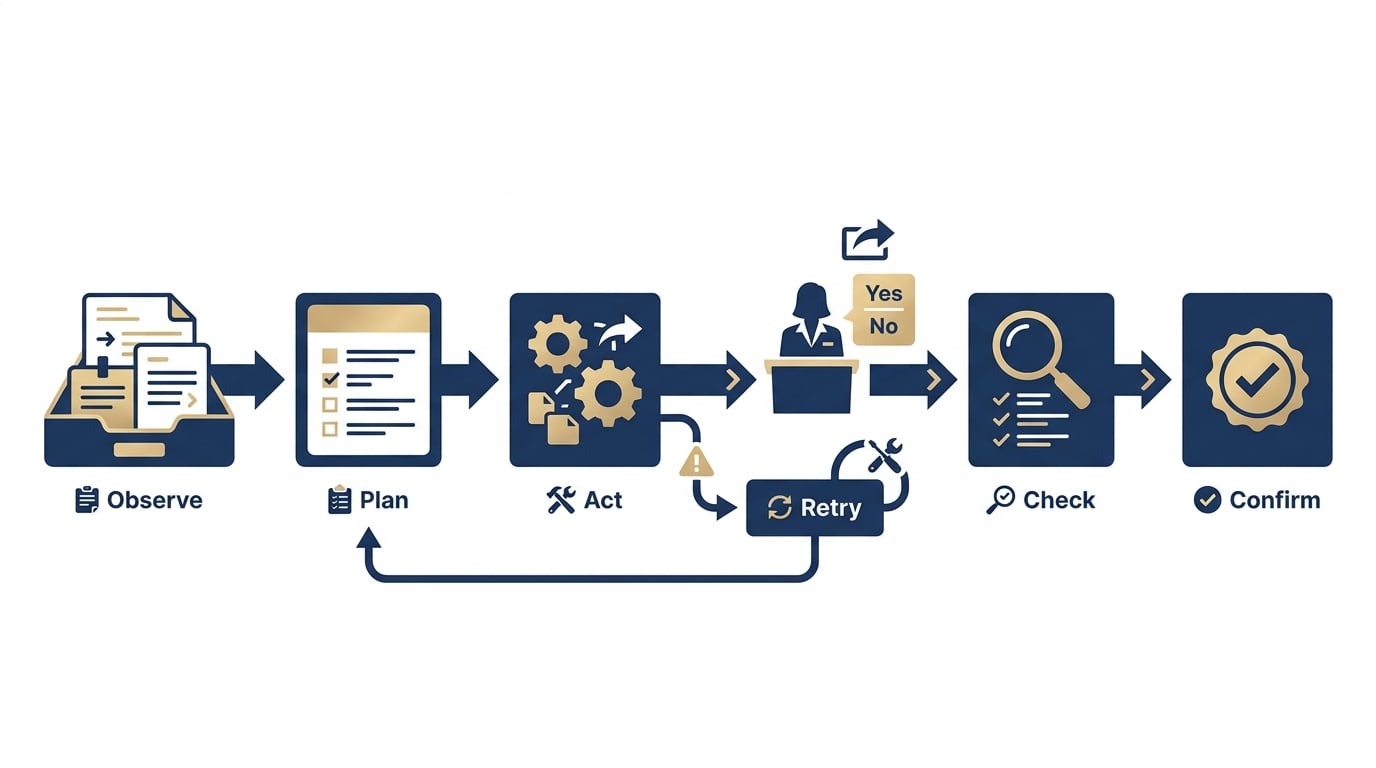
A left-to-right process diagram showing observe, plan, act, check, and confirm stages for an agentic AI app, with a user approval gate before irreversible actions and a fallback branch when tools fail.
Choose one bounded task and one success metric
Pick a workflow you can pilot without months of integration work: support triage into a draft reply, meeting scheduling to a confirmed booking, or note cleanup into a structured summary. Define one outcome that proves it worked, like "draft created and ready for approval" or "calendar event created with correct time and attendees."
Effort note: a reliable demo can take 1-2 days. A usable pilot is more like 1-3 weeks once you include integrations, OAuth scopes, enterprise approvals, and access to realistic test data.
Map the agent loop before writing prompts
Write the loop in plain states: observe (inputs), plan (next steps), act (tools), check (verify results), finish (report). Include a hard stop where the agent must ask for approval before irreversible actions (send email, book calendar, charge card).
Decision point: choose where you allow automatic retries. Retrying a read-only query is usually fine. Retrying an action that creates something (ticket, event, message) needs idempotency and user-visible confirmation.
Connect tools, permissions, and fallback paths
List the exact tools and constraints up front (this prevents "agent magic" that cannot ship):
- Tools: calendar API, CRM, tickets DB, notifications, on-device storage
- Permissions: request the minimum needed (and explain why), especially for contacts, calendar, and background work
- Fallbacks: if a tool errors or data is missing, ask a targeted question and show an incomplete status instead of pretending the task finished
Dependency caveats: your reliability is bounded by tool uptime, API quotas, auth refresh behavior, and data quality. Plan for "no access" and "stale data" as first-class outcomes, not exceptions.
Add one concrete operational target (so you can evaluate reality)
Example: a scheduling agent that creates a calendar event and asks the user to confirm.
- Tool call: Google Calendar API
events.insertwithattendees,start/end, and arequestIdor your own idempotency key stored server-side - Required confirmation: user approves the final title, time, and attendees before insert (or at least before sending invites)
- Targets for a first pilot (adjust to your stack): a directional goal like "most runs succeed end-to-end on the eval set," "median <= 1 correction," and "p95 runtime under a minute if tool latency allows"
Measurement plan: log (a) loop count, (b) tool call outcomes, (c) time-to-completion, and (d) where users corrected the agent. Use median and p95, not just averages.
- Tool call: Google Calendar API
A complementary angle worth comparing lives in The Last Step AI App Builders Don't Solve: Publishing.
What mistakes make agentic AI apps brittle?
Autonomy without clear boundaries
If your agent can do "anything," it will eventually do the wrong thing, and trust collapses fast. The fix is not more prompting. It is tighter scope, fewer tools, and explicit approval rules for irreversible actions.
| Risk | What it looks like | Mitigation you can actually ship |
|---|---|---|
| Tool sprawl | Agent uses extra tools "just in case" | Only expose tools needed for the one workflow |
| Surprise actions | Sends, books, edits without clear user intent | Require approval before write actions and show a preview |
| Hard-to-debug failures | You cannot tell why it looped or quit | Log state transitions, tool inputs/outputs, and exit reason |
| Review and compliance friction | Permissions feel excessive | Minimize scopes, explain intent, and support "no access" flows |
Tradeoff: tighter boundaries reduce some "wow" moments. The upside is you can support, monitor, and improve the system without guessing what it did.
Invisible steps and weak confirmations
- Do not hide tool calls when the task touches money, outbound messages, or calendar commitments.
- Show intermediate states like drafted, queued, or awaiting approval so users can intervene early.
- Make completion explicit with a final confirmation plus the artifact, like the sent email, the calendar invite, or the created ticket ID.
Pitfall: if confirmations are too frequent, users will feel like they are doing the work anyway. Aim for one high-stakes confirmation and good defaults everywhere else.
Skipping evaluation until after launch
- Track completion rate, correction rate, and failure recovery on a repeatable test set, not just "good replies."
- Test edge cases: missing permissions, stale data, contradictory instructions, and time zone weirdness.
- Treat prompts, tool reliability, and UX feedback as one system, because a weak link breaks the workflow.
Realistic ops note: someone will own on-call for tool failures, auth bugs, and model regressions. If that is not staffed, keep the scope smaller and the actions lower risk.
For tradeoffs, checklists, and edge cases, Froxi AI vs Manual Publishing: Risk, Complexity, and Speed Compared rounds out this section.
Execution checklist before you ship
Pre-launch checks for a first agentic build
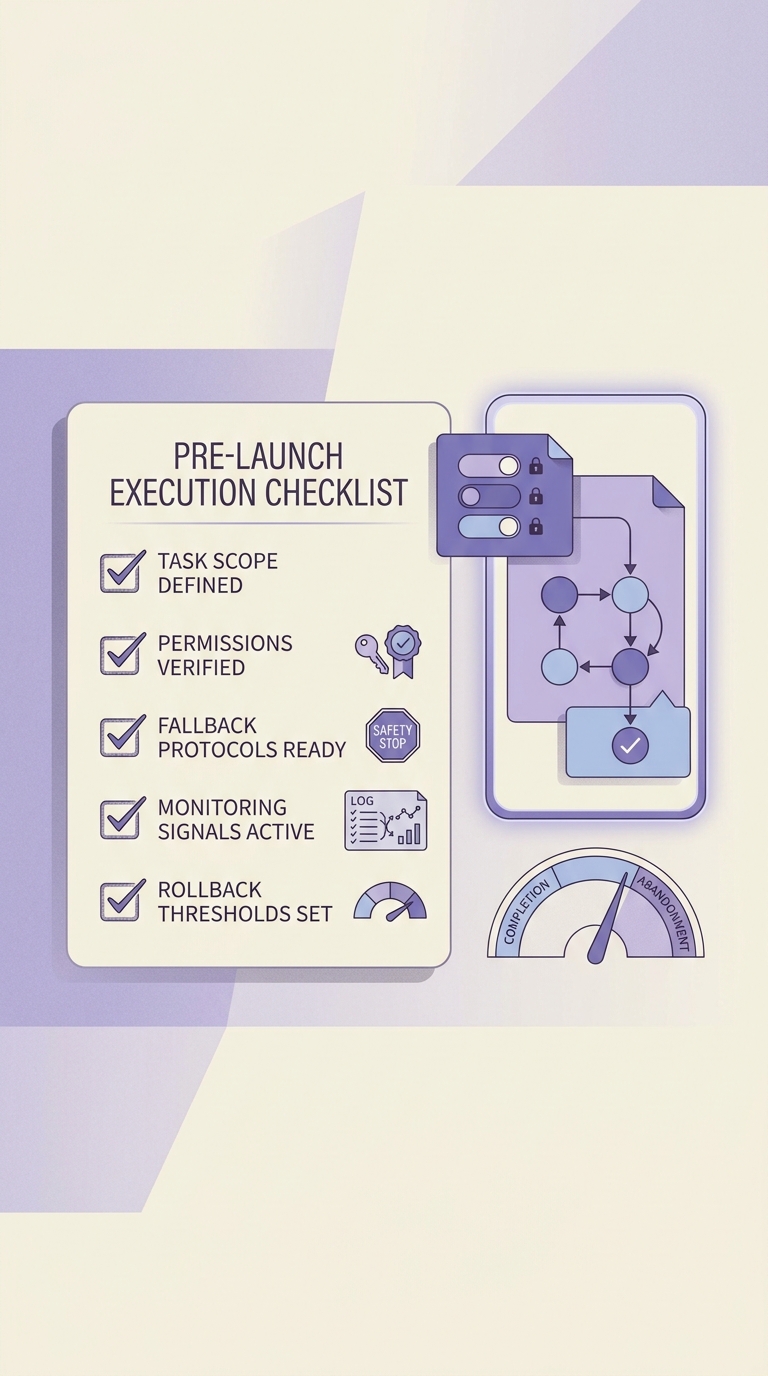
A mobile-friendly checklist block for shipping an agentic AI app pilot, covering task scope, permissions, fallback behavior, and monitoring signals before launch.
- One workflow only, with one success metric (for example, "created ticket with correct fields") and one approval rule for high impact steps
- Tool permissions documented and justifiable for mobile review, including why each capability is needed for the task
- Fallback UX ready: clear messaging for failed actions, missing data, rate limits, or blocked access, plus a safe "stop and hand back to user" path
- Basic observability: correlation IDs per run, tool call logs, and a way to replay failures on a fixed eval set
Launch-day monitoring and rollback signals
- Track completion rate, top abandonment step, and user corrections in the first sessions
- Watch for repeated failures at the same loop step (plan, tool call, parse, confirm), then patch that step first
- Define a rollback threshold for misfires on high stakes actions (payments, messages, deletions)
Common failure modes and who fixes them
Plan for these up front, because they determine your real maintenance cost:
- OAuth expiry and consent drift (usually owned by: platform or mobile + backend integration owner)
- Rate limits and quota exhaustion (owned by: backend; may require product changes like batching or caching)
- Partial writes and idempotency bugs like duplicate tickets or double invites (owned by: backend; needs run IDs and idempotency keys)
- Tool schema drift when vendors change fields or permissions (owned by: integration owner; needs contract tests and monitoring)
- Model output parsing failures (owned by: whoever owns the agent runtime; mitigate with schema validation and safe fallbacks)
Top 5 AI Tools to Generate App UI Without a Designer reframes the same problem with a slightly different lens - useful before you finalize.


