
If you are trying to use Stripe in a mobile app, the hard part is usually not the API integration. It is staying inside App Store and Google Play payment rules so you do not get rejected or forced into a late rebuild. This guide gives you a practical decision path for common product types, plus the tradeoffs to plan for up front.
Early proof block: Policy snapshot + operational workflow (directional, not legal advice)
| Snapshot from current Apple/Google guidance | What it means in practice | Reader impact |
|---|---|---|
| Digital goods and subscriptions delivered in-app usually require Apple IAP / Google Play Billing | Stores care most about the digital entitlement delivered in the app, not which processor you prefer | Plan for store billing for digital access unless you have a confirmed, current exception |
| Stripe is typically acceptable for physical goods and real-world services | These categories are generally not required to use store billing | You can often keep Stripe for orders like appointments, deliveries, or shipments |
| External purchase links can be possible, but only under specific programs, regions, and UX rules | Eligibility, disclosures, and UI patterns vary and can change | Treat external links as a dependency to confirm early, not a launch-week escape hatch |
| Entitlements must be verified server-side for reliability | Plan to process App Store Server Notifications and Play RTDN into your entitlement service | Fewer support tickets for "I paid but I am locked out," and clearer auditability during review |
- Explanation: This is a condensed reading of Apple and Google policy patterns based on their public docs, plus the minimum backend workflow most teams need for stable entitlements.
- Interpretation: If you sell digital access inside the app, assume store billing until you verify a current, approved exception for your app, region, and UX.
- Impact: You avoid building a single universal Stripe checkout that you later have to split right before review (when you have the least time to change it safely).
How to Integrate Stripe Into Your iOS App Step by Step goes deeper on the ideas above and adds concrete next steps.
Why is Stripe tricky in mobile apps?
Teams reach for Stripe because it is a clean stack across web and mobile. The issue is that App Store and Google Play do not treat every purchase the same. Using Stripe in-app for digital goods or subscriptions can conflict with Apple In-App Purchase rules and Google Play Billing requirements, which can lead to review rejection or a forced redesign (Apple App Review Guidelines, Play Console Payments).
One thing worth noting: policies vary by app category and region, and they change over time. If you are in a gray area (education, marketplaces, creator tools, regulated services), treat this as product ops work, not just engineering. Plan time to re-check current docs, and consider counsel for edge cases.
When you move from outline to execution, In-App Purchases and Subscriptions: The Complete Publishing Guide helps close common gaps teams hit here.
Which teams feel the pain first?
- Subscription apps that want Stripe for upgrades, trials, or renewals inside the app
- SaaS apps that try to charge for digital access during in-app onboarding
- Marketplace apps mixing services with digital add-ons
- Teams trying to ship one shared payment flow across iOS and Android
Tradeoff: splitting flows adds engineering, QA, and support overhead. A realistic starting range for a small app is often a few days to a couple of weeks depending on StoreKit/Play Billing familiarity, backend entitlement complexity, and your QA matrix (devices, accounts, regions, and restore flows).
A complementary angle worth comparing lives in How Subscription Apps Get Rejected - and How to Prevent It.
What do App Store and Google Play allow?
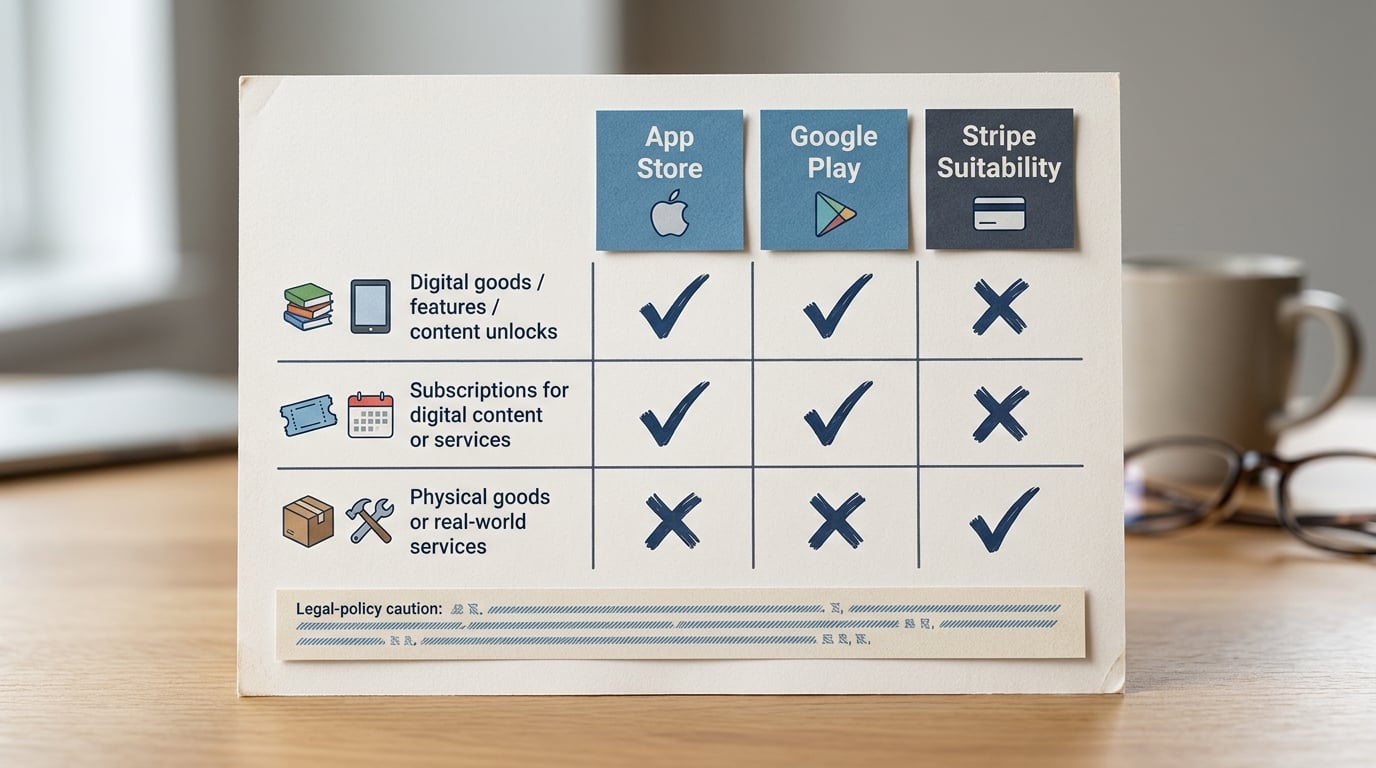
A compact comparison table showing purchase types such as digital subscriptions, app unlocks, physical goods, and services, with columns for App Store, Google Play, and Stripe suitability. It makes the policy split obvious before the reader reaches the implementation steps.
| Purchase type in the app | App Store default | Google Play default | Stripe in-app suitability |
|---|---|---|---|
| Digital goods, features, content unlocks | Apple IAP required | Play Billing required | Usually not allowed |
| Subscriptions for digital content or services | Apple IAP required | Play Billing required | Usually not allowed |
| Physical goods, real-world services | Other processors allowed | Other processors allowed | Typically allowed |
A practical rule of thumb based on current guidance: if the user receives a digital entitlement inside the app, plan on store billing unless you qualify for a specific external purchase program and implement it exactly as required.
Dependency caveat: external purchase programs can require enrollment steps, specific disclosures, and strict UI patterns, and availability differs by region and app type. Approval is not guaranteed even if you believe you qualify (Apple external purchase, Android external links).
For tradeoffs, checklists, and edge cases, Everything You Need to Know About Apple and Google Developer Accounts rounds out this section.
How do you choose the right payment flow?
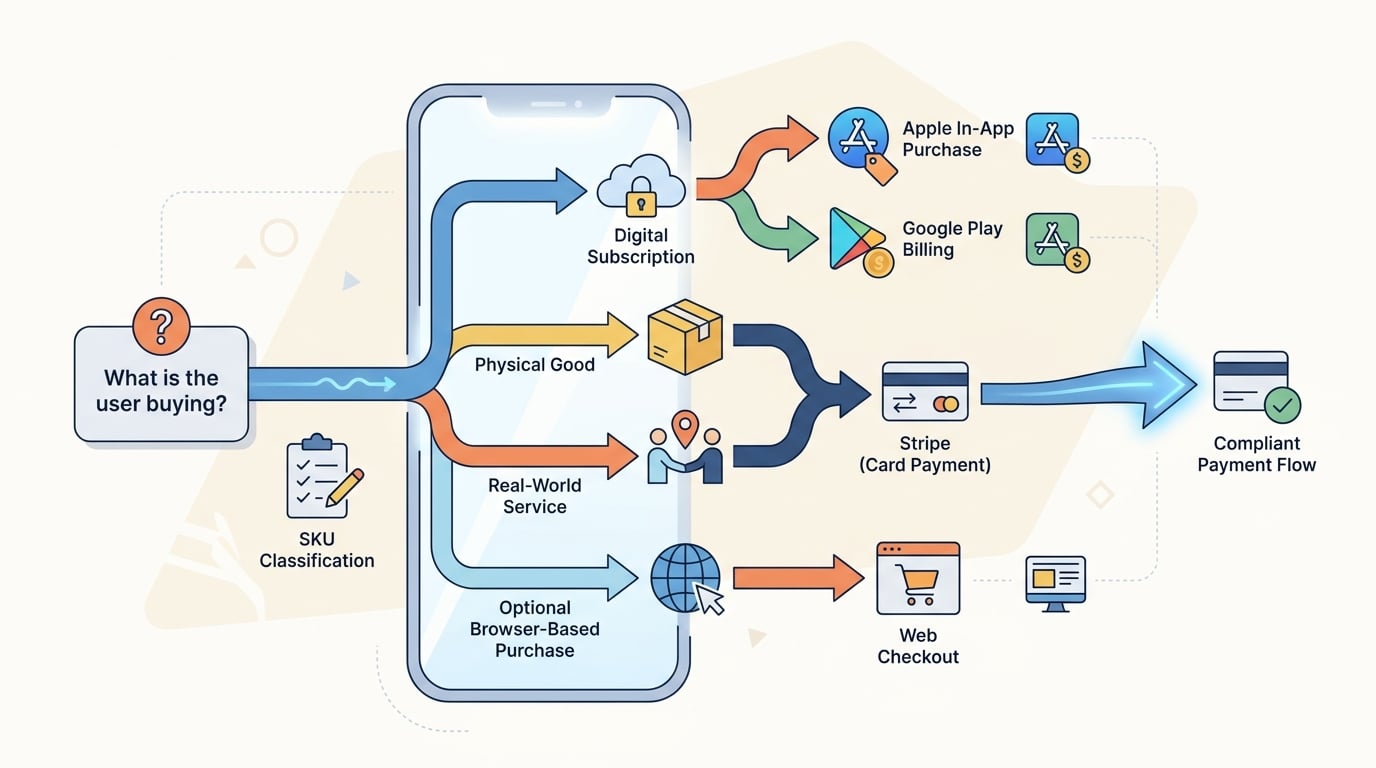
A simple decision tree that starts with 'What is the user buying?' and branches into Stripe, Apple In-App Purchase, Google Play Billing, or web checkout. It reinforces the platform-specific routing logic for mobile teams.
Classify every SKU before writing code
Make a simple list and label each item: digital subscription, digital feature, physical good, or real-world service. This is usually 30-60 minutes if pricing is settled, longer if packaging is still moving.
Route by category, then by platform
Digital entitlements in-app go to StoreKit (iOS) and Play Billing (Android). Stripe stays for physical and service checkouts, and possibly web checkout if you are eligible and implement required UX.
Pick one entitlement source of truth (and budget for the plumbing)
If you support both store billing and Stripe, your backend needs to reconcile access: receipt validation, renewals, cancellations, refunds, and restores. For a simple single-plan product this can be a few days; it grows quickly with upgrades, trials, family sharing expectations, multiple plans, or account linking across devices.
Concrete example: suppose you sell a $9.99/mo digital subscription (unlocks in-app content) plus a $49 coaching session (real-world service). Route the subscription purchase to StoreKit/Play Billing, route coaching to Stripe, and make your backend entitlement service the source of truth: StoreKit/Play events update subscription_active, Stripe webhooks update coaching_credits, and the app reads one unified access record.
Publishing Apps Built With Flutter, React Native, or Native reframes the same problem with a slightly different lens - useful before you finalize.
What are the common Stripe-in-mobile mistakes?
Treating every purchase as Stripe-compatible
Stripe can power a checkout, but the stores can still block it for digital goods and subscriptions. A common rejection trigger is selling a digital entitlement in-app via Stripe and expecting it to pass.
Tradeoff: store billing can reduce pricing flexibility and complicate cross-platform subscriptions. The upside is fewer review surprises for in-app digital value.
Hiding the payment route from review
Even a compliant flow can get rejected if reviewers think you are steering users around store billing. Put the tap-by-tap journey in review notes, and make sure the UI and copy match those notes.
Ignoring upgrades, restores, and cross-device access
Mixed-device users expose entitlement bugs quickly. A user might buy on iPhone, then sign in on Android and expect access immediately.
Common failure modes to plan for:
- Entitlement sync lag after purchase, cancellation, or refund (show a "processing" state if needed)
- Reviewer confusion (UI looks like a digital unlock via Stripe, even if you intend it as a service)
- External link noncompliance (you built web checkout, but disclosure and UI requirements are not met)
What should your launch checklist include?
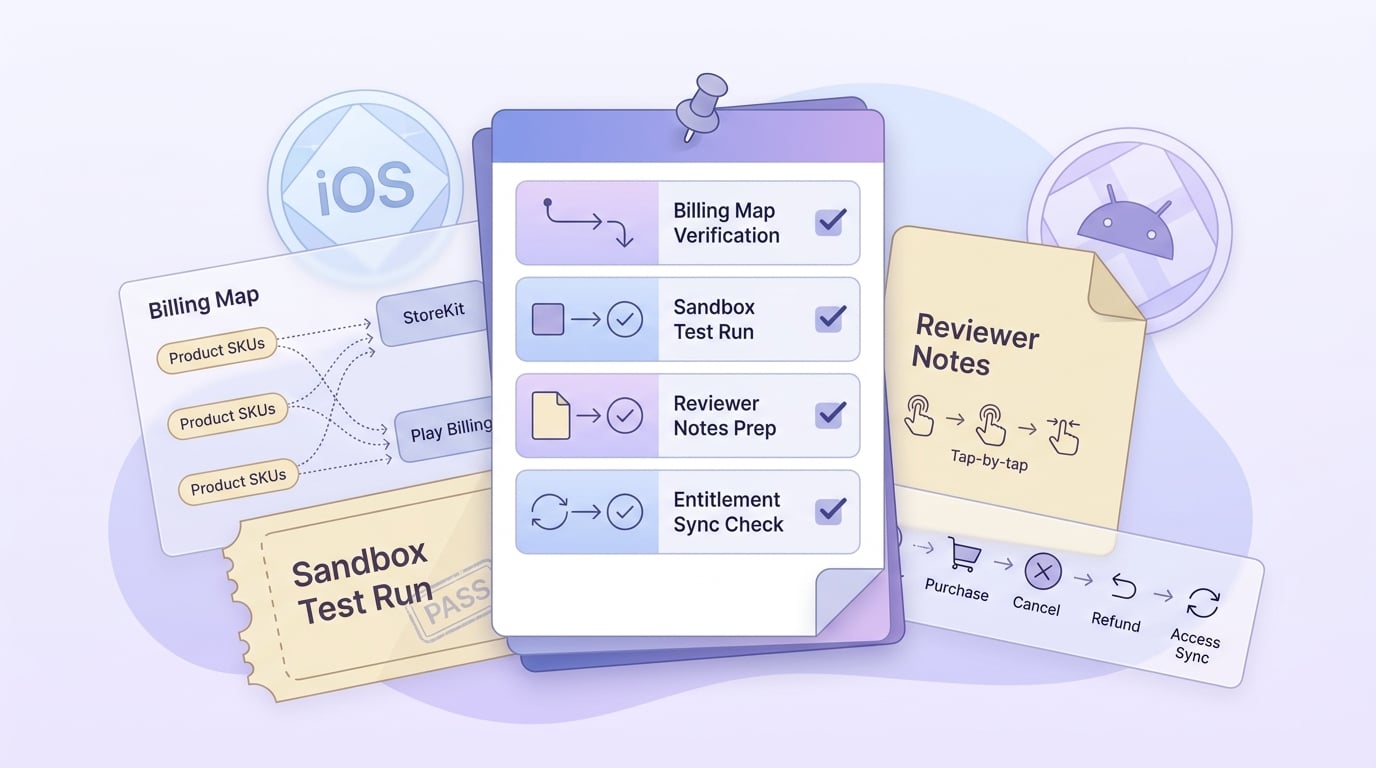
A checklist block for app teams to verify billing mappings, sandbox tests, review notes, entitlement sync, and platform-specific messaging before submitting to the App Store or Google Play.
- Confirm each SKU maps to the correct billing path (StoreKit/Play Billing for in-app digital goods, Stripe only where permitted) (Apple, Google).
- Make your server the source of truth for access, and define restore rules per platform.
- Add reviewer notes: tap-by-tap purchase route, any external link copy, and what the user receives after payment.
- Budget QA time: expect at least half a day per platform for sandbox basics, plus extra time for refunds, retries, offline, and account switching (often where bugs hide).
| Check | What you want to see |
|---|---|
| Paywall to confirmation | Same SKU, same route, no silent switches |
| Entitlement sync | Access granted quickly and consistently; if delayed, show a clear status |
| Fallback screens | Helpful error, no dead ends |
Operational signals that help in week 1 (and reduce guesswork):
- Funnel events:
paywall_view -> purchase_start -> purchase_success(split by iOS vs Android vs web) - Stripe Dashboard: dispute rate and top decline codes (only for allowed Stripe flows)
- Store events: App Store Server Notifications / Play RTDN feeding your entitlement service (depends on backend plumbing, retries, and monitoring)
CTA: Build your billing routing map
Draft a 1-page SKU matrix (SKU - category - platform - billing method) before you commit to code. It is a practical way to avoid a review-time rewrite.
Audit your billing map
How should you think about tradeoffs and ongoing maintenance?
A split setup is not free. You will maintain two billing SDKs, two test environments, and a backend that reconciles entitlements across payment systems. You also inherit ongoing policy churn, which means you may need occasional UX or copy updates even if your code is stable.
The practical takeaway: assign ownership for (1) SKU classification, (2) entitlement logic, and (3) review notes updates when pricing or packaging changes. If no one owns it, it usually turns into support tickets and rushed hotfixes.
CTA: Sanity-check your edge cases before launch
Do a 30-minute walkthrough of refunds, restores, and cross-device access. If any case is unclear, fix the rules now, not after support tickets pile up.
Run the edge-case checklist


