
Turning an app idea into a real product in 30 days is less about speed hacks and more about making a few uncomfortable decisions early: what you will not build, what "done" means, and who you are shipping for first. I learned this last spring when I had to get a usable MVP into testers' hands in a single month without burning out or overbuilding.
How to Build a SaaS App With AI in a Weekend goes deeper on the ideas above and adds concrete next steps.
Early proof: what changed in 30 days (and what it actually means)
Category: Validation
Statistic: 8 interviews
Label: User conversations by Day 30
Context: Moves validation from none to real feedback loops
Category: Scope
Statistic: 13 features cut
Label: Scope reduced to 5 MVP features
Context: Explicit cuts create a shippable core flow in 30 days
Category: Early traction
Statistic: 7/12 users
Label: Beta activation in first week
Context: Early usability signal - not product-market fit
| Day 0 (idea stage) | Day 30 (MVP stage) | |
|---|---|---|
| Artifact | Notes, rough mockups, a few voice memos | Clickable MVP with a working core flow and a store submission checklist drafted |
| Validation | 0 direct user conversations | 8 user interviews + a small waitlist |
| Scope | 18 feature ideas competing for priority | 5 MVP features, 13 explicitly cut |
| Users | 0 | 12 beta testers invited, 7 activated in the first week |
| Measurement | None | Basic funnel events instrumented (open, start flow, complete flow) |
| Proof block label | What to take from it |
|---|---|
| Explanation | This is a snapshot of outputs (MVP, events, testers) and early signals (activation, drop-offs), not a claim of market success. |
| Interpretation | The biggest acceleration came from explicit scope cuts and a measurable core flow, not from working faster. Activation here is an early usability signal, not product-market fit. |
| Reader impact | A 30-day deadline can help you answer: can real people complete the core job, and where do they get stuck? It will not guarantee store approval, and reviews or rejections can easily add 1-2 weeks. |
When you move from outline to execution, How to Validate Your App Idea Before Building Anything helps close common gaps teams hit here.
What blocked the build before week one?
Before the 30-day push, I told myself I was being "thoughtful." In reality, I was avoiding the moment where the idea becomes specific enough to be wrong.
The problem was not the idea, it was the scope
The tempting extras that almost derailed v1:
- Fancy onboarding with tooltips and personalization
- Payments and subscriptions "so we can monetize from day one"
- In-app chat and sharing "for virality"
- Admin dashboard "so we can manage everything"
- Multiple roles and permissions "for teams"
Cutting these features was a tradeoff, not a virtue signal. We delayed learning about pricing, team workflows, and enterprise needs, but we shipped something testable and reduced rework.
Constraints and dependencies we could not ignore
- Team and time: two people (me plus one part-time engineer), mostly nights and weekends. Realistically that was 10-20 focused hours per week each, sometimes less.
- Platform: cross-platform (React Native) reduced duplicate UI work, but added setup and native debugging overhead.
- Store risk: reviews can take days, and rejections happen (privacy, permissions, metadata). Plan at least one resubmission buffer.
- Analytics effort: even basic events take time to implement and QA. Budget 2-4 hours to wire events and 1-2 hours to confirm data is clean.
If you only have weekends, the schedule can still work, but something will slip. Usually it is polish, edge cases, or device coverage.
A complementary angle worth comparing lives in The Fastest Way to Make Your First $1,000 From an iOS App.
How do you turn an app idea into a build plan?
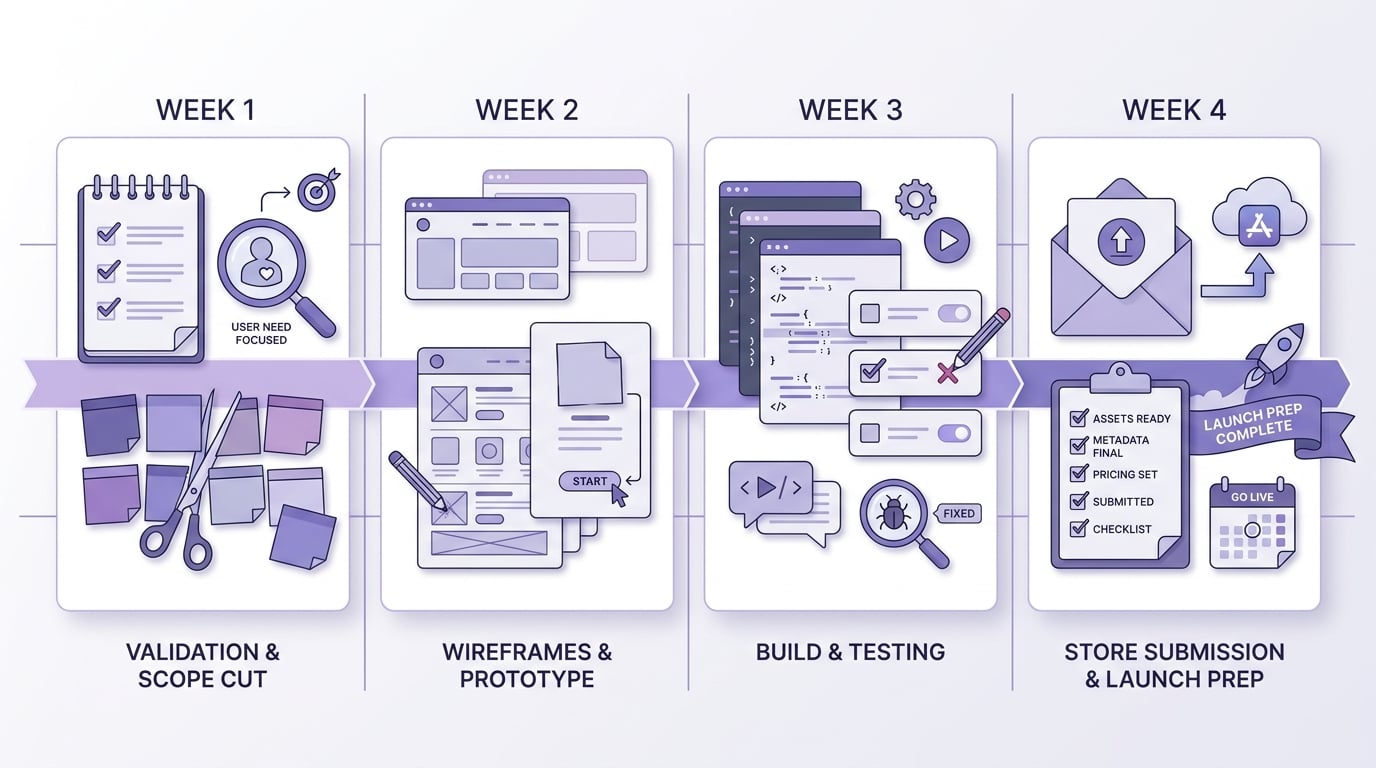
A four-week timeline showing the exact sequence for turning the app idea into a product: week 1 validation and scope cut, week 2 wireframes and prototype, week 3 build and testing, week 4 store submission and launch prep.
The turning point was treating planning like product work, not procrastination. We picked one job, wrote down what "done" meant, and built a week-by-week plan we could actually execute.
Week 1: narrow the app to one job
Write the single user outcome in plain language
A useful test is whether most users can achieve the outcome in about a minute on a decent device and network. If it takes longer, the core flow usually needs fewer steps or clearer UI before you add features.
Turn that outcome into a minimum feature set
List only the screens required to complete the outcome once, end to end. Cut anything that does not directly support that path.
Create a "not in v1" list and treat it like a contract
Feature requests go into v2 by default. This removes daily debate and protects momentum.
Week 2: prototype the flow and test for confusion
We used a Figma prototype and ran five quick tests with people who matched the target user. The calls were short, but recruiting and scheduling often takes 2-3x longer than you think, and you will get no-shows.
What we looked for:
- Can they find the main action without guidance?
- Where do they hesitate, backtrack, or ask "what does this mean?"
- Does first success happen fast, or do they hit a dead end?
One thing worth noting: early testers can be biased (friends are too polite, power users are too advanced). Treat feedback as a clue to investigate, not a feature request to implement verbatim.
Week 3: lock release criteria (so week 4 does not spiral)
We wrote release criteria early because week 4 is where good intentions die, especially when bugs and store requirements show up at the same time.
| Release criterion | Why it matters | How to check quickly |
|---|---|---|
| Core flow completes without crashes | Prevents instant churn and bad reviews | 20 manual runs across 3 devices |
| First-run experience is clear | Avoids "I opened it and nothing happened" | Fresh install test script |
| Permissions requested only when needed | Reduces distrust and rejection risk | Walkthrough + store guidelines check |
| Basic analytics events are firing | Enables real learning in sprint 2 | Verify events in Firebase/Amplitude |
A small tool and time budget (so the work is visible)
| Task | Tool(s) | Typical time cost (small team) |
|---|---|---|
| Prototype and iterate on the flow | Figma | 3-6 hours |
| Implement core flow | React Native | 10-25 hours depending on complexity |
| Instrument and verify events | Firebase or Amplitude | 3-6 hours |
| Store metadata and compliance basics | App Store Connect / Play Console | 3-6 hours (often split across days) |
These are not guarantees, just realistic ranges. Unknowns like native permission issues, flaky builds, or a last-minute policy question can blow up a night.
For tradeoffs, checklists, and edge cases, Best Way to Get Your First App Downloads for Free rounds out this section.
What happened during the build and launch?
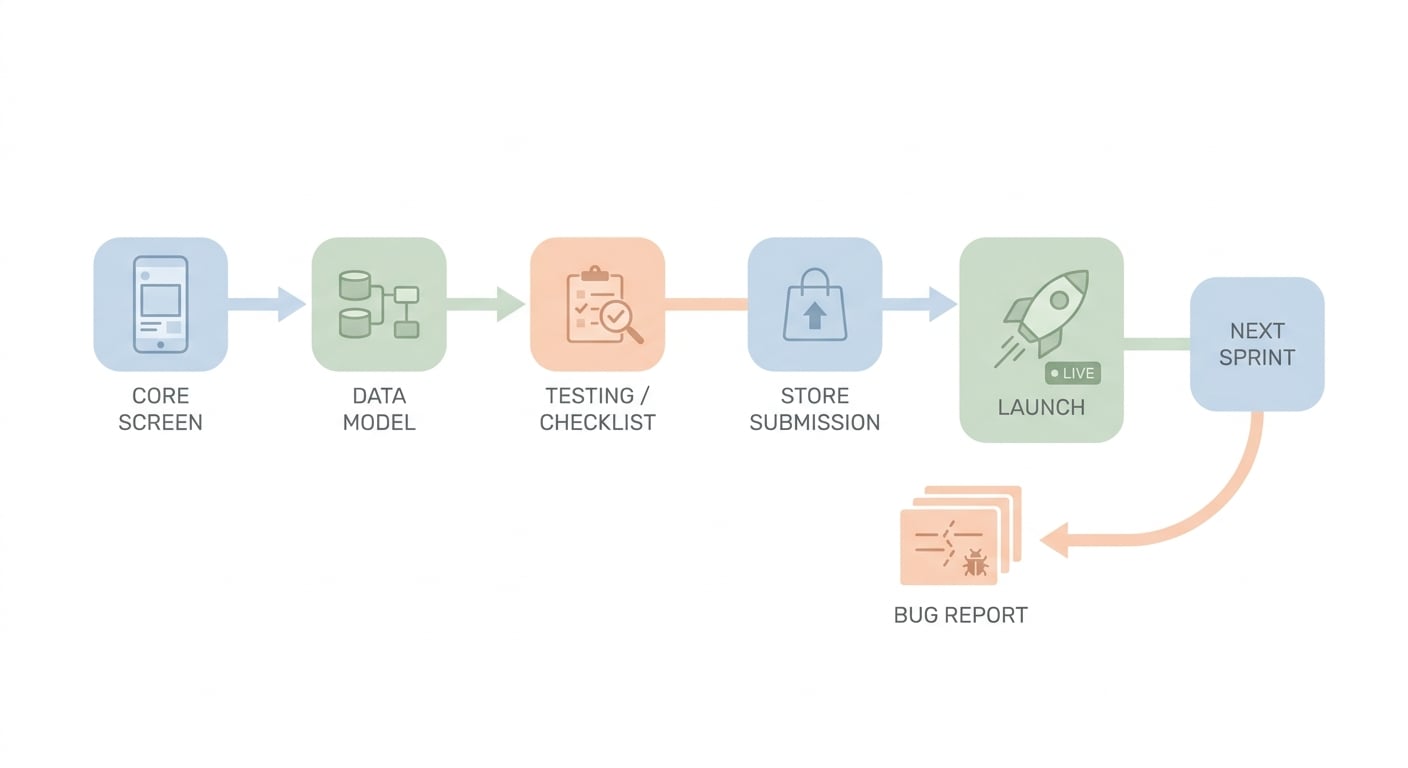
A simple process diagram showing the launch path from core screen to data model, testing, and App Store or Google Play submission, with a feedback loop that sends early bug reports back into the next sprint.
Once the plan was set, the work became a sequence of decisions: what to build first, what to measure, and what to postpone without regret.
The implementation sequence that kept the project moving
Build the core screen first (even with fake data)
We wanted a home screen we could iterate on daily. It reduced thrash and made testing possible earlier.
Stabilize the data model before UI extras
We froze the core data structures early. Changing them later is where small teams quietly lose a week.
Instrument a small funnel, then verify it
We tracked app_open, flow_start, flow_complete. Activation was flow_complete within 24 hours of install, mostly because it was simple and consistent.
Do store readiness earlier than feels comfortable
Screenshots, privacy policy link, support email, account deletion expectations, and permission copy took longer than expected. Plan a half-day just for store metadata, plus buffer for revisions.
Beta test, then fix the top five issues only
This can feel arbitrary, but it protects the ship date. More fixes might be worth it if they block the core job, but they usually push submission and increase fatigue.
What the first launch proved (and what it did not)
We did not win the market. We proved we could ship, learn, and iterate without drowning in scope.
What we got that mattered:
- 7 activated beta testers
- A short list of drop-off points tied to real steps in the flow
- An MVP that was close to submit-ready, with known gaps documented
The limit: the product was real, but still rough. We postponed monetization and team features, which kept the app simple but delayed learning about willingness to pay and multi-user edge cases.
What to do next if your app is still an idea
Your goal is not to cram a full product into 30 days. Your goal is to build the smallest version that can generate trustworthy feedback.
A practical starting point:
- Pick one core job and define activation (completed flow within 24 hours is a decent default).
- Cut features that do not directly support first success.
- Plan for store review time, analytics implementation, and at least one unexpected bug.
Minimum Functionality: Avoid the 'Feels Like a Demo' Rejection reframes the same problem with a slightly different lens - useful before you finalize.


