
Building a SaaS app in a weekend used to be a party trick. With AI, it can be a practical way to produce evidence fast, as long as you treat 48 hours as a focused experiment, not a finished business. You will leave with a v1 you can demo and learn from, plus a clearer sense of what is worth building next (and what is not).
Early proof: what AI actually accelerates (and what it does not)
| Build task | What AI tends to speed up | What still takes real founder time | Reader impact |
|---|---|---|---|
| ICP and positioning draft | First-pass personas, pains, and angles | Choosing a buyer with urgency, access, and budget | You get to outreach sooner, but market choice still decides the outcome |
| Landing page + onboarding copy | Variants fast, decent structure | Tight promise, proof, and honest constraints | Fewer mismatched signups and clearer sales calls |
| Frontend scaffolding | Routes/components generated quickly | UX decisions, edge states, accessibility basics | More time on the core workflow instead of glue code |
| Debugging and test ideas | Error interpretation, suggested fixes | Deciding what is safe to ship | Fewer obvious demo failures, but quality is still on you |
| Basic docs and support text | Draft FAQs, emails, tooltips | Tone, expectations, support boundaries | Less confusion, fewer back-and-forth messages |
Example workflow AI helps you assemble quickly (still needs your validation): CSV upload -> validate columns -> run transform -> results table -> export CSV
Explanation: Across weekend walkthroughs and starter playbooks (for example, Webtwizz, StarterPick, Stormy), the consistent pattern is that AI compresses drafting and scaffolding time so you reach a first demo faster. These are directional examples, not guarantees.
Interpretation: The weekend shifts from "can I build anything?" to "can I ship one loop that a user can finish without my help?"
Reader impact: Expect AI to save hours on setup and copy, but still plan for 2-4 hours of environment setup and deployment fixes. If you add auth, payments, or external integrations, budget extra time for debugging and edge cases.
How to Build a Full iOS App With Cursor AI in a Weekend goes deeper on the ideas above and adds concrete next steps.
Is a weekend SaaS build still worth it?
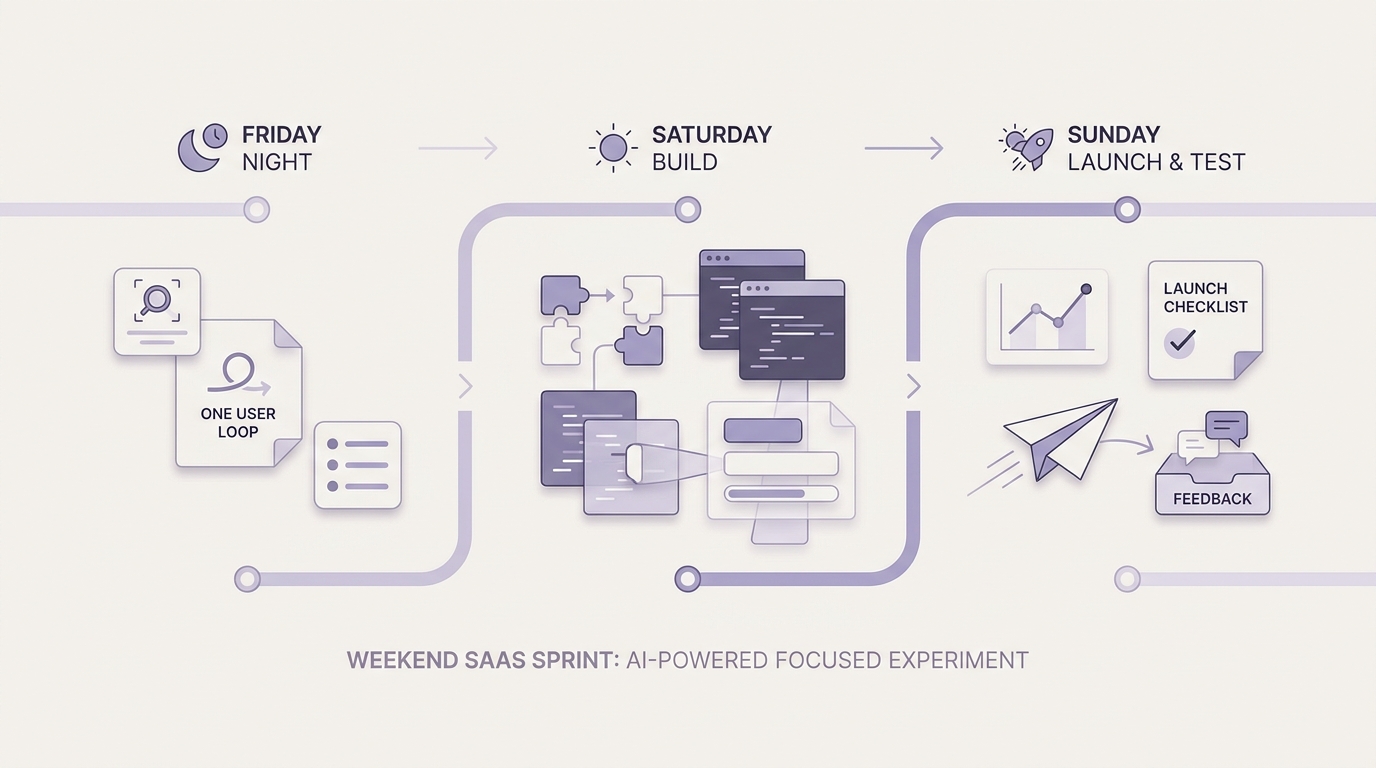
A Friday-to-Sunday timeline showing the compressed SaaS build sequence: scope lock on Friday night, workflow build on Saturday, analytics and test launch on Sunday, with each milestone tied to a concrete deliverable.
AI makes first drafts cheap: copy, UI scaffolds, schema sketches, even test ideas. The real win is spending more time on user-facing decisions and less on boilerplate.
A weekend SaaS is one customer pain, one core workflow, and one paid or gated outcome. A realistic target is a shippable v1 with one login, one screen flow, and one conversion path, plus enough stability to show real users without constant narration.
Why founders should care now:
- Lower cost of learning before committing to a bigger roadmap.
- Real screens improve interviews because users react to concrete flows.
- Shipping earlier surfaces objections, pricing feedback, and trust signals.
- Tradeoff: speed can hide risk. AI-generated code can ship security mistakes, and fast launches can create support load you did not plan for.
When you move from outline to execution, 10 Best No-Code Mobile App Builders This Year helps close common gaps teams hit here.
What should you build in 48 hours?
Choose one narrow use case with a clear buyer
Pick a repetitive task someone already pays to solve manually
Look for spreadsheet labor, copy-paste ops, or weekly reporting chores. If the user already pays in money or time they can price, you can often charge sooner.
Define buyer, user, and the urgency moment before you prompt or code
Who approves spend, who uses it, and when does the pain spike? Weekend products usually hook into a deadline: end-of-month close, inbound lead follow-up, onboarding, or audit prep.
Apply a hard scope filter
If it needs multiple personas or multiple workflows to make sense, it is too big for a weekend. Keep a backlog list, but protect the v1 loop.
The minimum stack for a credible v1
- AI coding assistant for scaffolding and debugging, but keep the architecture boring and readable.
- Hosted database you can set up quickly, plus simple migrations.
- Auth and a single gated action. Do not build a full admin system, but do protect user data.
- One dashboard or results view that shows status and output, even if plain.
- One output path (email, CSV, webhook, share link).
- A deployment platform with preview URLs.
Effort note: auth + deployment often takes longer than expected. Budget 2-4 hours for setup, configuration, and "why is this failing in production but not locally" fixes. Add 1-3 more hours if you are new to the framework, and more if your integration requires OAuth or enterprise security reviews.
Build the proof before the polish
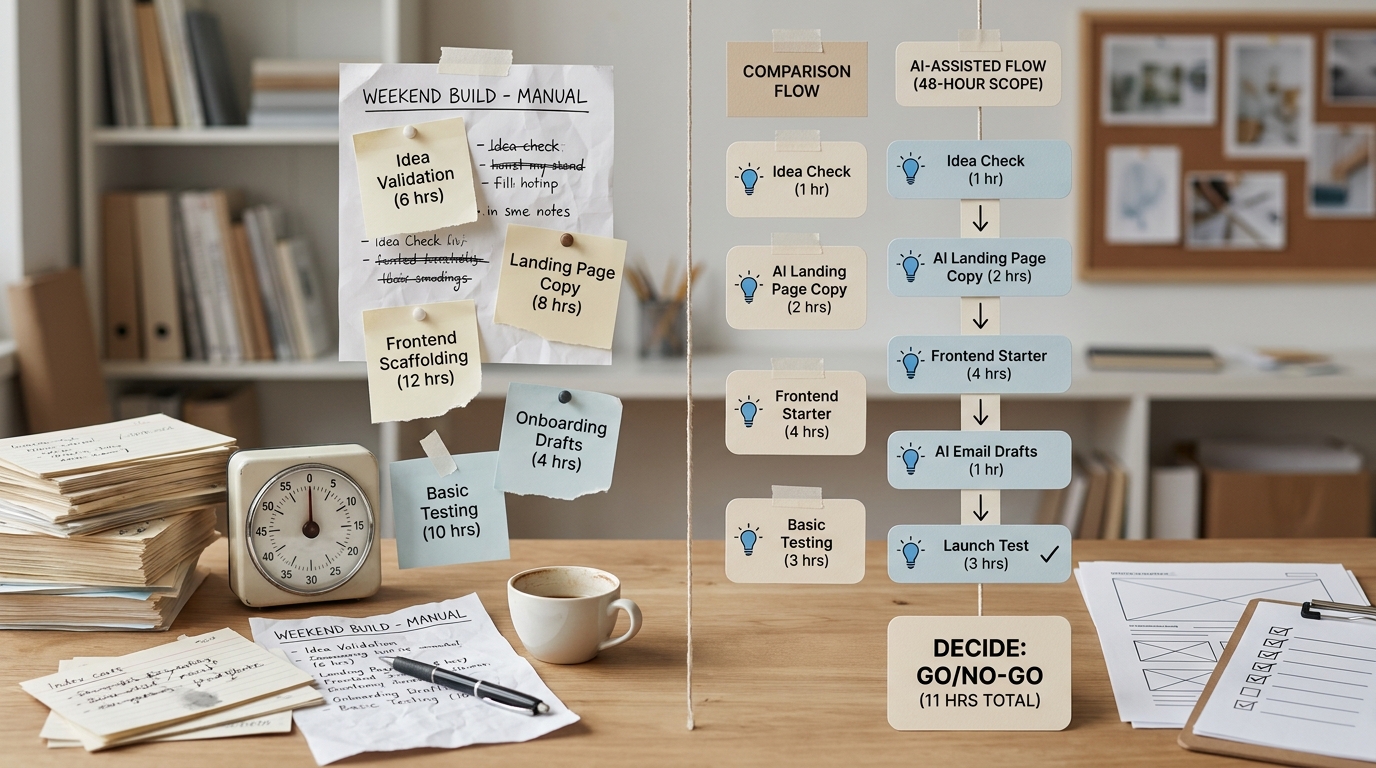
A concise comparison table contrasting pre-AI versus AI-assisted weekend SaaS tasks such as idea validation, landing page copy, frontend scaffolding, onboarding email drafting, and basic testing, with the time-saved implication for faster launch.
- Pick one activation metric, usually signup-to-first-result.
- Defer roles, deep permissions, multi-tenant edge cases, and fancy analytics until users ask (and pay).
- Treat v1 as a sales and learning asset, not final architecture.
- Design can be basic, but the workflow must complete without founder intervention.
If you miss the 48-hour target, do not force it by shipping something fragile. Ship a smaller proof:
- Non-auth demo: remove signup, use a single shared demo link, and clearly label it as a preview.
- Fake data mode: include sample inputs and generated outputs so users can see the loop.
- Concierge step: you manually run the processing behind the scenes and deliver results, while you harden automation later.
A complementary angle worth comparing lives in The Last Step AI App Builders Don't Solve: Publishing.
How do you execute a weekend SaaS build?
Friday night: lock scope and generate the skeleton
Write the one-sentence problem and one-sentence promise
Use: "For [user] who struggles with [task], this app [outcome] in [time] without [friction]." This protects you when AI suggests extra features.
Draft the app structure and data model
Generate only what supports the loop: auth, core workflow, results. Avoid "future tables" you do not need yet.
Draft the landing page and onboarding copy first
This forces clarity and gives you a customer-facing artifact early. It also reduces the temptation to hide in code all weekend.
What can slip: If you are adding billing, plan for it to slip. Stripe setup, webhooks, tax settings, and edge cases can eat Sunday, especially if you have not shipped Stripe before.
Saturday: build the core workflow end to end
Implement the single primary action
Input, processing, output, and a saved record. Skip settings screens unless required for the loop.
Test ugly paths with dummy data
Empty inputs, bad formats, retries, partial failures. AI can suggest fixes, but you decide what "safe enough" means for your users.
Add only the essential integration
For most weekend SaaS, that is auth + database + one output path. Anything else is a backlog item.
Realistic expectation: expect 3-6 hours of "why is this state broken" work even with AI, especially around forms, async jobs, and validation. If your domain is complex (fintech, HR, medical, enterprise SSO), a usable v1 in 48 hours may require cutting scope further or using a concierge workflow.
Sunday: instrument, package the demo, and do a test launch
Add lightweight analytics and error tracking
In practice: PostHog or GA4 for key events, plus Sentry for crashes and API errors. Track a small set you will actually look at.
Goal Example metric Example event name Activation Time-to-first-result first_resultFunnel sanity Signup completion rate signupReliability Error rate on primary action Sentry issue count for the "run" endpoint Create one demo asset and one conversion path
A 60-120 second video or a short GIF is enough. If you charge, keep it simple: one plan, one promise, clear refund or support expectations.
Launch to a small, relevant audience
Send it to 10-30 people who match your buyer profile. Capture the top bugs and top requests, then prioritize based on willingness to pay (or commit to a pilot), not loudness.
Risk caveat: If your app touches sensitive data (customer lists, HR info, health, finance), do not rush privacy and security. A weekend build can still be a breach if you cut corners on access control, secrets handling, storage, or logging. Consider using fake data for the first demo, then harden before you accept real customer data.
For tradeoffs, checklists, and edge cases, Top AI Coding Assistants for Mobile Developers in 2026 rounds out this section.
The risks are real, but they do not cancel the approach
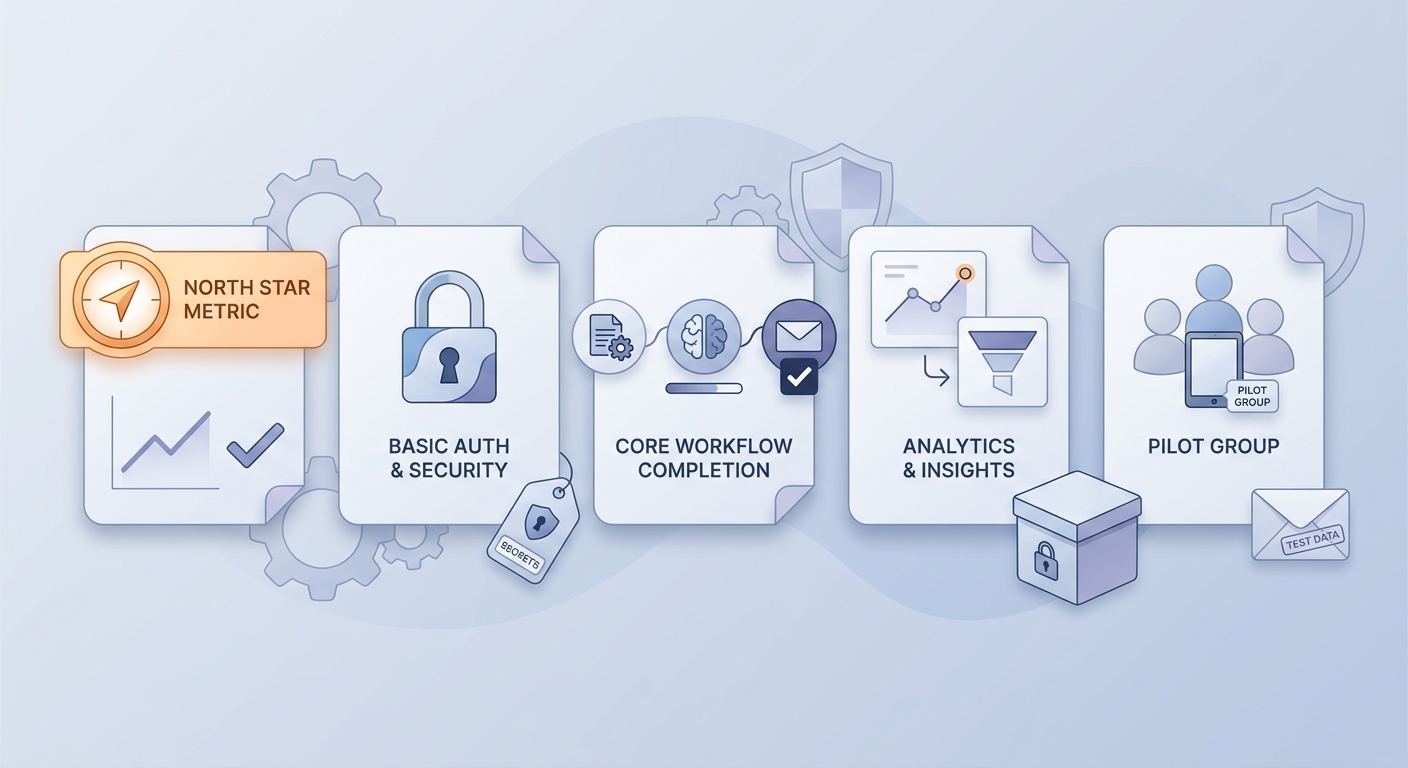
A pre-launch checklist for a weekend-built SaaS app covering the single activation metric, basic auth, core workflow completion, analytics, and a small-audience test before broader rollout.
Common failure modes:
- Scope creep into a multi-feature app that solves no job well.
- Trusting generated code without checking auth, validation, and access control.
- Spending all weekend on UI polish while the workflow is fragile.
- Promising outcomes you cannot reliably deliver yet, then attracting the wrong users.
- Shipping without limits (no beta disclaimer, no support boundaries), then drowning in support.
What AI cannot decide for you:
- Positioning: who it is for, what it replaces, and why now.
- Pricing and packaging: free trial vs paid beta vs service-assisted onboarding.
- Quality bar: which defects are annoying vs trust-breaking.
- Data handling: what you store, what you should not store, and how you secure it.
A simple definition of done for a weekend v1:
| Area | Done means |
|---|---|
| Core loop | A target user can complete one run end to end |
| Reliability | Errors are surfaced, and retries do not duplicate data |
| Data safety | Basic access control, secrets not in code, logs do not leak inputs |
| Demo readiness | One demo script + sample data + clear "beta" expectations |
AI App Positioning Without Policy Risk reframes the same problem with a slightly different lens - useful before you finalize.


