
Most language learning apps fail for a predictable reason: they copy Duolingo's surface features, then wonder why users churn after a week. If you are trying to build a Duolingo-style app that actually drives daily practice, you need a clear learning engine, a retention loop, and a content workflow that scales without breaking quality. This guide helps you scope a proof-driven MVP you can ship and iterate on, with realistic effort expectations, operational dependencies, and a launch checklist.
Early proof block (illustrative targets for your first 2-4 weeks)
| Illustrative target | What to decide first | Why it matters |
|---|---|---|
| Narrow first language pair | One learner type, one goal | Faster content shipping and clearer onboarding |
| Short lesson length | A lesson that fits in a break | Increases completion and repeat sessions |
| Core retention metrics | Lesson completion, D1 and D7 return | Tells you if the loop works before scaling |
These are illustrative targets for an early release cycle, not universal benchmarks. Define each metric once and keep it consistent week to week (example: D1 retention = a user who returns and starts any lesson 24 to 48 hours after install, D7 retention = returns 7 to 8 days after install).
Interpretation: if users start lesson 1 quickly, finish a short session, and return within a week, your habit loop is likely strong enough to justify more content and polish. If you miss, it often means onboarding is doing too much, lessons are too long, or feedback is not helping users recover from mistakes. Reader impact: you spend a few weeks tuning the core loop instead of months producing content users never reach.
Top 5 Tools to Localize Your App for Global Markets goes deeper on the ideas above and adds concrete next steps.
Why build a Duolingo-style language app now?
Who this guide is for and what outcome it delivers
Category: Outcomes
Statistic: 38%
Label: First-pass approval rate
Context: When metadata is complete upfront
Category: Product
Statistic: 3 - 5 min
Label: Bite-sized lessons users finish
Context: A quick “win” lowers drop-off in session one
Category: Retention
Statistic: D7 return + completion
Label: Track retention, not content size
Context: Lesson completion + day-7 return show early stickiness
Building a Duolingo-style language app is hard for a specific reason: retention comes from a tight learning loop, not from badges, cartoons, or a big course catalog. This guide is for founders validating an EdTech product, product managers scoping an MVP, and mobile teams shipping iOS and Android apps who want a concrete plan instead of a feature wishlist.
The outcome is practical: you should be able to define an MVP that supports short lessons, instant feedback, streaks, progress tracking, and a reasonable roadmap to launch. You are not trying to copy Duolingo's voice or course library, just the parts of the model that can drive daily practice when executed well.
What makes Duolingo-style apps sticky in practice
- Short lesson with a clear win: one bite-sized objective finished in minutes so users feel progress without planning.
- Instant feedback: corrections at the moment of error, plus a short explanation when it helps. Duolingo's public learning content emphasizes optimizing practice and review over time, which depends on timely feedback and repetition loops (Duolingo Research, Duolingo learning blog).
- Streak reward: a visible commitment device that can turn practice into a daily habit for some learners.
- Visible progress: units and mastery signals that reduce uncertainty about what to do next.
One thing worth noting: these mechanics work differently by niche and channel. If users come via teachers, enterprise, or paid bundles, your notification tolerance, price sensitivity, and retention curve can look very different from an ad-driven consumer funnel.
The cost of skipping the fundamentals
If onboarding is unclear or the first lesson feels slow, many users will not start. That makes paid acquisition look "broken" because early retention drives downstream ROI.
If feedback is weak (especially for listening or pronunciation), the app can feel like a quiz instead of a tutor and trust drops. In practice, this shows up as one session and done behavior, plus reviews like "doesn't explain mistakes."
The business impact is usually wasted spend: content production that nobody reaches, engineering time on features that do not move retention, and marketing tests that look worse than they should. The practical takeaway: prove the learning loop before scaling content or polish.
When you move from outline to execution, How to Start Building Mobile Apps With Zero Experience helps close common gaps teams hit here.
What should a Duolingo-like app prove first?
You are not trying to prove you can build every Duolingo feature. You are trying to prove that a learner can start quickly, finish a first lesson, and come back tomorrow because the loop feels rewarding and doable.
Plan for multiple iterations over 2 to 6 weeks for an MVP loop, depending on content complexity and how quickly you can ship. Store review time, audio licensing, and content approvals often add waiting time, so build a buffer if you have a hard launch date.
A simple proof table for your MVP scope
| Area | Must ship for MVP proof | Can wait (post-proof) | Practical impact |
|---|---|---|---|
| Onboarding | goal + level check + first lesson in < 60 seconds | deep placement tests, heavy personalization | faster first lesson start, fewer drop-offs |
| Curriculum | one path of 20-40 micro-lessons for 1 language pair | multiple courses, CEFR mapping | less content risk, quicker iteration |
| Review loop | mistakes recap + basic spaced review queue | advanced scheduling, daily quests | improves retention with minimal UX |
| Feedback | instant correctness, hints, basic audio playback | AI tutor, conversation roleplay | avoids "quiz app" perception |
| Progress | streak, XP, simple mastery bars | leaderboards, clubs, leagues | tracks habit before social complexity |
What this means: launch readiness is mostly about content throughput and a stable lesson engine, not social features or AI. Prove the loop first, then add motivation layers.
The early validation signals to watch
Treat these as directional, not universal. Language difficulty, seasonality, learner intent, and acquisition channel will shift results.
- Lesson start rate: do users reach lesson one without friction?
- First-session completion: do they finish something that feels like a win?
- D1 and D7 return: are they coming back after the novelty fades?
Healthy behavior often looks like: users finish lesson one, make a few mistakes, recover with feedback, then start a second lesson without hunting through menus. Weak results usually mean you should shorten the first lesson, reduce choices in onboarding, or reduce new vocab per screen before adding features.
CTA: Get your MVP scope reviewed
Share your current feature list, target learner, and first language pair and I will help you cut it to a proof-driven MVP you can realistically ship in weeks, not quarters.
Request a quick review
What to validate before full build
- One language pair and one persona (example: English to Spanish for busy beginners) so feedback is about the loop, not coverage.
- In the first session, users can repeat back the promise in plain words: "I do one short lesson a day."
- A clickable prototype or thin beta tests the habit loop: trigger (reminder), action (lesson), reward (clear progress), and next step (queued review).
The tradeoff: the narrower you go, the faster you learn, but the less your results generalize to other languages or levels. Treat your MVP like a test rig, not a long-term architecture guarantee.
A complementary angle worth comparing lives in Best Free Resources to Learn iOS Development in 2026.
How do you build a language learning app step by step?
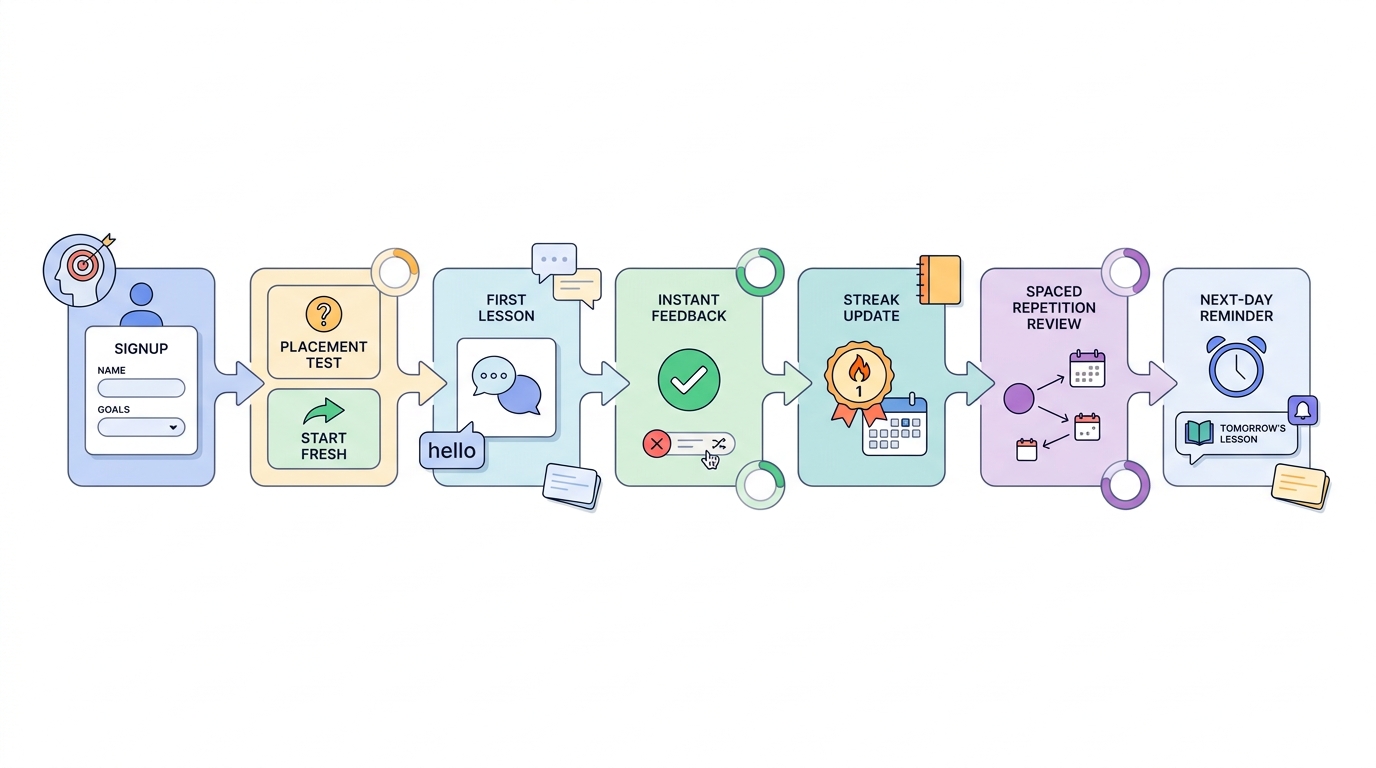
A process diagram that traces a Duolingo-style flow from onboarding to lesson, feedback, streak update, spaced repetition review, and the next daily lesson reminder.
1. Define the learning model, audience, and lesson format
If you skip this, you will rebuild your content system later. The app structure depends on who you teach and what a "lesson" contains.
Expect a few focused working sessions across product and content, plus at least one prototype run to confirm your lesson truly fits the time you promise.
Pick one audience and one promise
Choose a tight persona like "busy beginners" or "travelers who need survival phrases." The constraint is intentional: it keeps onboarding and lesson sequence straightforward, and it makes early feedback interpretable.
Choose one lesson format for v1
Start with flashcards plus short sentence translation, or a mixed micro-lesson with 2 to 3 exercise types. Avoid shipping speech scoring, deep grammar explanations, and stories all at once since each adds content rules, QA time, and platform dependencies.
Lock the first language pair and lesson length
Commit to one pair (example: English to Spanish) and a consistent lesson target like 3 to 5 minutes. Audio playback is reasonable for v1; pronunciation scoring is optional because accuracy varies by accent, mic quality, and environment. The practical takeaway is a simpler authoring pipeline and analytics you can compare across lessons.
2. Design the core product loop and data model
Now turn the habit loop into screens and stored state so progress feels real. Plan at least a few days for data modeling, event naming, and edge cases, because "simple" progress systems get expensive to rewrite once users have history.
In practice, you want the smallest set of objects that supports: course path, lesson attempts, review queue, streak state, and XP or mastery.
3. Build a lesson engine you can iterate on quickly
Your lesson player is the product. Keep exercise types limited and make them consistent so content creation and QA do not bottleneck every release.
A realistic dependency: if you add audio, you also add download behavior, caching, and failure states (no network, slow network, missing asset). Plan time to test this on older devices and spotty connections, not just on your best phone.
4. Create a content workflow that does not collapse under QA
Most teams underestimate content operations. Even with only 20 to 40 lessons, you need a way to author, review, test in-app, and ship fixes quickly.
Common failure modes to plan for:
- Content QA bottleneck: one reviewer becomes the gate for every change, releases slow down, and you stop iterating on retention.
- Answer grading edge cases: users type unexpected variants, and "wrong" feedback feels unfair. This is extra tricky in languages with gender, case, or flexible word order.
- Audio and speech mismatches: TTS pronunciation or timing does not match text, and learners lose trust fast.
A practical constraint: if you do not have a dedicated content owner, your MVP timeline will usually drift. Even small edits add up when they require app builds, store review, or backend migrations.
5. Instrument analytics and learn weekly, not monthly
Instrument the funnel you need to make decisions, then review it on a weekly cadence. If you wait for "enough data" without a schedule, you will ship by gut feel.
Minimum instrumentation tends to be:
- install - account created - first lesson started - first lesson completed
- D1 return - D7 return
- exercise error rate and hint usage by
exercise_id - crash rate and latency for lesson load and audio playback
One thing worth noting: retention is easy to misread if you change definitions midstream or ship major onboarding changes without tagging versions. Track by app version and cohort when you can.
For tradeoffs, checklists, and edge cases, Top 5 Voice-to-Text Apps for Mobile Professionals rounds out this section.
What are the risks and dependencies that slow teams down?
Here are the issues that most often turn a "4 week MVP" into a 10 week project.
| Risk or dependency | What it breaks | Mitigation you can do early |
|---|---|---|
| Content QA is slower than expected | Release cadence and iteration speed | Define acceptance rules, add a second reviewer, keep exercise types few |
| Speech or pronunciation scoring is inaccurate | Trust, reviews, learner frustration | Treat as optional, start with playback and simple recording, test accents and noise |
| App store review delays | Launch timing and hotfixes | Submit early, keep subscription flows simple, add buffer for rejections |
| Notification opt-in is low | Habit loop and D1/D7 | Make lessons valuable without notifications, use in-app cues first |
| Learner mismatch (wrong persona/channel) | Retention looks bad for the wrong reason | Narrow targeting, add a short "why are you here?" question, test channels separately |
The tradeoff: adding robustness (offline, speech, deep personalization) can improve the product later, but it increases QA surface area now. For MVP, ship fewer features that you can keep dependable.
How to Add Gamification to Your Educational App reframes the same problem with a slightly different lens - useful before you finalize.
What is the launch checklist for a language learning app?
Pre-launch checks for product and content
- Onboarding and core loop: complete sign up, place test or start point, first lesson, streak award, and progress save on a fresh install and after logout.
- Lesson flow: confirm audio plays, answer validation is consistent, hints work, and error states have a safe fallback (skip, retry, report).
- Streak and reminders: streak increments once per day, time zones are correct, and notifications respect opt-in.
- Progress tracking: XP, mastery, and review queues update end to end, including offline then sync (if you support offline).
- Content depth: the first path supports several days of practice without obvious repetition fatigue.
- Store and compliance: privacy policy, data collection disclosures, subscription terms, restore purchases, and parental settings (if relevant) are ready for review.
First-week launch operations
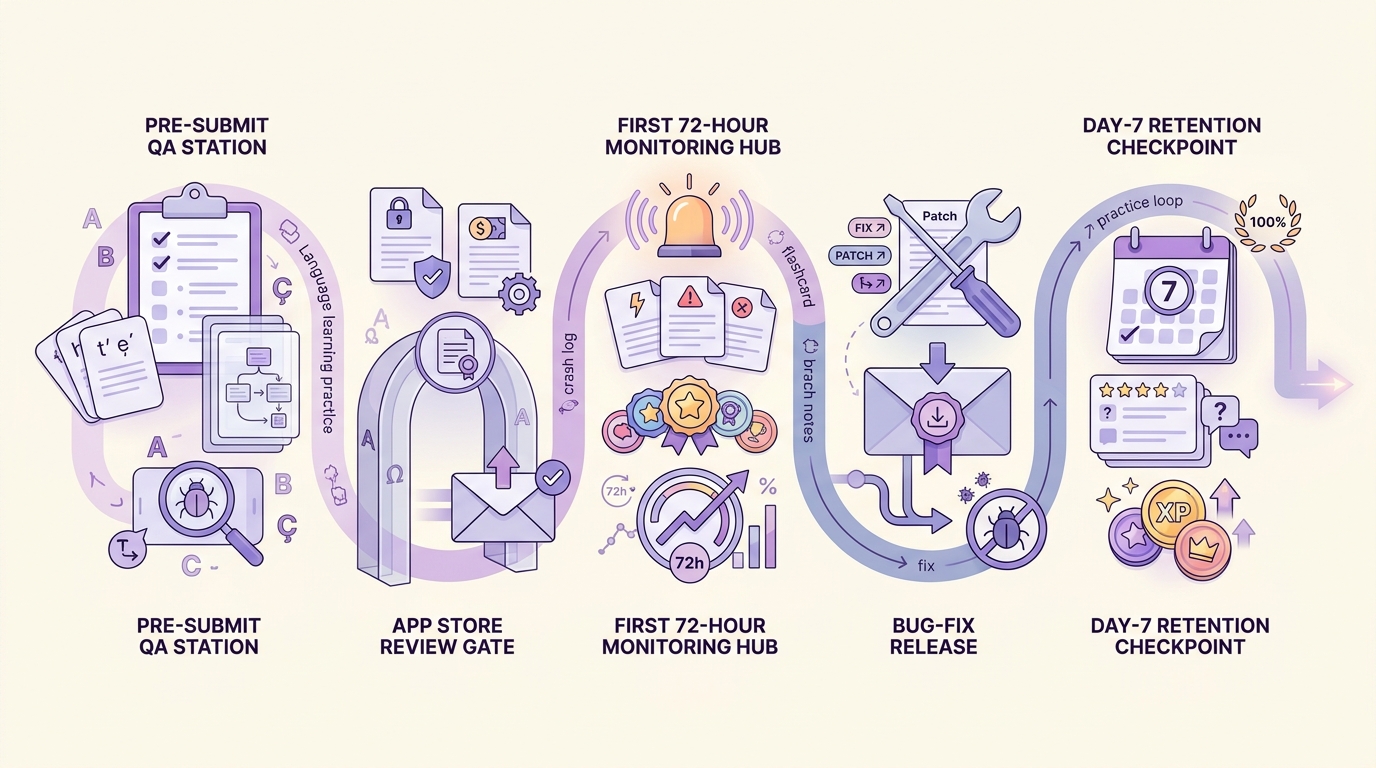
A launch-week timeline for a language learning app, showing pre-submit QA, store review, first 72-hour monitoring, bug-fix release, and retention check at day 7.
- Monitor by platform: activation, first lesson completion, D1 retention, crash rate, and payment failures.
- Read qualitative signals: support tickets and reviews for confusion around audio prompts, feedback, and account setup.
- Ship fast: plan a hotfix cadence for crashes, onboarding copy, content edits, and exercise tuning.
Timeline reality check: pre-submit QA - store review - first 72-hour monitoring - hotfix release - day 7 retention check. If you rely on contractors for content or audio, align schedules before launch week so you are not blocked on fixes.
When to add advanced features after MVP
Add these only after the core loop works and your content ops can keep up without heroics.
- Conversation mode or roleplay (human or AI assisted)
- Rich pronunciation coaching
- Social leagues and groups
- Deeper personalization and adaptive paths
CTA: Use a launch-ready audit checklist
If you want a second set of eyes before App Store and Play Store submission, use the audit to catch pricing, policy, and retention blockers early.
Get the launch audit


