
Localizing your app can be a practical way to reach new users, but doing it with spreadsheets, copy-paste, and last-minute translators can turn each release into a coordination problem. This ranking covers five tools that can help teams ship multilingual App Store and Google Play updates with fewer errors, clearer ownership, and more consistent copy, assuming you can invest real setup time and ongoing review effort.
How to Launch Your App in Multiple Countries at Once goes deeper on the ideas above and adds concrete next steps.
Which app localization tools help apps scale globally?
This ranking focuses on operational reality: reducing handoffs, preventing drift between in-app strings and store presence, and keeping release cadence intact. The goal is not to crown a universal winner, but to help you pick a tool that matches your team shape, release frequency, and risk tolerance.
When you move from outline to execution, 10 Best No-Code Mobile App Builders This Year helps close common gaps teams hit here.
What should you look for in app localization software?
This is optimized for app teams that need to localize both store presence (metadata, screenshots, release notes) and in-app text without slowing down releases. Criteria emphasize translation control, App Store and Google Play workflow support, developer workflow integration (Git, CI/CD, handoff), language coverage posture, and pricing posture by plan tier.
One thing worth noting: global growth is rarely blocked by the ability to translate a sentence. It is more often blocked by operational friction, unclear ownership, and quality drift across listings, builds, and assets.
A complementary angle worth comparing lives in Best App Store Optimization Tools Ranked.
Scope, methodology, and limits
Scope and methodology (directional, not a lab test): This is a product comparison based on vendor documentation and credible industry write-ups, not a controlled benchmark of translation accuracy, speed, or ROI. Capabilities and integration depth are based on publicly available sources like Crowdin, AppDrift Documentation, Apple guidance in Localization - Apple Developer, and industry comparisons such as Best App Localization Software in 2026 - Designveloper and Crowdin vs Lokalise: Which TMS Wins for Mobile App Localization (2026).
Limits to keep in mind: Pricing, language availability, and enterprise features can change by plan tier, seat count, and usage. Integration claims should be verified against your stack (repo structure, build system, approval workflow) because "supported" can still mean non-trivial setup. Store localization requirements also vary between App Store Connect and Play Console, and API automation may be constrained by permissions, rate limits, or review steps.
For tradeoffs, checklists, and edge cases, Top 10 Mobile App Development Tools You Need in 2026 rounds out this section.
Why does manual app localization slow releases?
Manual workflows tend to break once you add languages or increase release frequency:
- Release friction: translations arrive late, then someone rushes copy-paste into App Store Connect and Play Console.
- Version drift: store titles, subtitles, and keyword fields diverge from the app build or from each other.
- Asset mismatch: screenshot overlay text and in-app strings fall out of sync.
- Hidden effort: even "just 3 locales" often turns into 2-6 hours per release in coordination, QA, and rework, depending on assets, time zones, and who is available to review.
Publishing at Every Stage: How App Store Strategy Changes as You Grow reframes the same problem with a slightly different lens - useful before you finalize.
Early proof: a compact comparison of the five tools and what they solve best
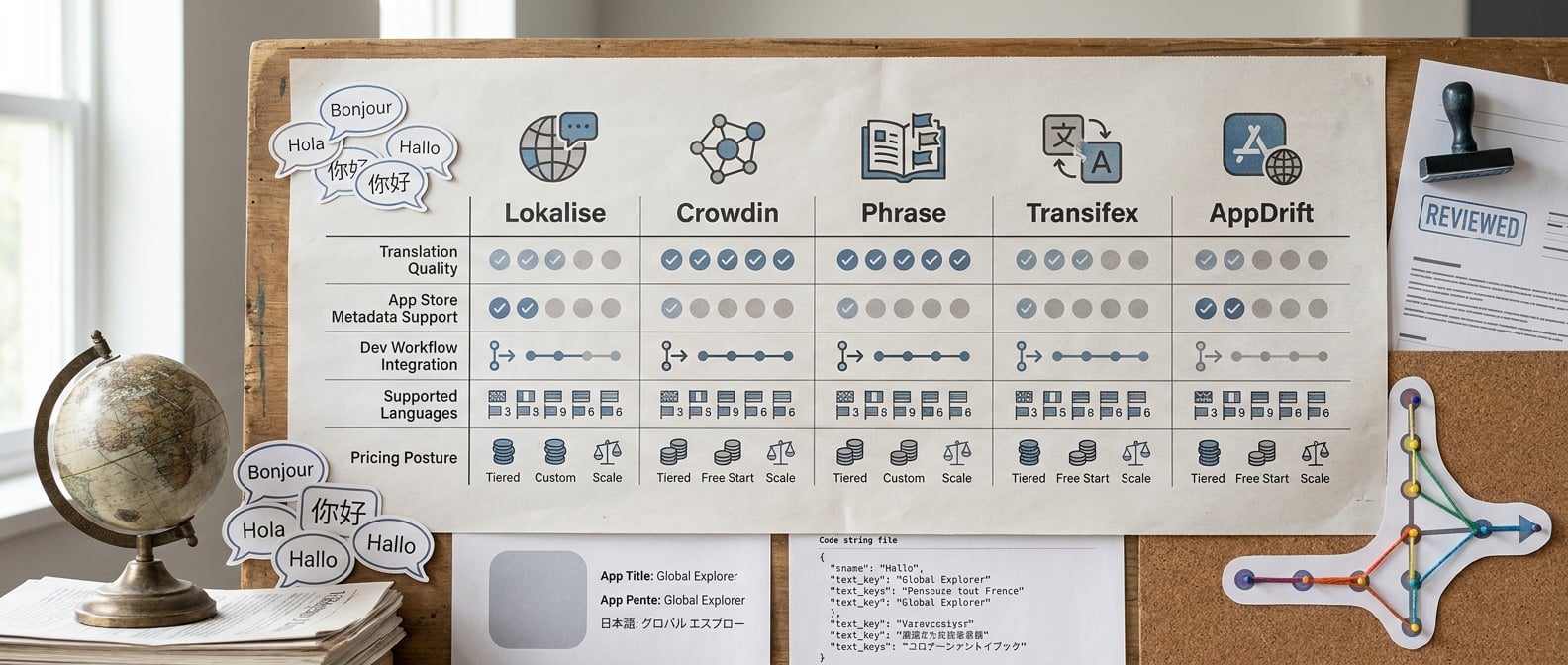
A compact comparison table showing five app localization tools scored across translation quality, App Store metadata support, developer workflow integration, supported languages, and pricing posture. The visual is designed to help readers see the tradeoffs immediately before reading the ranking analysis.
| Rank | Tool | Best fit (based on vendor positioning/docs) | Key operational artifact you should expect to set up |
|---|---|---|---|
| 1 | Lokalise | Cross-functional teams where product and marketing both edit localized content | Glossary + screenshot/text review workflow; expect 0.5-2 days to set roles and QA checks |
| 2 | Crowdin | Teams prioritizing automation and integrations at scale | Branch mapping + CI sync; expect 1-2 sprints to stabilize conflicts and approval rules (Crowdin) |
| 3 | Phrase | Orgs that need governance, permissions, and auditability | Role model + approval gates; expect more admin time and plan-tier verification |
| 4 | Transifex | Continuous localization programs with recurring content changes | Reviewer SLAs + automation rules; risk is queueing if reviewer coverage is thin |
| 5 | AppDrift | ASO and listing teams optimizing store presence first | Metadata and screenshot pipeline; often paired with a separate TMS for in-app strings (AppDrift Documentation) |
Explanation: The table summarizes common fit patterns implied by vendor docs and industry comparisons. The "Rank" is a shortlist order for typical mobile app workflows, not a performance test of translation quality.
Interpretation: The differentiator is usually handoffs. Tools help most when they replace copy-paste and "who approves this?" threads with a predictable checklist.
Reader impact: If you pick a tool that does not match your workflow (for example, strong TMS but weak store ops), you may keep spreadsheets anyway and still spend 2-6 hours per release on coordination. With a good fit and disciplined gating, many teams can reduce late-stage rework, but results depend on reviewer throughput and how often strings change.
The five tools, interpreted by workflow fit and launch impact
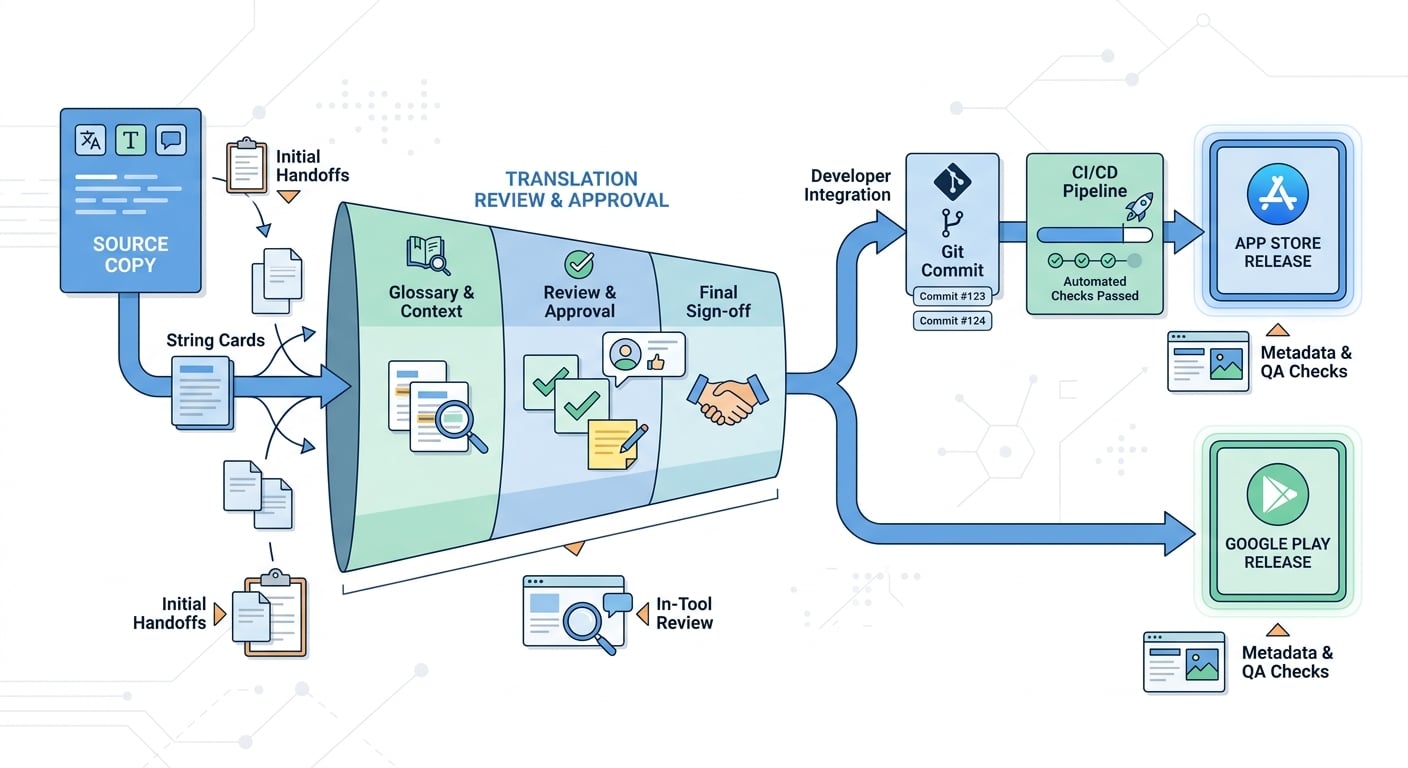
A process diagram showing how localized strings move from source copy to translation review to App Store and Google Play release, with integration points for Git, CI/CD, and in-tool review. The diagram should emphasize reduced handoffs and faster update cycles for app teams.
- Lokalise: A practical fit when marketers and developers both touch localization and you need collaboration plus QA checks. Plan a few hours to a day to set up roles, glossary, and key naming conventions, then ongoing reviewer time each release.
- Crowdin: A strong option when integrations and automation are non-negotiable. The tradeoff is maintenance: pipelines, branch strategy, and conflict handling can take 1-2 sprints to settle, especially with multiple active branches (Crowdin).
- Phrase: Often selected for larger programs that prioritize permissions and governance (based on vendor positioning and common buyer intent). The tradeoff is cost and process overhead; confirm which controls exist at your plan tier before standardizing.
- Transifex: Works well for ongoing localization where content changes regularly and needs predictable workflows. It performs best when you can define reviewer SLAs, otherwise reviews can queue up and quietly delay releases.
- AppDrift: Useful when the bottleneck is store listing workflow and ASO iteration speed. The dependency risk is split ownership if you still need a separate TMS for in-app strings, so define boundaries early (AppDrift Documentation).
Constraints and risks that commonly decide success (regardless of tool):
- Branch conflicts and string-key churn can create duplicate work and mistranslations after refactors.
- Screenshot versioning gets messy when design files, overlay copy, and store uploads are owned by different people.
- Reviewer bottlenecks by time zone can turn "continuous localization" into a waiting room.
- Automation failure modes include bad file mapping, stale caches, permission changes in App Store Connect, and shipping incorrect metadata faster than you can roll it back.
A concrete workflow example (what "good ops" looks like)
Here is a compact workflow many mobile teams use. It typically takes 1-2 sprints to implement cleanly, plus a recurring weekly time budget for reviews, fixes, and occasional pipeline maintenance.
Source of truth in Git
Developers store strings in the repo (for example, iOS .strings, Android XML). Someone owns source copy quality, otherwise you will pay in retranslation churn and inconsistent terminology.
Sync to TMS on pull requests
Use an integration to upload new strings on merge and pull translations on a schedule or release branch. Expect iteration to get file mapping, branching, and conflict handling right.
Reviewer model, SLA, and glossary enforcement
Assign reviewers per locale, define a realistic turnaround (often 24-72 hours depending on time zones), and maintain a glossary and style guide. This is ongoing work as product naming and UI patterns change.
Store metadata packaged as a release deliverable
Treat title/subtitle/keywords, release notes, and screenshot overlays as versioned outputs with an owner and an approval step. Automation can save time, but it also increases blast radius, so include a final human check and a rollback plan.
Pre-release QA gate (strings + store)
Run a short gate that catches predictable issues: placeholders, plurals, truncation, broken line breaks, and screenshot overlays not matching in-app terminology. Build this into your release checklist so it does not get skipped in the last 48 hours.
A simple ownership map keeps this from becoming "everyone's job":
| Stage | Owner | Output | Risk check |
|---|---|---|---|
| String changes | Engineering | Updated keys + context | Key churn, missing context |
| Translation + review | Locale reviewer | Approved translations | Time zone delays, inconsistent terms |
| Store updates | Growth/ASO | Localized metadata + assets | Wrong variant uploaded, stale screenshots |
| Release gate | Release owner | Go/no-go checklist | Placeholder breaks, truncation |
Where pricing and effort change the decision
Pricing is rarely just "cheap vs expensive." It is usually about plan-tier lock-in and how much operational burden you accept.
- Budget-friendly to mid-market: good for immediate wins in metadata or a small number of locales. Watch caps (words, locales, seats) that can spike costs after expansion.
- Mid-market: often makes sense when you ship monthly or faster and want fewer manual merges and fewer release-day scrambles. You will still spend time on reviewer coordination and QA.
- Premium or enterprise: can be justified when the cost of mistakes is high (brand, compliance, churn) or when you need complex permissions. Expect more admin work and a longer rollout.
The practical constraint: tools do not fix ownership. If nobody owns locale priority, reviewer throughput, and release gating, you will still miss deadlines, just in a nicer UI.
What to do next: choose the right localization stack for your App Store and Google Play launch
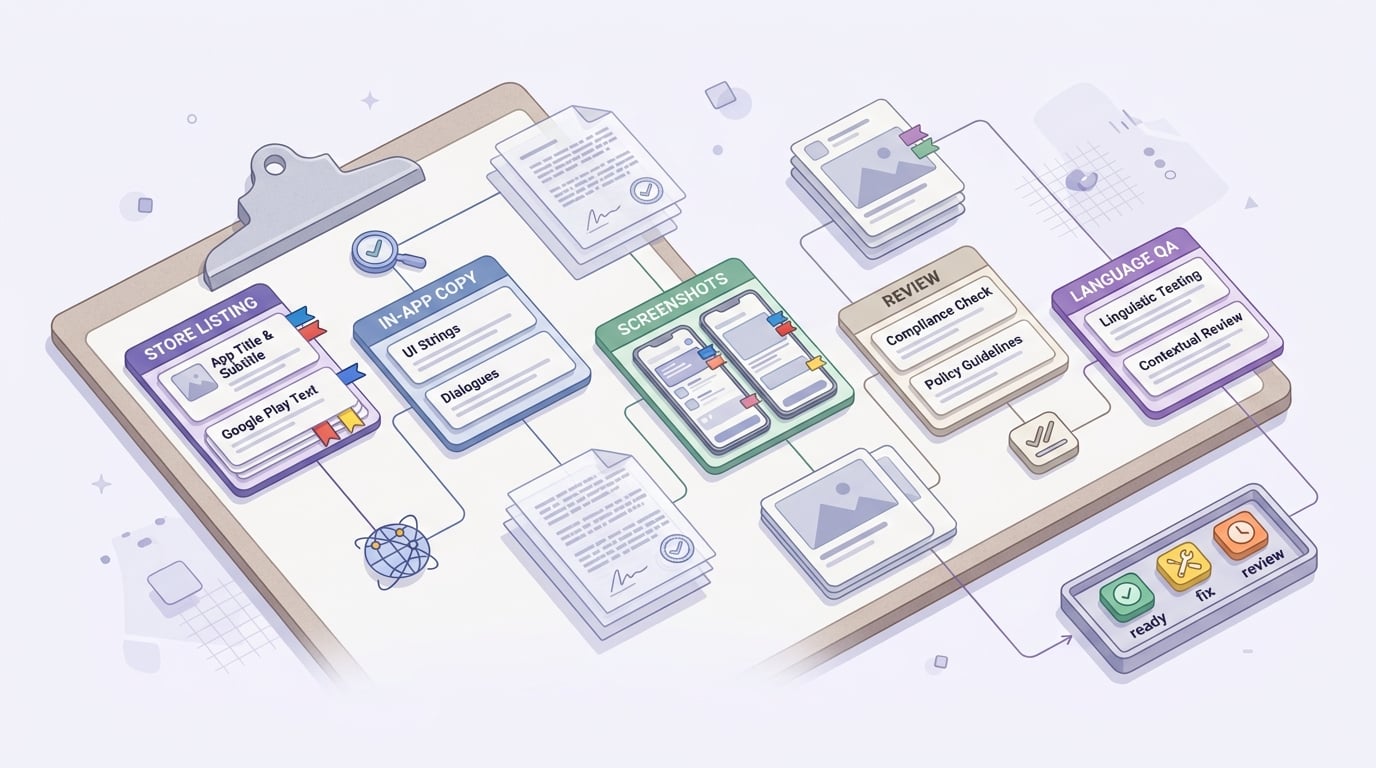
A concise pre-launch checklist covering App Store titles and subtitles, Google Play listing text, in-app strings, screenshots, review steps, and language QA before release. The visual should help readers apply the article immediately to an upcoming international launch.
Match the tool to your stage, and be honest about bandwidth:
- First expansion (1-3 locales): prioritize simplicity. Budget a few hours per locale for QA and asset checks, plus time to fix source copy issues you uncover.
- Growth expansion (4-12 locales, frequent updates): prioritize workflow integration and review coverage. Drift and bottlenecks often show up within 1-2 release cycles.
- Global operations (12+ locales): prioritize governance and repeatability. Invest in automation after glossary, reviewer model, and release gating are stable.
A lightweight pre-launch checklist prevents avoidable rework:
- Confirm each locale has correct App Store title, subtitle, and keyword field variants and follows platform constraints (see Localization - Apple Developer).
- Align Google Play listing equivalents so you are not unintentionally testing two different messages.
- Verify in-app strings match the build: placeholders, pluralization, truncation.
- Audit screenshots and localized overlays for terminology consistency.
- Add human review for top markets where tone and category norms affect conversion.


