
Validating an app idea before you build helps you avoid spending weeks on features nobody adopts. The goal is not to prove your idea will be a huge business. It is to collect enough real-world evidence to decide whether to build, revise, or drop it with fewer regrets.
Early proof (what "good validation" can look like)
This table is a directional example of stronger vs weaker signals you might see in the first 1-2 weeks. It is not a benchmark: your results will vary by niche, trust, channel quality, and whether your ask is free, paid, or time-intensive.
| Idea statement | What you can measure in a week (often realistic) | What the signal means | Reader impact (what you can do next) |
|---|---|---|---|
| "An AI planner app for everyone" | 10-20 friendly comments, vague praise | Interest in the topic, not proof of a specific need | You still do not know who it is for or what to build first |
| "Meal planning for parents of toddlers with allergies" | 8-12 interviews, 5-7 mention the same weekly pain, 5-15 waitlist joins | Repeated pain plus a measurable action | Clearer MVP scope and positioning language that matches users |
| "Receipt tracking for freelance designers who bill monthly" | 50-150 targeted landing page visits, 10-30 signups, 3-8 demo requests | Intent plus willingness to spend time continuing | Stronger case to prototype the core flow and estimate build effort |
Explanation: compliments and curiosity are weak signals. Repeated pain, clear workarounds, and concrete actions (signup, demo request, follow-up) are stronger.
Interpretation: you are looking for evidence of behavior change, not agreement.
Reader impact: you cut v1 scope faster, and you get landing page and App Store copy from real user language.
Planned visual placement: After this section, insert Visual 1 (stat_cards) comparing weak signals vs strong signals vs business impact.
Top 7 Tools to Build Your App Backend Without Code goes deeper on the ideas above and adds concrete next steps.
Why do app ideas fail before the first line of code?
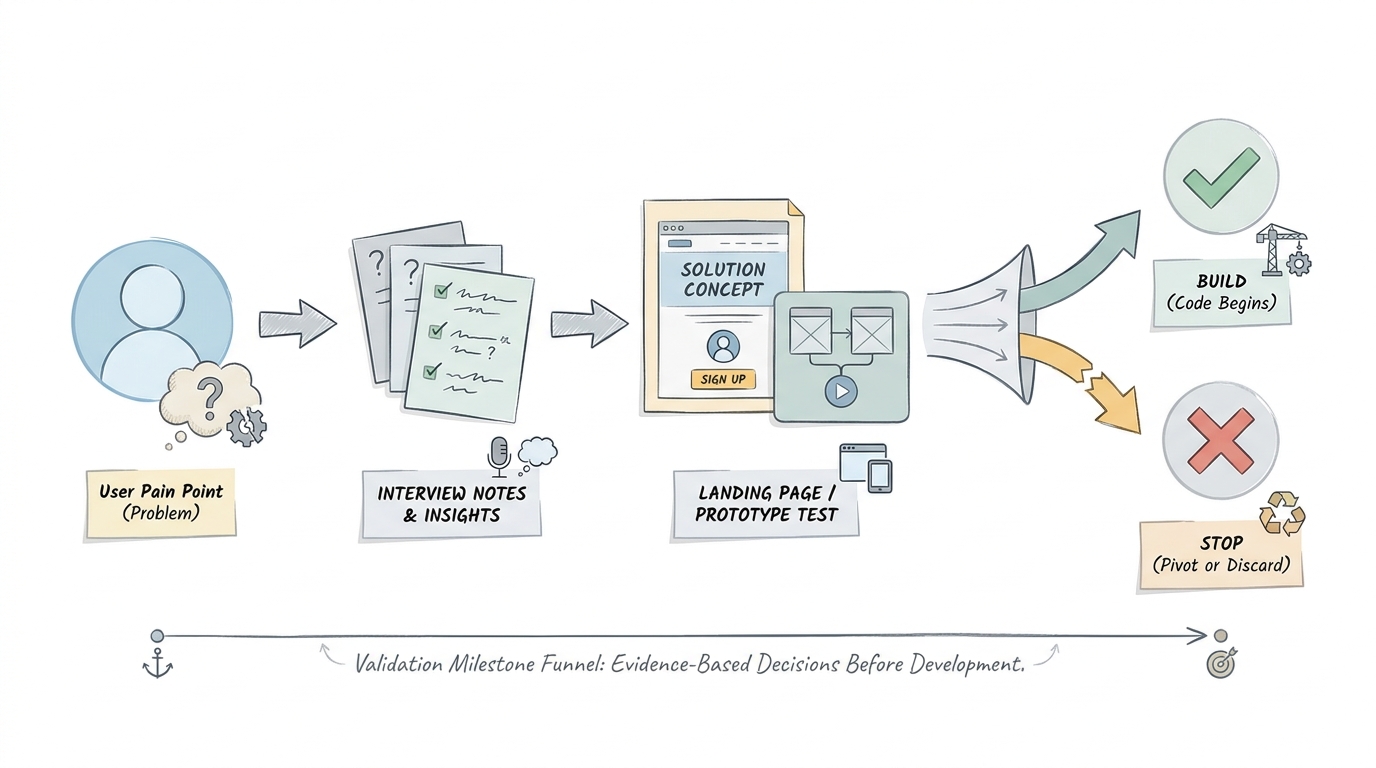
A simple flow diagram showing the sequence from one user and one pain point to interviews, landing page or prototype, and a pass-fail decision before coding begins.
Category: Risk
Statistic: 43%
Label: Failures from no market need
Context: Most ideas die pre-code due to weak demand signals
Category: Business impact
Statistic: $5K - $20K
Label: Typical pre-dev validation cost
Context: Often comparable to rebuilding a failed MVP - validate before you build
Category: Evidence
Statistic: 5000+
Label: Early-stage ideas analyzed
Context: Large-sample analysis reinforces market-fit as a top failure mode
Most ideas stall because the problem is not painful enough, not frequent enough, or already solved "well enough" by habits and existing tools. People can be supportive in conversation while still not changing behavior.
A useful reminder: CB Insights (2024) attributes roughly 43% of startup failures to lack of market need. Treat that as directional, but it highlights the practical order of operations: reduce demand risk before you over-invest in execution.
When you move from outline to execution, 10 Best No-Code Mobile App Builders This Year helps close common gaps teams hit here.
How do you validate an app idea before building?
This workflow fits a solo founder or small team. If you already have access to the target users, you can do it in about a week; if you do not, plan 1-2 weeks because recruiting and scheduling usually dominate the calendar.
Start with a specific user and one painful job to be done
Write the target user in one sentence
Pick a real group you can reach, not "everyone." Example: "Freelance designers who send invoices monthly and hate tracking receipts."
Define one painful job they already do
Describe current reality and workarounds. Example: "They forward receipts to themselves, lose emails, and spend Sunday night sorting expenses."
Set one success outcome for the app
Make it measurable for the user. Example: "In under 2 minutes, they can capture a receipt and have it ready for invoicing and taxes."
Decision point: if you cannot name where these people hang out (communities, workplaces, newsletters, search queries), validation will stall. That is not always a product flaw, but it is an acquisition constraint you should surface early.
Run problem interviews before showing a product concept
Ask about the last time the problem happened
Use recent behavior questions: "Walk me through the last time you did this." People describe last week more accurately than they predict next month.
Probe for workarounds, frequency, and cost
Ask what they tried, how often it happens, and what it costs in time, stress, or money. Stronger signals include recurring friction and any existing spend (tools, subscriptions, contractor help).
Capture exact phrases and decision triggers
Write down repeated wording and what caused them to seek help. Those phrases often become landing page headlines, onboarding steps, and your App Store subtitle.
Realism note: recruiting is usually the bottleneck. Expect to send 30-60 outreach messages to get 8-12 qualified conversations, plus 2-4 hours of scheduling and follow-ups. Small incentives can help response rates, but they can also bias people toward being agreeable, so keep incentives modest and keep questions grounded in past behavior.
Use a landing page or clickable prototype as the first proof point
Create a one-page waitlist with one promise
Say who it is for, what it solves, and one call to action (join waitlist, request access, book a short call). Tools like Carrd or Webflow are usually fast enough for this.
Test understanding with a clickable prototype
Use a simple Figma prototype to test the main workflow. You are testing comprehension and sequence, not visual polish.
Define a validation checkpoint
Pick one measurable result per test: waitlist signups, demo requests, or successful task completion during a prototype session.
Tradeoff: landing pages test intent at a distance, prototypes test usability up close. Landing pages are sensitive to channel quality and trust, and prototypes can be biased if you "help" users past confusion without noticing it.
Planned visual placement: After this section, insert Visual 2 (process_diagram) showing user and pain point - interviews - landing page or prototype - pass/fail decision.
A complementary angle worth comparing lives in Map App Data Flows and Release Strategy for First Submission.
What counts as strong proof before you spend build time?
This is the decision layer: translate feedback into signals, and set rules so you do not talk yourself into building.
Choose the right metric for the stage you are in
- Interviews: frequency and intensity of pain, plus evidence of real workarounds
- Landing pages: qualified signups and follow-up requests from the right audience
- Prototype sessions: core task completion without repeated hints
Pick one metric that matches the risk you are reducing. If demand is unclear, focus on qualified follow-ups. If demand is clear but the flow is unclear, focus on task completion.
Set a pass-fail threshold before you collect feedback
- Define one threshold per test, and write it down (example: "10-25% of qualified visitors join the waitlist" or "5 people ask for a next step without prompting").
- Decide what "revise" means in advance (example: "If pain is real but messaging is unclear, rewrite the promise and rerun with 25-50 targeted visits").
- Treat thresholds as decision tools, not universal benchmarks.
Quick reality check: small samples can mislead in both directions, and the channel can make a weak idea look strong (or vice versa). When results are muddy, assume it is a message-match or audience issue until you have evidence it is a product issue.
For tradeoffs, checklists, and edge cases, Why Most First App Submissions Fail - and How to Be the Exception rounds out this section.
Mistakes that make app validation look better than it is
Most validation mistakes are unintentional. They happen when you optimize for encouragement instead of evidence.
Common mistakes (and what to do instead)
| Mistake | What it looks like | Fix |
|---|---|---|
| Compliments as proof | "I would totally use this" with no next step | Ask for a concrete action: waitlist, follow-up call, or intro |
| Too many features | People agree to everything | Test one core workflow tied to the painful job |
| Channel blindness | Good interviews, weak signups | Tighten targeting and message-match before changing the product |
| Coaching users | Prototype "works" only with hints | Stay quiet, watch where they hesitate, then adjust the flow |
A practical guardrail: if the test did not require time, attention, or reputation, treat it as a weak signal.
Top 5 Things Every Founder Must Do Before Submitting an App reframes the same problem with a slightly different lens - useful before you finalize.
Your pre-build checklist and decision points
This is the handoff from learning to execution. Keep a record of what you learned, and make a decision you can defend later when the build gets harder than expected.
Pre-flight checklist before you write any code
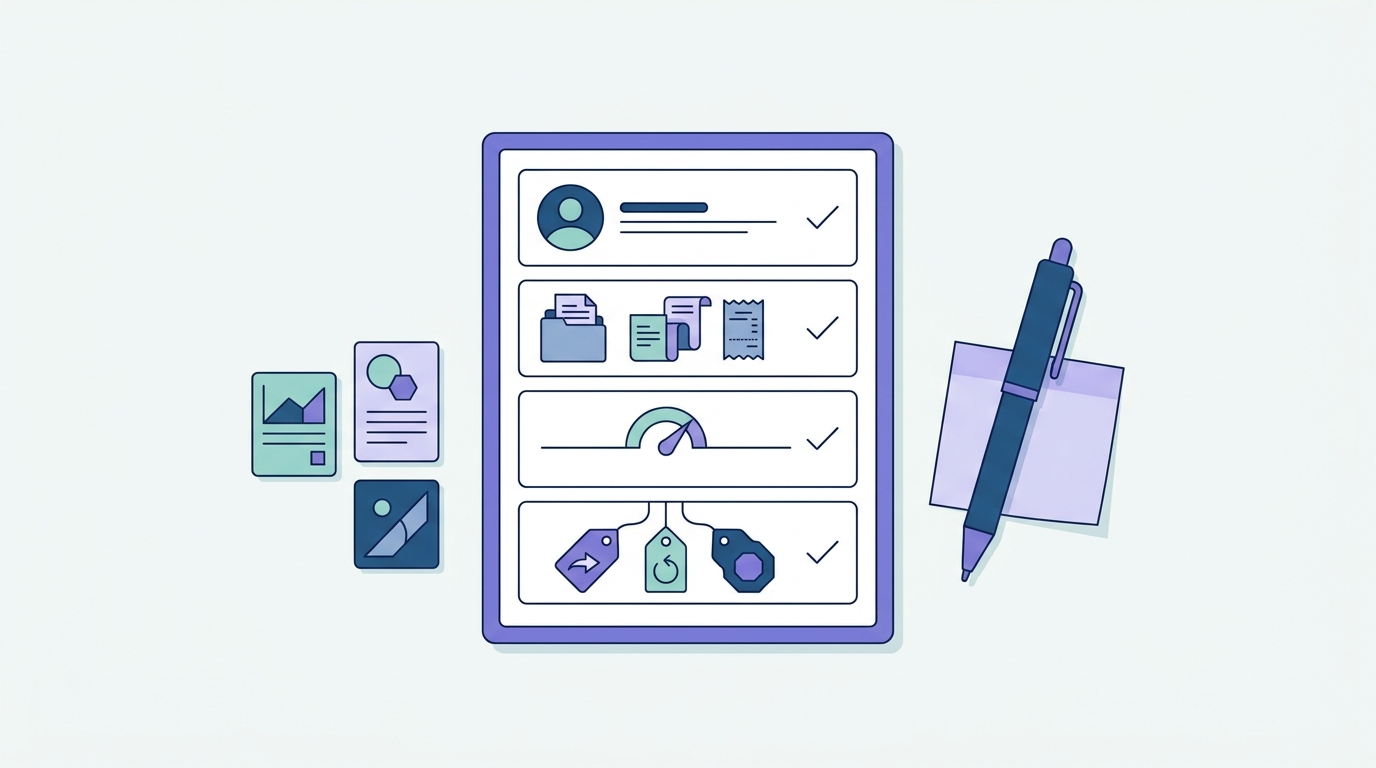
A clean checklist of the final validation tasks: confirm the user, capture evidence, define the threshold, and decide whether to build, revise, or stop.
- One user segment, written in one sentence
- One painful job to be done and one primary outcome
- Evidence from at least one of: interviews, waitlist signups, prototype task completion
- A written threshold that justified starting development (or justified a revision)
- Notes on the main alternative users use today (tools, spreadsheets, habits)
- Key dependencies (access to users, a repeatable channel, any paid spend, and any technical constraints like data access)
Planned visual placement: After this section, insert Visual 3 (checklist_block) summarizing the final validation tasks and decisions.
Decision tree after the first round of tests
- Build if multiple qualified users report the same recurring pain and a meaningful share take a measurable action (signup, follow-up, demo request).
- Revise if the pain is real but the audience is inconsistent, the workflow is confusing, or the value is different than you expected.
- Stop if users are polite but unwilling to take action, or if the pain is rare and easily handled by existing tools.
Budget another iteration if you choose "revise." For many teams, that is another 3-7 days of work plus recruiting time, not a quick afternoon.


