
Founders keep treating Mixpanel vs Amplitude like a feature shootout, but the make-or-break work happens earlier: deciding what you mean by events, identities, properties, and consent before launch. If you skip those declarations, you usually end up debating dashboards and backfilling instrumentation under pressure. By the end of this piece, you will have a minimal set of pre-launch rules that makes either tool produce cleaner, more actionable analytics from week one.
Best 5 App Analytics Tools for Mobile Founders goes deeper on the ideas above and adds concrete next steps.
What should you declare before launch?
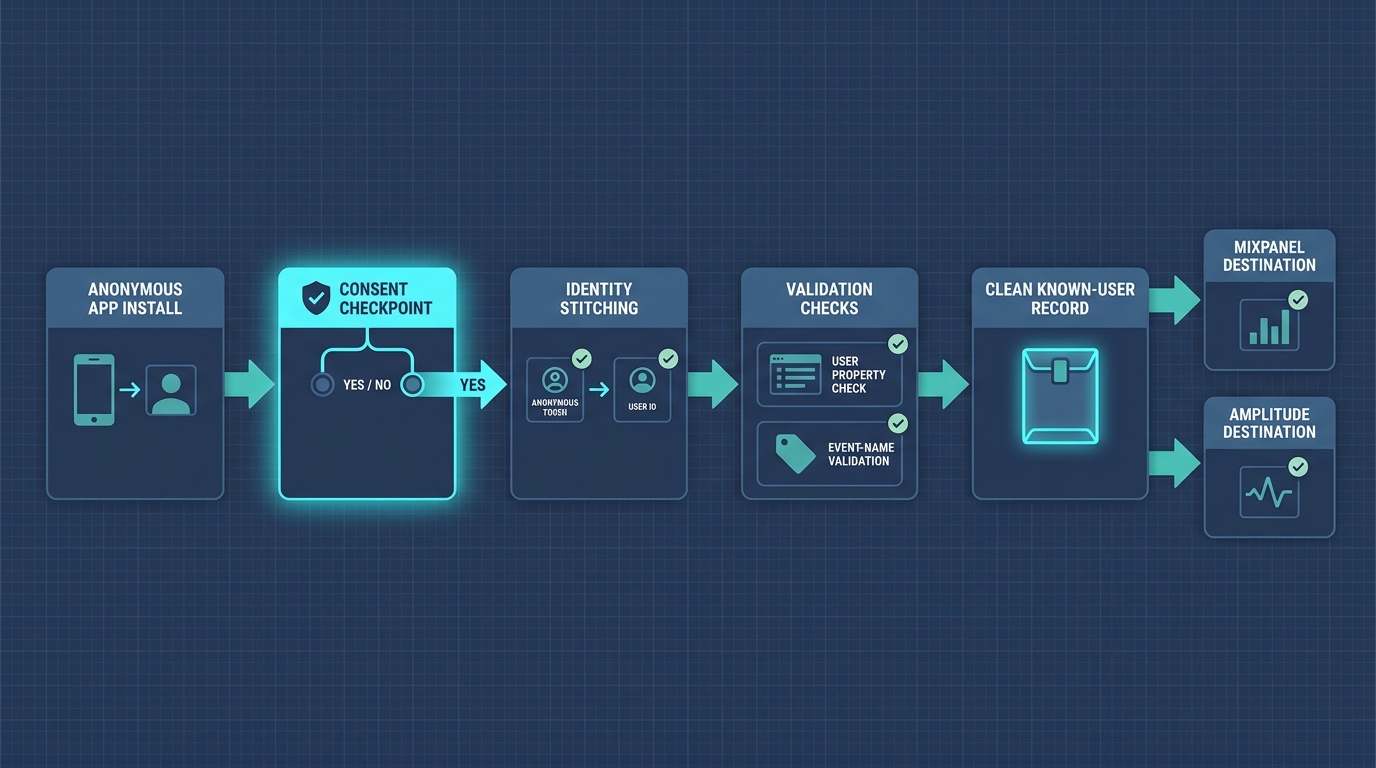
A flow diagram showing how a mobile event moves from anonymous app install to known user, with checkpoints for consent, user properties, and event validation before data reaches Mixpanel or Amplitude.
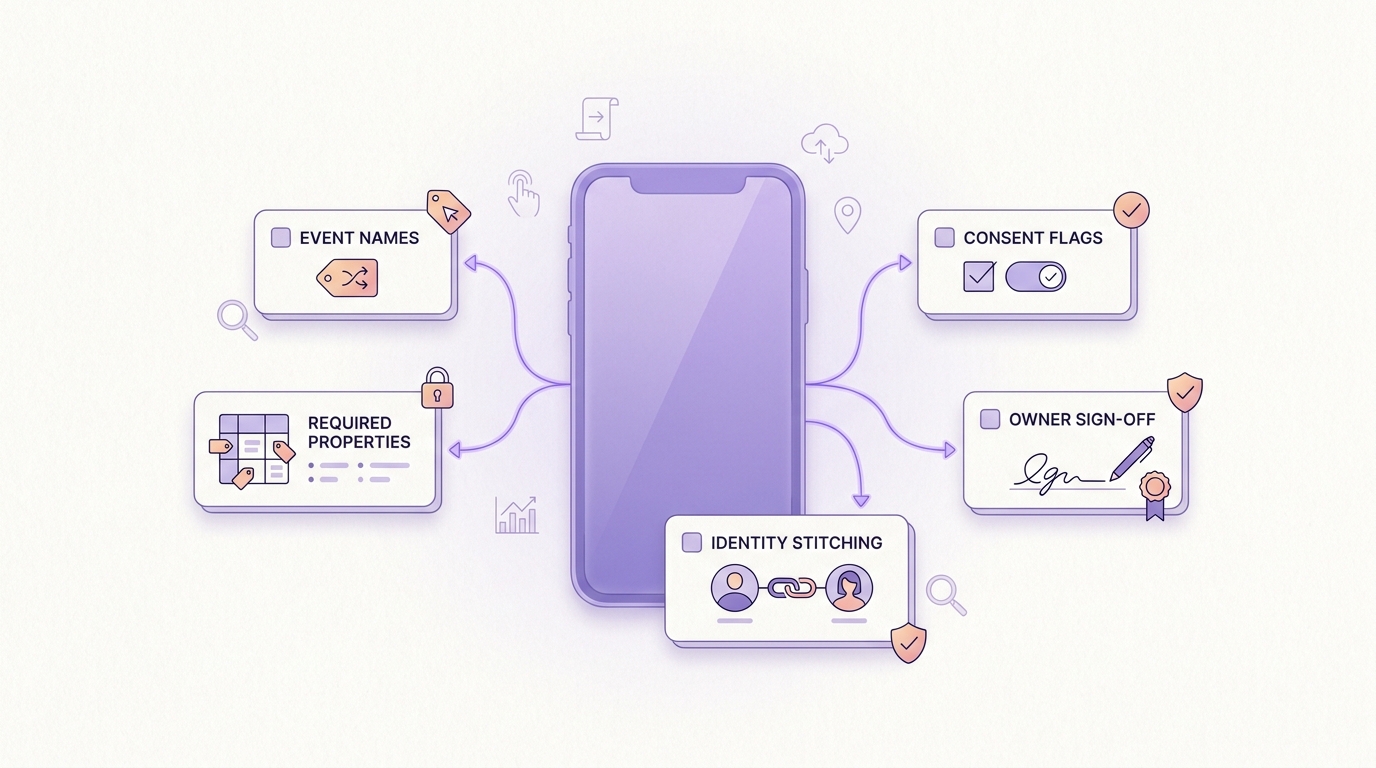
A compact pre-launch checklist showing the minimum analytics declarations for a mobile app release: event names, required properties, identity stitching, consent flags, and owner sign-off.
| Declaration | Why it breaks analysis if missing |
|---|---|
| Event names + definitions (verb + object, when it fires) | Teams ship slightly different "versions" of the same intent, and funnels stop being comparable across releases. |
| Required properties + allowed values | Segmentation and cohorts become guesswork when key fields are missing or free-form. |
| Anonymous-to-known stitching rule | Retention and conversion can quietly become "devices" instead of "users" after login flows change. |
| Consent flags + collection behavior | Sample size changes week to week, and trends can look like product changes when they are privacy changes. |
| Source-of-truth owner + change process | Event drift accumulates until dashboards are debated instead of trusted. |
What this is: a lightweight release gate you can review in 30-60 minutes, then validate in staging the same day if instrumentation is already wired.
How to interpret it: if you cannot answer these items clearly, your first funnels and cohorts will be harder to compare across versions and teams.
Impact: you can reduce post-launch rework (renames, rebuilt funnels, reprocessed cohorts), but results still depend on QA discipline and whether teams follow the rules after launch.
When you move from outline to execution, Top 7 Mobile App Analytics Tools Ranked for 2026 helps close common gaps teams hit here.
Why should launch analytics be declared before choosing Mixpanel or Amplitude?
The first mistake is comparing dashboards before the tracking plan exists
Mixpanel or Amplitude is rarely what makes launch analytics work. The foundational choice is what you declare, in writing, before the first user opens the app: your event schema, property taxonomy, and identity model. Both vendors effectively tell you to start with a tracking plan because the tool cannot rescue undefined behavior later (Amplitude Docs, Amplitude Docs).
In practice, launch questions are brutally specific (activation, onboarding drop, week-one retention). If "Signed Up" or "Onboarding Completed" is ambiguous, your first post-launch meeting becomes a definition debate instead of a product decision.
What teams usually discover too late (and what it costs)
- Different teams ship different versions of the same event, so conversion drops are artifacts, not signals.
- Mobile identity drifts (reinstalls, multiple devices), which fractures cohorts unless merge rules are clear.
- SDK auto-capture overlaps custom events, creating duplicates that look like engagement.
- Consent and privacy choices change sample size, which makes early trends noisy.
One constraint worth stating plainly: even with a good plan, you need engineering time to instrument, plus an owner to QA and manage drift. If nobody owns it, the plan becomes shelfware.
A complementary angle worth comparing lives in What to Do in the First 48 Hours After Your App Goes Live.
What do you need to define for Mixpanel or Amplitude to work?
Declare the event map (journeys), not just a long event list
Your goal is a small set of decision events that support the questions you will ask in the first 2-4 weeks. Track journeys, not clicks, and be willing to say "not yet" to low-value events.
A practical minimum mobile launch spine:
sign_up_startedsign_up_completedonboarding_step_completed(withstep_name)first_key_action(define what "key" means for your product)subscription_started(if applicable)
Naming rules that keep charts readable:
- verb_noun, consistent tense, one canonical event per intent
- avoid screen names as event names (screens change more than intent)
- every event has an owner who approves changes post-launch
Declare properties, allowed values, identity, and consent as launch rules
These rules decide whether cohorts mean users or devices, and whether week-one retention stays stable.
- Required properties: start small with fields you can maintain:
platform,locale,app_version,acquisition_channel,plan, plus one product-specific segment. - Allowed values: define enums where ambiguity will hurt analysis (onboarding steps, plan tiers, paywall variants).
- Identity stitching: define anonymous ID at install, when it upgrades to user ID, and how merges work across devices. Document edge cases like reinstall, logout/login, and shared devices.
- Consent behavior: document when analytics starts on iOS and Android, what you collect pre-consent (if anything), and how opt-out affects attribution and retention cohorts.
Realistic effort note: writing a v1 is often 1-2 hours. Validating it is usually another 1-2 hours in staging, plus at least one fix cycle after you hit real-world edge cases.
Concrete mini-example (event spec you can paste into a tracking doc):
- Event:
onboarding_step_completed - Fires: when a user taps "Continue" and the next step loads successfully
- Required properties:
step_name(enum:welcome,permissions,profile,tutorial,done)app_version(semver string, for example1.3.0)platform(enum:ios,android)
Amplitude explicitly recommends pre-launch tracking plans and taxonomy work to prevent rework later (tracking plan, taxonomy playbook). Mixpanel practitioners land on the same operating reality: consistent taxonomy and property standards keep analysis clean as the product evolves (Mixpanel taxonomy guide).
Want a tracking plan template that is small enough to maintain?
I will share a v1 event spine and property list sized for a real team (not an enterprise spreadsheet).
get-the-template
Where Mixpanel and Amplitude differ in practice
| Decision reality post-launch | Mixpanel tends to feel like | Amplitude tends to feel like |
|---|---|---|
| Product team owns reporting | Fast, flexible exploration; governance is mostly up to you | Stronger push toward planning and governance workflows |
| Growth team runs experiments | Quick funnels and cohorts | Broader behavioral analysis patterns |
| Data team enforces standards | Works well if you actively enforce naming + properties (use Mixpanel Lexicon to document definitions) | Easier to operationalize via planning workflows (Amplitude Data Planning) |
A concrete operational check either way: track the share of events that include required properties. A reasonable internal goal for week one is "almost all events" having required props, with exceptions documented (for example, pre-consent flows). The exact threshold depends on your app complexity and how strict your consent gates are.
The strategic implication: treat launch analytics like a release artifact
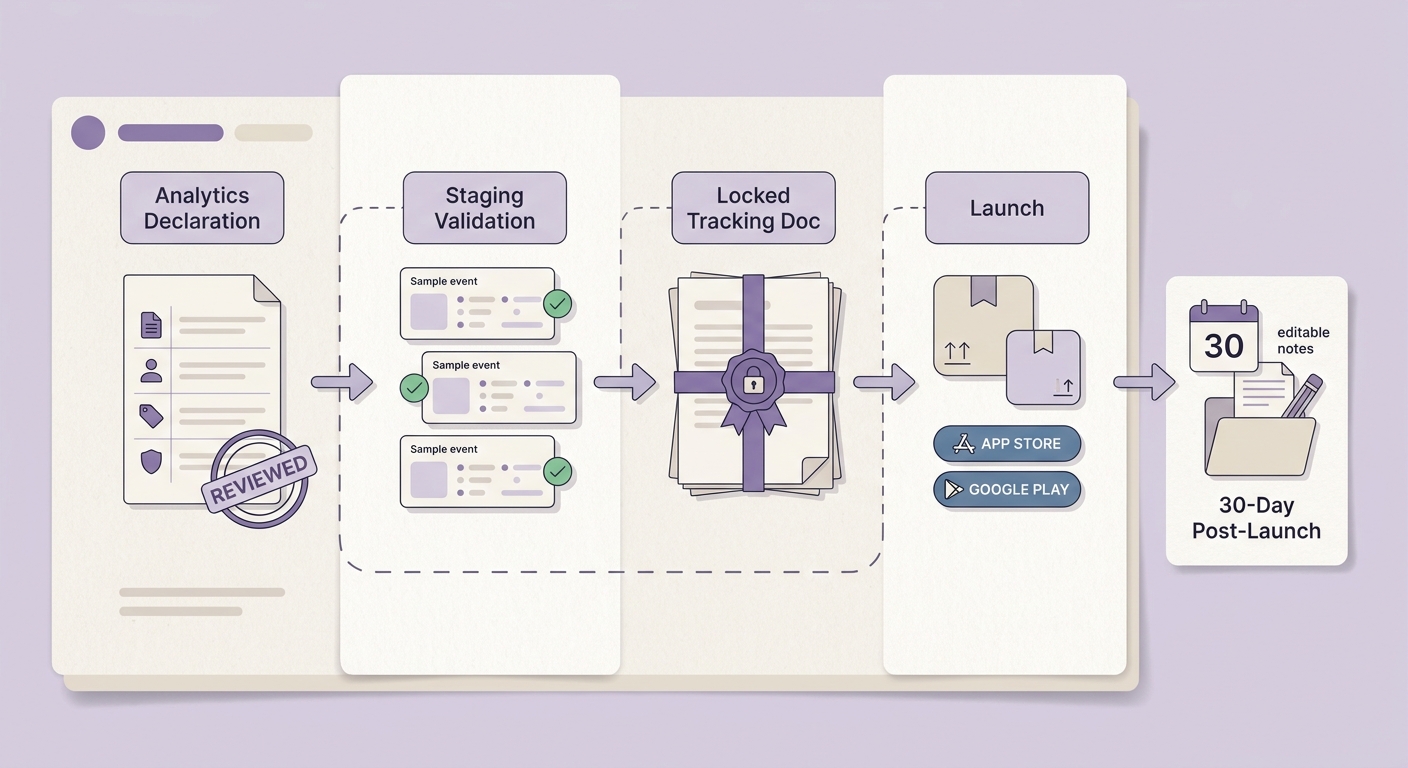
A release timeline that places analytics declaration review before TestFlight/internal testing, then freezes the tracking document before App Store or Google Play launch, followed by a 30-day post-launch change window.
Treat your tracking plan like a release artifact, not a one-time doc. That means versioning, review, and staged validation, just like code, and accepting that you are trading a bit of upfront coordination for fewer weeks of bad data later.
Operational risks and dependencies to plan for (regardless of vendor):
- Identity merge mistakes: incorrect identify/alias calls (or merge rules) can inflate retention by merging unrelated users, or deflate it by splitting the same user across IDs.
- Consent gating breaks attribution: if attribution properties are only available pre-consent (or only post-consent), channel reporting may drift week to week as opt-in rates change.
- SDK auto-capture duplicates: auto-tracked taps or screen views can overlap with custom events, making engagement look higher than it is.
- Governance ownership: someone has to own definitions and drift. In many teams this is a PM or growth lead for semantics plus an analytics engineer (or senior engineer) for instrumentation quality.
- Ongoing burden: plan on 30-90 minutes per week during the first month to review new events, investigate anomalies, and fix missing properties.
How to turn declarations into a pre-launch workflow
Run a 30-60 minute tracking review
Product, engineering, and growth approve the event map, property dictionary, identity rules, and consent behavior in one sitting. If the right people cannot attend, expect slower fixes and more rework after launch.
Validate on staging (plan 1-2 hours)
Test key funnels and identity stitching in TestFlight or internal testing, not in production. Check duplicates, missing properties, and whether consent gates behave as documented.
Freeze, then change deliberately
Freeze the launch tracking doc, and require an owner, a reason, and a version note for every post-launch change. This will not prevent mistakes, but it makes them visible and fixable before they contaminate weeks of analysis.
Next step: Add tracking validation to your release checklist.
I can share a simple PR checklist that catches missing properties, duplicate events, and identity edge cases before you ship.
add-to-release-checklist