If your app uses OneSignal for push notifications, one of the most common sources of App Store or Google Play review churn is a privacy mismatch: what the SDK can collect, what your app actually sends, and what your disclosures and permission screens claim. These issues are often fixable, but they typically require coordinated changes across engineering, product, and whoever owns store listings. This guide gives you a practical checklist to reduce review back and forth and avoid privacy surprises after release, without pretending you can eliminate reviewer discretion, policy changes, or edge-case interpretations.
How to Fix App Store Guideline 5.1.1 Privacy Rejection goes deeper on the ideas above and adds concrete next steps.
What data should you verify before launch?
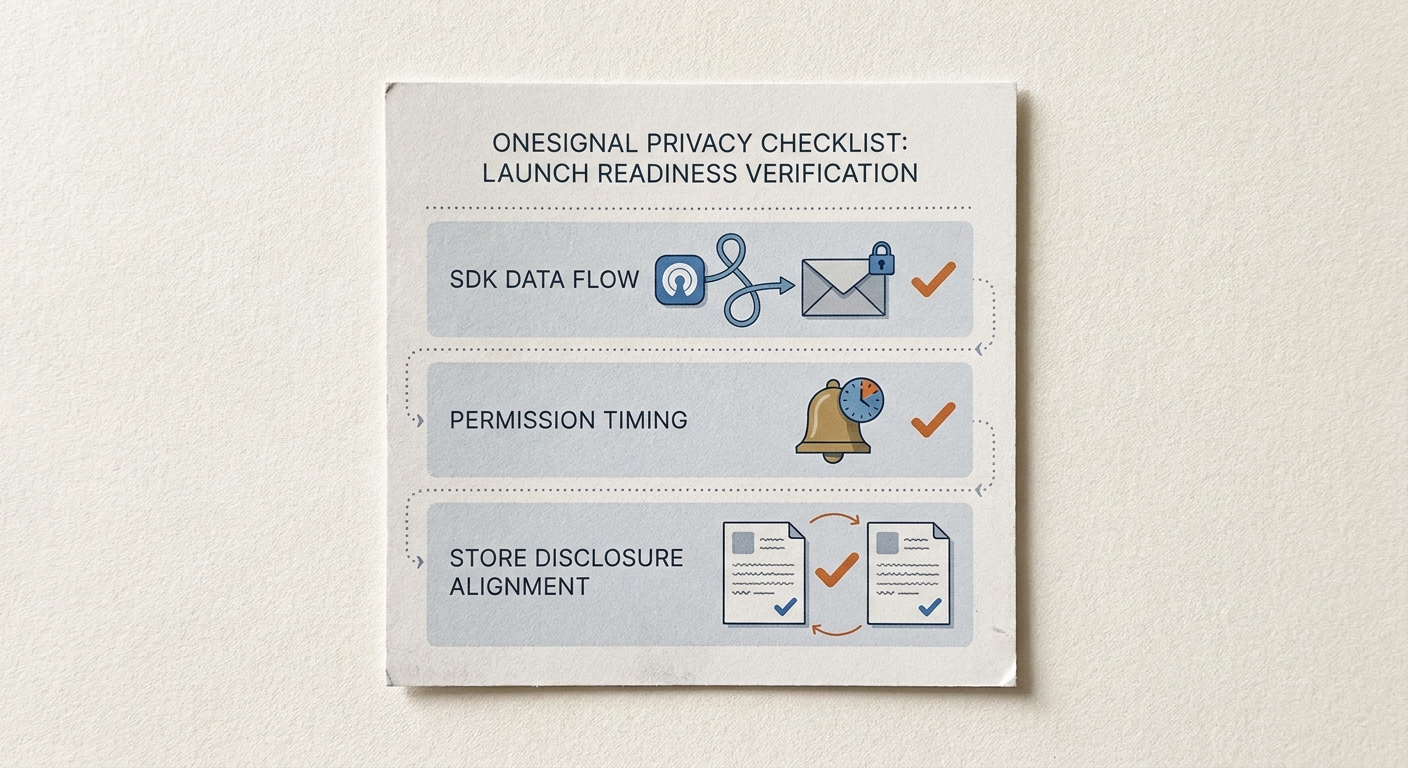
A compact proof card showing the three launch-readiness checks for OneSignal push privacy: SDK data flow, permission timing, and store disclosure alignment for App Store and Google Play.
Before you touch forms or policy text, capture a small evidence packet that reflects what the app does today, not what you plan to ship. In practice, this takes 30-90 minutes if ownership is clear and you know where the settings live. It can take a half day or more if tags are set by multiple systems (app, backend, CDP, dashboard) or store listing access is bottlenecked.
Proof card (collect these three screenshots or exports):
| Check | What to capture | Why it matters |
|---|---|---|
| OneSignal SDK and data flow | SDK version in the app, enabled features, and what identifiers you send or set as tags (see OneSignal personal data guidance) | Reduces accidental collection or linkage you forgot to disclose |
| Permission timing and opt-in state | Where the prompt appears, and how you log opt-in status changes | Early prompts can lower opt-in quality and create consent ambiguity |
| Store disclosures | App Store App Privacy Details and Google Play Data Safety entries for notification related data | Reviewers look for consistency across claims and behavior |
Explanation (what this proves): This packet shows what your app does at runtime, what users are told at the moment of consent, and what you declare publicly in the stores. It is not exhaustive, but it covers the three artifacts reviewers usually compare.
Interpretation (how to read it): If any row is uncertain (for example, you cannot confidently explain what tags are set where, or who can change them), treat that as a risk flag. "Uncertain" typically means "undocumented," which slows down reviewer responses and increases rework.
Reader impact (why you should care): Teams that assemble this upfront often cut clarification cycles because they can answer questions with specific evidence instead of re-auditing under deadline. Reviewer interpretation still varies by region and reviewer, so this packet reduces avoidable mismatch risk rather than guaranteeing approval.
Also write a short internal audit note (5-7 lines): what data is sent to OneSignal, what is stored, what is linked to a user account, and what the notification purpose is. OneSignal documents how to think about personal data and Google Play Data Safety mapping, and Apple is explicit that disclosures must be accurate and complete. (Sources: OneSignal docs on handling personal data and Google Play Data Safety requirements; Apple App Privacy Details.)
Planned image: a compact proof card summarizing SDK data flow, permission timing, and disclosure alignment.
Decision checkpoint (quick go-no go gate): proceed only if all are true.
- One push purpose: a documented reason (for example, transactional plus optional marketing as a separate toggle).
- Disclosure match: App Store and Play disclosures mirror the real OneSignal data flow, including identifiers and segmentation inputs you actually use.
- Owner assigned: one person can answer privacy review questions within 1 business day (or you accept that review timelines will stretch).
When you move from outline to execution, The Privacy Policy Page That Prevents Rejections helps close common gaps teams hit here.
Why do App Store and Google Play push privacy reviews fail?
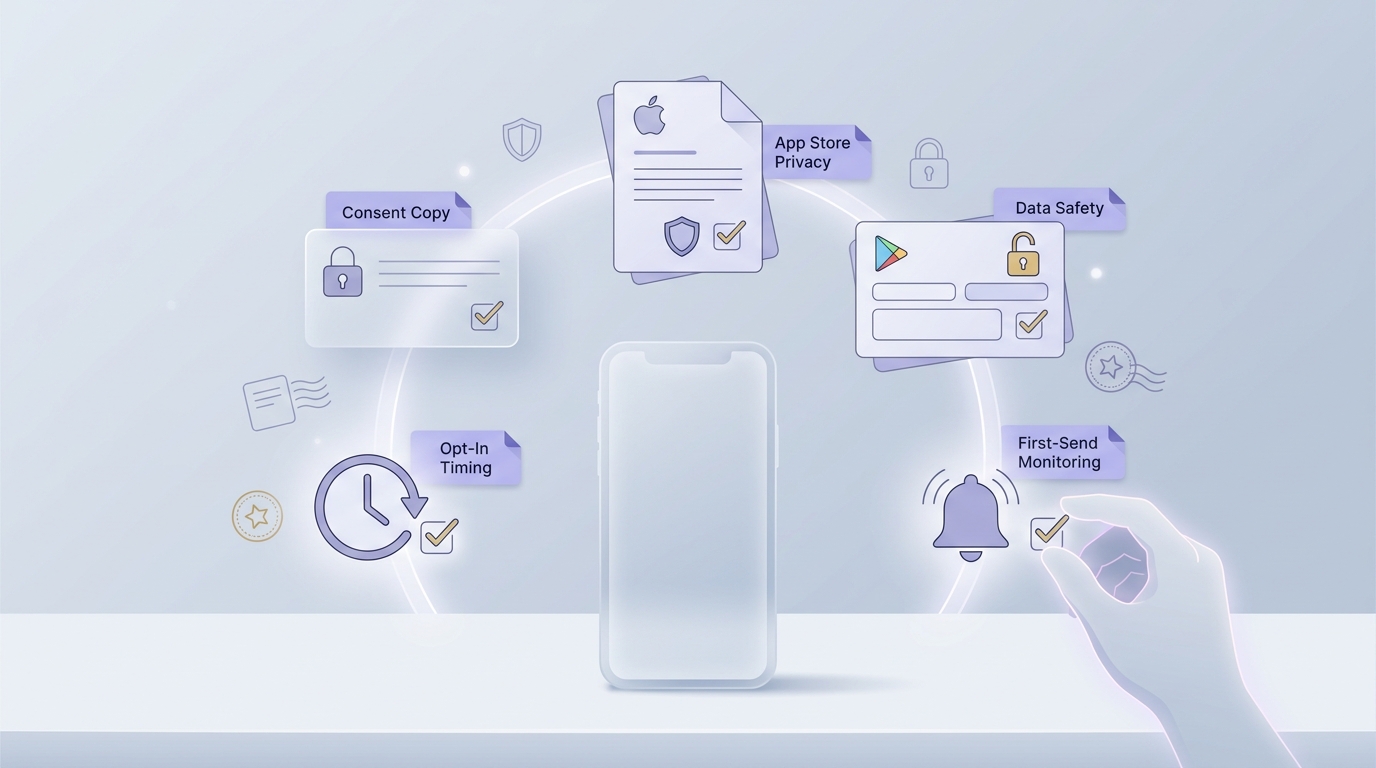
A release checklist block for the final OneSignal privacy review, covering consent copy, opt-in timing, App Store privacy answers, Google Play Data safety fields, and first-send monitoring.
A push privacy mismatch rarely stays confined to engineering. It spills into review, growth, and customer trust at the same time, usually right when you are trying to ship. The common pattern is simple: the app behavior and SDK configuration evolve faster than the store disclosures and the consent UX.
Here is what a privacy-safe push workflow actually has to cover:
- SDK configuration and accessible data: what the OneSignal SDK can collect or receive in your setup, including device identifiers and any optional fields you enable (see OneSignal data questions).
- Permission timing and UX: when you ask for notification permission, what you promise in the explainer screen, and whether the first messages match that promise.
- Notification content and targeting logic: whether sensitive content can appear on the lock screen, and whether segmentation uses data you did not disclose or have consent to use.
- Consent and records: how you log opt-in, opt-out, and changes over time, plus how users revoke consent.
- Store disclosures alignment: App Store App Privacy and Google Play Data Safety should reflect what you actually collect and why, not what you intended to collect.
What this means: reviewers are validating consistency, not just whether pushes work.
Operational tradeoffs worth acknowledging:
- Better context before prompting often improves long-term engagement, but it may reduce short-term opt-in volume compared to prompting on first launch.
- Adding granular toggles can reduce complaint risk, but it adds UX surface area and ongoing maintenance (copy, settings, QA).
- Tightening tags and identifiers can reduce privacy risk, but it may limit segmentation flexibility for growth teams.
A complementary angle worth comparing lives in Does Your App Need a Privacy Policy? (Yes - Here's Why).
What is the OneSignal privacy checklist?
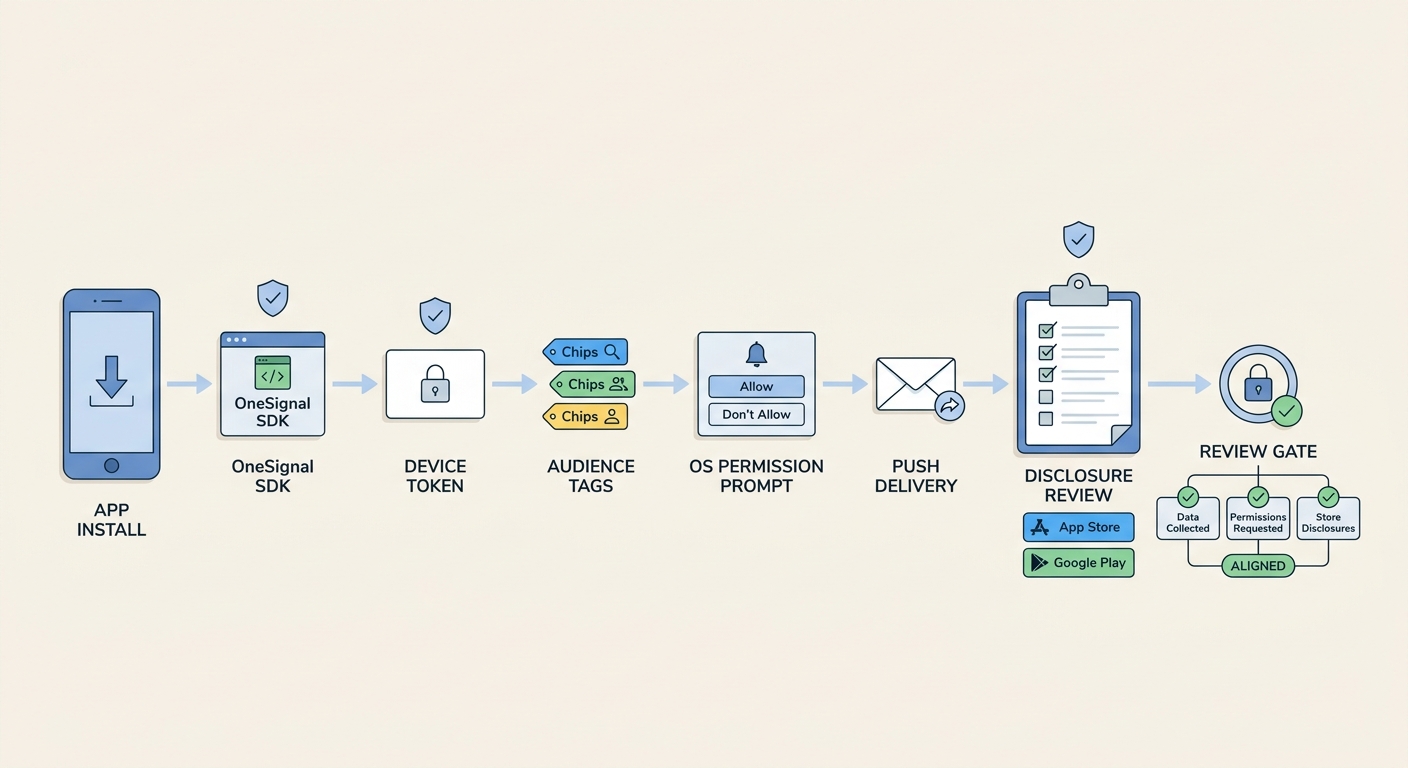
A simple process diagram tracing a push notification from app install to OneSignal SDK, device token, audience tags, permission prompt, and App Store or Google Play disclosure review.
This is designed to be a realistic sequence, not a theoretical best practice list. If you have clean ownership and instrumentation, you can get through most of it in 1-2 focused work sessions. If you need cross-team approvals (legal, marketing, App Store listing owners), plan for several days of calendar time even if the actual work hours are small.
1) Map the notification data path (before touching settings)
This step is investigative. Budget 1-3 hours for a straightforward app, and 4-8 hours if tags or identifiers are set in multiple places (app code, backend jobs, CDP, OneSignal dashboard) or if older features were added without documentation.
Capture:
- OneSignal SDK version(s) by platform and any optional modules enabled.
- All identifiers you send: external user ID, emails, phone, custom tags, and any analytics identifiers you pass through.
- Where tags are set, by whom, and what systems have permission to modify them.
Common failure modes:
- Tags are written by multiple pipelines, so no one can confidently say what "a user looks like" in OneSignal today.
- Old experiments left behind tags that imply sensitive traits (health, finance, children) even if you do not intend that.
- You cannot reconstruct historical consent state because you only store the current boolean, not change history.
2) Separate transactional from promotional (then design controls)
Write down which notifications are required for account function (password reset, receipts) versus optional marketing. This separation drives your toggle design, consent language, and store disclosures, and it reduces reviewer ambiguity when they test the app.
In practice, most apps land in one of these models:
| Model | What users get | What you must maintain |
|---|---|---|
| Single stream (transactional only) | Low frequency, high trust | Fewer toggles, simpler disclosures |
| Split stream (transactional + marketing toggle) | Clear expectations and control | More UI copy, QA, and targeting discipline |
| Multi-category preferences | Maximum control | Highest maintenance and higher risk of inconsistent behavior |
Tradeoff: the more granular the settings, the more likely you need ongoing coordination to keep actual sends aligned with the settings logic.
3) Align permission UX to your real messaging plan
Permission UX is where growth goals and compliance realities collide. The practical goal is not "prompt later" as a rule, but "prompt after the user understands the value and can reasonably expect the notifications you will send."
Implementation guidance:
- Put the explanation screen after a meaningful action (for example, "Track my order" or "Enable price alerts"), not on first launch unless your product truly depends on immediate alerts.
- Keep the promise specific: types of notifications, a rough frequency band (rare, weekly, frequent), and how to change settings.
- Avoid language that implies tracking or personalization you do not actually do, since it can increase disclosure scope.
Dependencies to plan for:
- Copy often needs product, legal, and localization review. That can add days of calendar time.
- If you have multiple entry points to the prompt (onboarding, settings, feature screens), keep them consistent or reviewers may see mixed intent.
4) Make consent and preference logging defensible
Reviewers do not always ask for logs, but when questions come up, weak records make answers slower and more subjective. Budget 2-6 hours to add or validate logging if you already have an analytics pipeline, and longer if you need a new event taxonomy or privacy review.
Minimum recommended logging (keep it simple, then iterate):
- Prompt shown: where it was triggered (onboarding, feature gate, settings) and platform.
- User decision: accept or deny, plus timestamp.
- Preference changes: toggles on or off by category if you support categories.
- First-send context: which notification type was first sent after opt-in (transactional vs promotional).
Risk note: if your organization restricts analytics for privacy reasons, you may need a lighter approach (for example, server-side logs of preference state changes only). The key is being able to answer "what did the user consent to, and when" without a scramble.
5) Reduce sensitive content and segmentation risk
This is where privacy mismatches often happen unintentionally. Teams add segmentation tags that look harmless internally but can be interpreted as personal or sensitive when tied to a device or account.
Practical guardrails:
- Treat tags as user data. If a tag value can reveal behavior or traits, assume it increases disclosure and consent burden.
- Default lock-screen safety. Avoid putting account sensitive details in notification previews by default. Let users opt into more detail if appropriate.
- Limit who can write tags. Ideally, only your app and a small set of backend jobs can set segmentation fields, not ad hoc dashboard edits.
Dependency caveat: OneSignal feature set and data surfaces can differ by platform, SDK version, and enabled modules. When in doubt, validate behavior on a real device build, not just dashboard settings.
6) Bring store disclosures into alignment (and keep them maintainable)
This step is usually less about the store forms and more about making sure you are not guessing. Expect 30-60 minutes to update disclosures if you already know your OneSignal setup and can access the listings. Plan longer if you need approvals from legal or your release manager, or if your Play Console and App Store Connect access is limited.
What to align:
- What you collect: device identifiers, contact info, usage data, or any custom identifiers you send to OneSignal.
- What is linked: whether the data is tied to an account or persistent identifier.
- Why you collect it: notification delivery, analytics, personalization, or marketing, based on what you actually do today.
- Data sharing language: be precise, and avoid broad claims that are hard to support later.
One thing worth noting: you cannot fully control how a reviewer interprets edge cases (for example, a single marketing send during a transactional flow). The goal is to remove obvious contradictions so you are not debating basics under deadline.
CTA: Want a fill-in checklist for your OneSignal setup?
Use a short template to map identifiers, tags, permission timing, and store disclosure fields. Expect 30-60 minutes if you can answer where tags are set and who owns listings.
Get the template
For tradeoffs, checklists, and edge cases, The Privacy Policy URL Trap: What It Must Include to Pass Review rounds out this section.
Release and post-launch checks (what teams forget)
This is the last mile work that prevents preventable back and forth. It typically takes 1-2 hours per release if your evidence packet is current. If you are changing consent UI, adding segmentation, or updating store disclosures, plan for 1-3 days of calendar time because reviews and approvals rarely happen instantly.
Pre-release verification:
- OneSignal configuration is current, pinned, and documented in release notes for the build (re-check OneSignal setup docs and data handling pages).
- Permission timing is intentional: your in-app explanation matches the system prompt, including purpose and how to change settings.
- Your first notification content does not leak sensitive information on lock screens by default (especially for transactional messages).
- App Store privacy answers match implementation, not marketing copy (Apple).
- Google Play Data Safety entries match enabled OneSignal features and your identifier usage (OneSignal).
Planned visual: a one-page release checklist covering consent copy, opt-in timing, store disclosures, and first-send monitoring.
Post-launch checks (first notification cycle): expect 1-2 hours of analysis if you already track events, and more if instrumentation is missing.
- Opt-in rate after the first prompt, split by entry point and platform. Sudden drops often mean unclear value or mismatched copy.
- Delivery and open rates by notification type (transactional vs marketing). Low delivery can indicate token or channel configuration issues, not only copy problems.
- Support tickets and reviews mentioning permissions, frequency, or data use. Treat these as early indicators that controls or disclosures need tightening.
When to re-run the checklist: before adding new tags or segments, changing targeting logic, after a store policy update, or after a OneSignal SDK upgrade. Even well-run teams get caught by shifting defaults, new SDK capabilities, or a reviewer interpreting a screen differently than expected.
CTA: Need a quick risk review before submission?
If you share your proof packet (screenshots only), I can help you spot common mismatch risks and the tradeoffs of different fixes. Turnaround depends on complexity, access to the right owners, and team availability.
Request a review
Why Your App Is Ready but Still Cannot Be Published reframes the same problem with a slightly different lens - useful before you finalize.