
Negative App Store reviews are inevitable. What is optional is how much damage they do. A professional response is less about convincing one unhappy user and more about protecting trust with the next hundred people who will read that review and your reply before they tap Install.
How to Respond to Rejection Emails (with Templates) goes deeper on the ideas above and adds concrete next steps.
Early proof: what a professional reply signals in practice
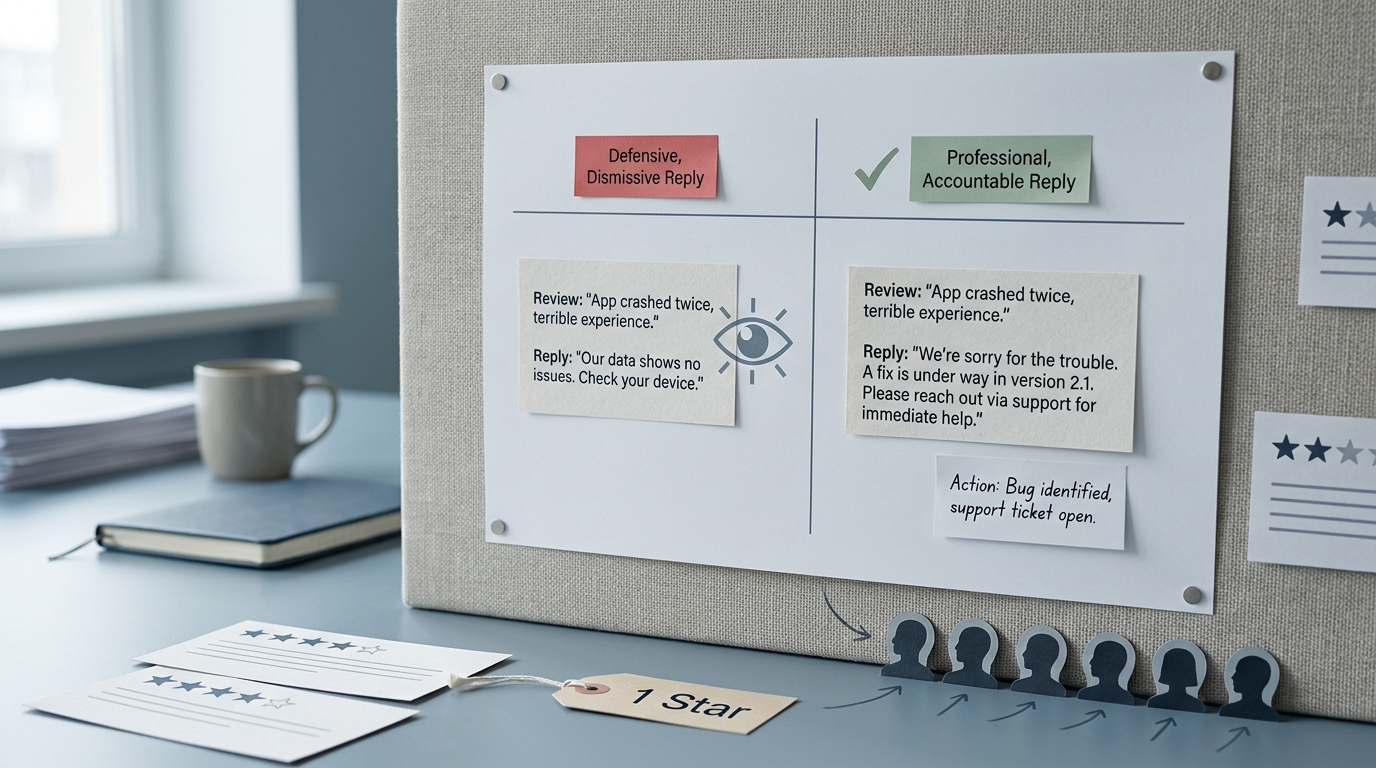
A simple comparison table showing a defensive reply versus a professional reply to the same one-star App Store complaint, with notes on how each version affects user trust and install intent.
| Element | Defensive reply (what users infer) | Professional reply (what users infer) | Likely reader impact |
|---|---|---|---|
| Acknowledgement | "Works fine for us." | "Sorry you hit this - that is frustrating." | Lowers perceived risk for undecided installers |
| Specificity | "Contact support." | "This looks like a crash on iOS 17.5 when opening Settings." | Signals real investigation, not hand-waving |
| Next action | "We will look into it." | "Fix is in 2.1.4 (now live). If you are still affected, email support with device + iOS version." | Turns a dead end into a resolution path |
| Tone | Defensive, impatient | Calm, human, accountable | Protects brand trust even if the rating stays low |
- Explanation: Store replies are a public signal of how your team handles problems under pressure.
- Interpretation: A good reply will not reliably lift ratings, but it can reduce uncertainty for people on the fence.
- Reader impact: Reviews act like lightweight due diligence, and your reply can make the product feel safer to try.
Apple also frames developer responses as part of Ratings and Reviews, so it is worth treating them as a real surface area of the product, especially in categories where trust is fragile (see Apple Developer guidance).
When you move from outline to execution, How to Publish Your Dreamflow App: Store Submission Done Right helps close common gaps teams hit here.
The job is not to win the argument; it is to protect trust
Negative reviews are a public signal that your product and operating habits are being evaluated in real time. Taking them personally is human, but it often leads to replies that read defensive, vague, or dismissive.
In many categories, App Store and Google Play reviews function like a public Q and A. Prospective users are judging the complaint and whether your team sounds accountable and capable of closing the loop.
One thing worth noting: replying well takes real effort. Someone needs enough context (release status, incident notes, support policies) to avoid accidental promises, which is harder during incidents, vacations, and fast release cycles.
A complementary angle worth comparing lives in Top App Store Rejection Reasons and What to Do About Them.
Why a public reply changes the meaning of a bad review
On the stores, your response is often read by more people than the reviewer who wrote it. Tone and response time can influence trust and sometimes conversion, even if the original rating never changes.
A calm, specific reply can turn "crashes on launch" into evidence that the team understands what is happening and has a fix path. This does not guarantee an install, but it reduces the perceived risk of trying your app.
For tradeoffs, checklists, and edge cases, Does Your App Need a Privacy Policy? (Yes - Here's Why) rounds out this section.
What should a professional App Store response include?
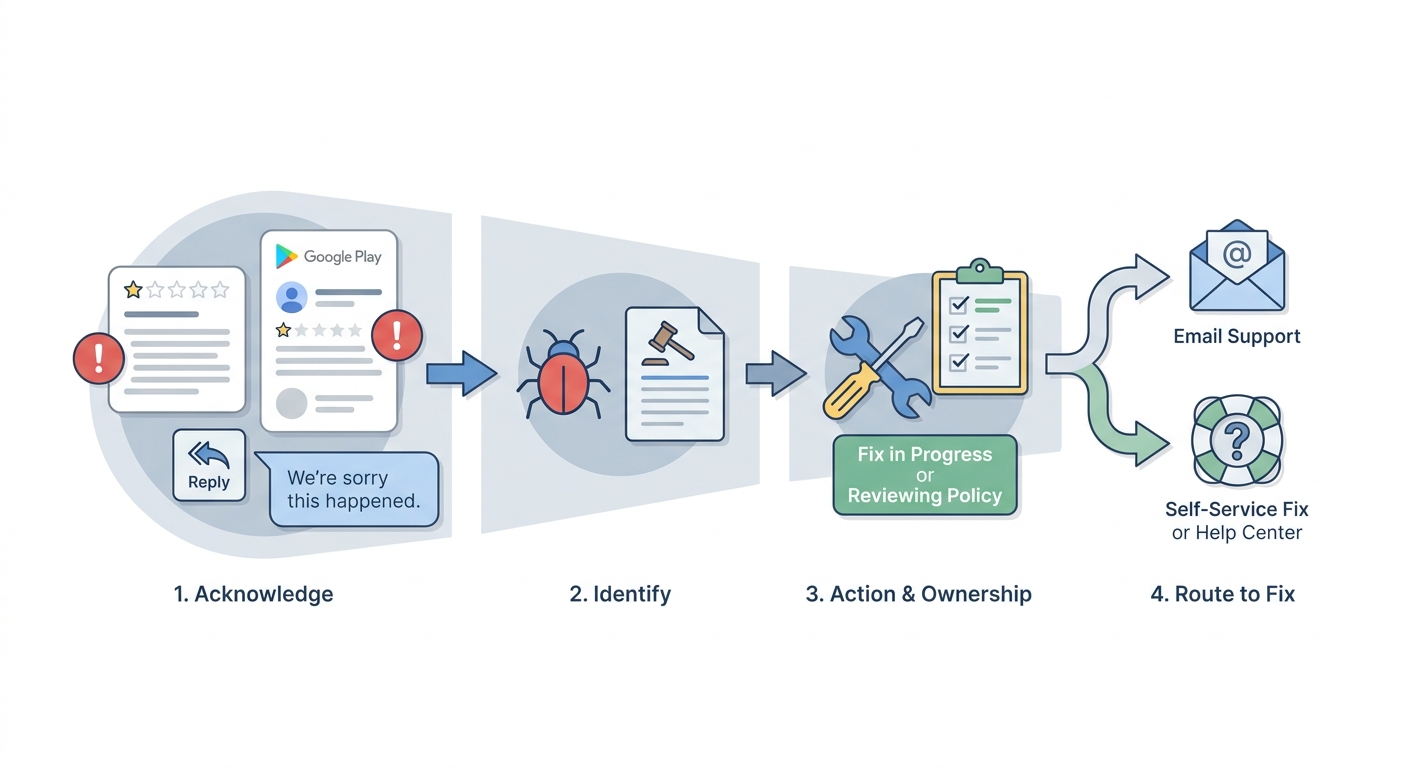
A four-step process diagram for responding to a negative app review: acknowledge the issue, name the bug or policy problem, state the next action, and route the user to the right fix path or support channel.
A professional store reply should read like a competent operator wrote it. You are writing for the next user as much as the current one, so clarity beats cleverness.
Use a four-part reply structure
Acknowledge the experience
Confirm the frustration without debating whether it "should" have happened. You are validating impact, not automatically admitting fault.
Name the issue category
Label it clearly (login failure, crash on launch, subscription confusion, missing feature, slow performance). This shows future readers you understood what was reported.
State the next action
Share what will happen next: a fix in progress, a workaround, a request for device details, or a policy clarification. Avoid vague promises like "we will look into it" unless you also say what you are doing next.
Route to the right resolution path
Give one clear next step: update to version X, contact support via a specific channel, or follow precise steps. For billing or refunds, route to the proper process without sounding like a brush-off.
Match the tone to the review
| Review type | Do | Avoid |
|---|---|---|
| Angry | Keep it short, calm, procedural | Matching intensity or sarcasm |
| Confused | Add one clear "how it works" sentence | Jargon or long explanations |
| Bug report | Be specific and ask for minimal details (device, OS, app version) | "Contact support" with no context |
| Pricing complaint | Acknowledge value concerns, clarify model, offer an option if real | Arguing that pricing is "obvious" |
| Support delay | Own the delay and set a realistic expectation | Promising immediate replies you cannot sustain |
A simple way to stay credible is to avoid phrases that trigger skepticism: "We are sorry you feel that way," "This is not possible," "Works on my device," or boilerplate that never mentions the issue.
What Happens When Your App Gets Rejected - and How to Respond reframes the same problem with a slightly different lens - useful before you finalize.
What mistakes should you avoid in App Store review replies?
Some negative reviews are unfair, vague, or emotionally charged. That does not change your job: your reply is still a public artifact of how your company behaves under pressure.
Ignoring reviews can be rational in a few cases (abuse, spam, no information). The constraint is capacity: if you cannot respond consistently, it is usually better to cover the highest-risk categories (crashes, billing, login) than to leave half-finished threads.
The expensive reflexes are denial and blame
- Do not argue the user is wrong unless there is a clear factual error you can correct politely.
- Do not blame the customer for misunderstanding onboarding; if many misunderstand, the product is unclear.
- Do not hide behind "email support" without acknowledging the public concern first.
- Do not overpromise timelines ("fix tomorrow") unless you control the release and are confident it will ship.
- Do not sound like legal. You can be precise about policy without reading cold or evasive.
Good vs risky wording (especially for timelines)
| Situation | Safer, credible phrasing | Risky phrasing |
|---|---|---|
| Fix timing unknown | "We are investigating and will update this reply when we have a confirmed plan." | "Fix coming soon." |
| Fix planned but not shipped | "Targeting a fix in 2.1.4, pending review and rollout." | "It will be fixed in 2.1.4." |
| Fix shipped | "Fixed in 2.1.4 (now live). Please update and let us know if it persists." | "Fixed." |
| Need more info | "If you can share device + iOS + app version, we can narrow this down." | "Contact support." |
How do you build a sustainable review response workflow?
You do not need a big system, but you do need consistency. Expect a small ongoing time cost: for many teams, 15 to 45 minutes per day (or a few hours per week) is reasonable once you include investigation and follow-ups. The real number depends on review volume, incident rate, app complexity, and whether you have tooling that links reviews to crash reports.
During major incidents or bad releases, plan for spikes. That is normal, and it is a good reason to keep the baseline workflow lightweight.
Set a first-response target you can hit
Start with 24 to 48 hours on business days, then tighten later if you have coverage. If investigation will take longer, acknowledge quickly and say when you expect to follow up.
Assign ownership and escalation
Decide who replies, who can approve sensitive topics (billing, security), and who gets looped in for crashes. Without this, replies stall or become generic.
Use tags and a simple log
Use App Store Connect to pull reviews, then log themes in a shared Google Sheet or Airtable. Track median first-response time and the percent of replies with a specific next step (update to a version, a workaround, or a clear request for details).
Close the loop after fixes ship (or plans change)
When you release a fix, update your reply with the version and one action step. If the fix slips due to release approval, staged rollout, or a regression, say so and update the timeline language to "targeting" plus a next check-in date.
For teams that want examples, Unstar’s guide has practical reply patterns aligned with how store users read responses (Unstar.app).
The strategic implication: replies are part of your product loop
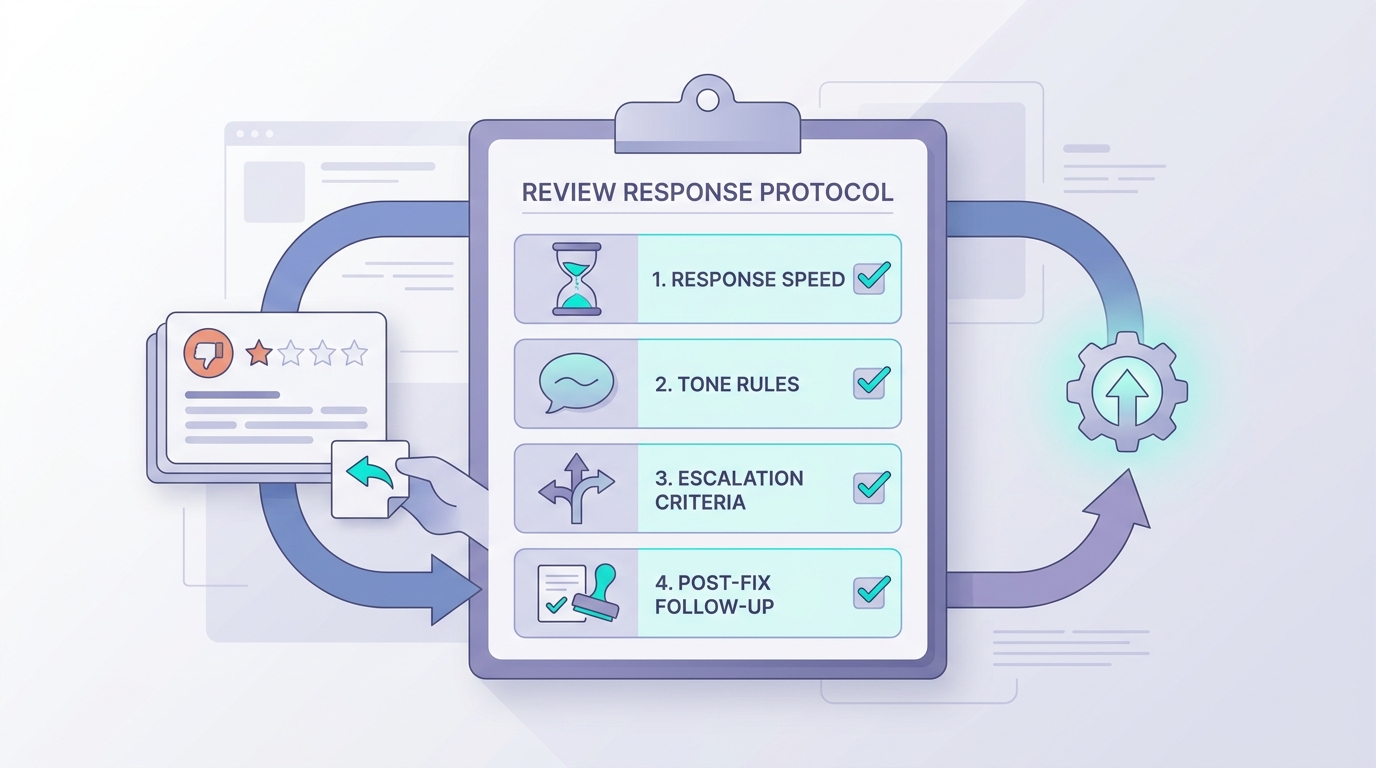
A concise operational checklist for app teams covering response speed, tone rules, escalation criteria, and post-fix follow-up for negative App Store and Google Play reviews.
Many startups treat reviews as reputation management. Operators treat them as a public input to product quality, support load, and revenue.
In practice, the loop looks like: signal - diagnosis - fix - communicate - learn. Replies cannot compensate for persistent product issues, but they can buy you time and goodwill while you improve the underlying experience.
Turn review themes into product priorities
- Cluster reviews by theme (crashes, performance, billing, onboarding, support delays).
- Watch for post-release spikes and treat them as QA or rollout signals.
- Prioritize trust breakers (login failures, paywall confusion, data loss) over nice-to-have requests.
- Save 3 to 5 internal examples of "good replies" so tone stays consistent as the team changes.
Final position: professionalism is a habit, not a guarantee
Professional replies are about being credible in public: clear ownership, clear next steps, and honest follow-through. Done consistently, they will not eliminate negative reviews, but they can make them less scary to the next buyer and create a cleaner feedback loop for the team.


