Most teams compare App Store Connect and Google Play Console like two dashboards, but the bigger shift is that they enforce two different ways of shipping. Apple’s review gate and TestFlight flow often reward planned release trains and tighter pre-flight checks, while Google Play’s tracks and staged rollouts can reward iteration and faster mitigation when something breaks. If you are tired of surprise delays, messy rollbacks, or a release process that does not match how your team actually builds, this breakdown will help you pick a console strategy that fits your cadence, constraints, and tolerance for operational risk.
Early proof block (directional, policy and category dependent)
| Claim (directional) | Evidence source | What it means in practice | Reader impact |
|---|---|---|---|
| iOS releases are typically gated by App Review | Apple submission and review workflow (Apple) | Calendar risk is real when screenshots, localization, or privacy copy are not ready | Plan a release train with buffer time and avoid last-minute scope changes |
| Android releases are structured around testing tracks and staged rollout | Play Console testing tracks (Google) | You can limit initial exposure and expand gradually, but only if you watch metrics and have a stop plan | Faster iteration is achievable, but it depends on monitoring, ownership, and rollback readiness |
| Both stores create hidden store-ops work | Store listing, metadata, policy compliance workflows (store documentation) | Screenshots, privacy details, and regional metadata often become the bottleneck | Expect 2-8 hours per release for store assets on small teams, more with localization or legal review |
- Explanation: The consoles do not just publish builds, they shape scheduling, approvals, and incident response.
- Interpretation: iOS typically biases toward fewer, higher-confidence releases; Android can support controlled learning loops if you actually use tracks and rollout controls.
- Reader impact: You can reduce missed launch dates and support load, but only after some setup work (often 2-6 weeks) to define owners, checklists, and monitoring.
How to Publish a Game on App Store - What's Different goes deeper on the ideas above and adds concrete next steps.
Why are App Store Connect and Google Play Console different?
Why this comparison matters (and what founders miss)
App Store Connect and Google Play Console both ship binaries, but the workflow incentives differ. Apple can behave like a controlled release environment (harden build, finalize metadata, pass review), while Google Play can behave like an iterative surface (segment risk with tracks, expand based on metrics).
Common misunderstandings that create avoidable delays and messy rollbacks:
- Picking based on UI familiarity instead of the operating model the store enforces.
- Underestimating store ops work (screenshots, privacy labels, localization, legal approvals).
- Assuming rollback is symmetric when mitigation often depends on feature flags, remote config, and on-call ownership.
- Treating submission as a one-off event rather than a repeatable system with stop rules and a named release owner.
Here is the thing: the same bug can have very different business impact depending on your mitigation path. If checkout crashes, Android can sometimes contain exposure faster via rollout controls, while iOS may require waiting on review for a binary fix unless you have a server-side mitigation ready.
When you move from outline to execution, App Store Connect vs Google Play Console: Key Differences helps close common gaps teams hit here.
How do App Store Connect and Google Play Console differ in practice?
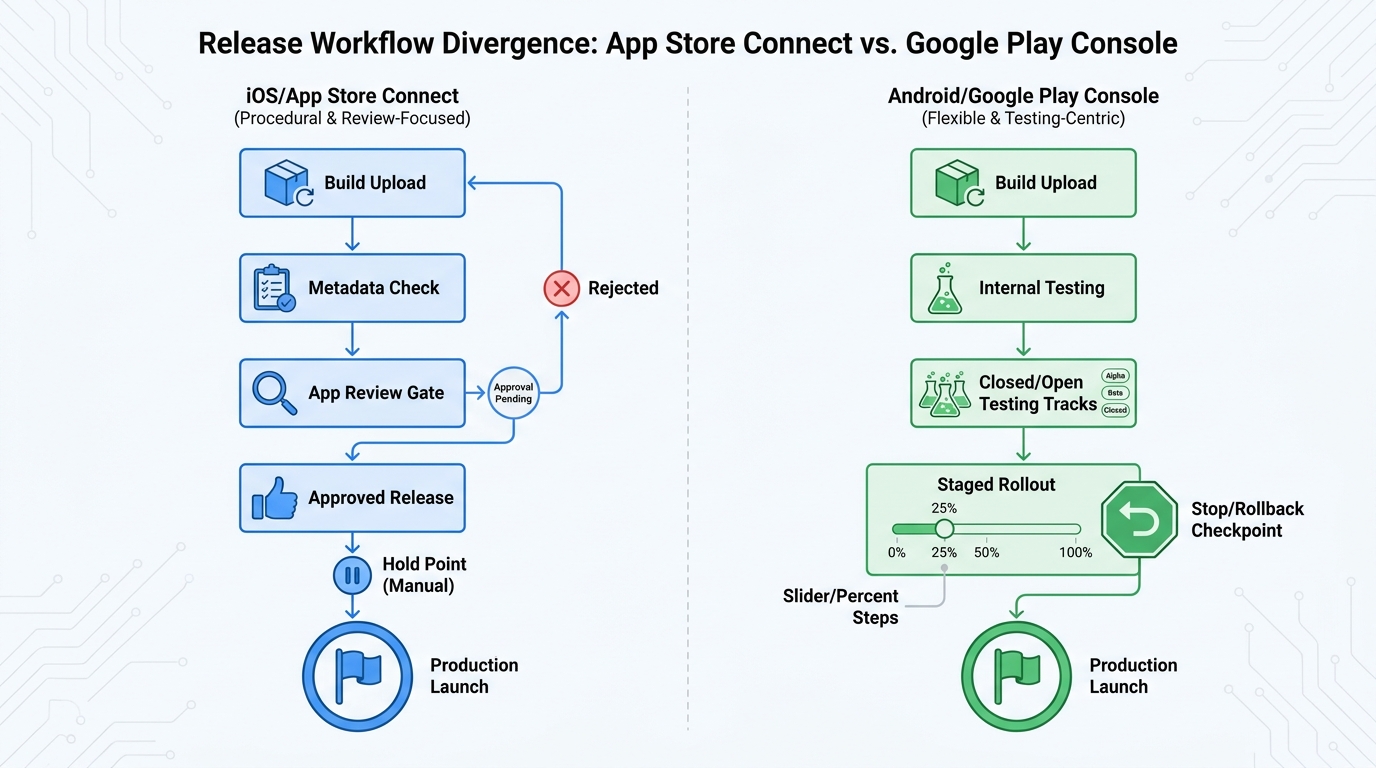
A side-by-side process diagram showing the path from build upload to live release in App Store Connect versus Google Play Console, including review, testing, staged release, and production launch checkpoints.
Review and submission workflow
| Stage | App Store Connect (iOS) | Google Play Console (Android) | Operator impact |
|---|---|---|---|
| Gate to production | Explicit App Review step (Apple) | Test tracks and release management before full exposure (Google) | iOS needs calendar buffers; Android needs monitoring and clear stop rules |
| Typical cadence shape (illustrative) | Often release trains (for example, every 1-2 weeks) to absorb review variability | Often faster iteration (for example, 1-3 per week) if testing and rollout discipline exist | Android speed is possible, but process debt shows up as churn and support load |
| Fast fixes | Depends on review timing, submission quality, and whether you can mitigate server-side | Can be quicker to limit exposure, but still depends on alerting and who can pause the rollout | Both require readiness: feature flags, crash monitoring, and a named release owner |
One failure mode to plan for: a policy or metadata rejection loop. A build can bounce for screenshots, permission rationale, or guideline interpretation, which can add days and create rework even if engineering is done.
Testing and rollout tools that shape team behavior
- iOS: TestFlight supports structured beta testing, but it does not remove the need to plan production timing around review. For a small change, expect 1-3 days to recruit testers, collect feedback, and push a revised build; longer if the change touches onboarding, payments, or permissions.
- Android: internal, closed, open testing tracks let you widen access in steps, then halt a rollout if metrics spike (Google). The tradeoff is operational: without dashboards, alert thresholds, and someone empowered to pause a rollout, staged rollout becomes "ship and hope."
Operational detail (example): if you use Firebase Crashlytics, you can set a simple go-no-go rule like "crash-free sessions must stay >= 99.5% during a 10% staged rollout for at least 2-6 hours before expanding." Thresholds vary by category, baseline stability, and traffic volume, so treat these numbers as a starting point, not a universal standard.
Operational cost (often underestimated)
- Checklist upkeep: keeping assets, privacy language, and submission steps current takes 15-30 minutes per release, plus occasional deeper updates when policies change.
- Alert fatigue and false positives: staged rollout only helps if alerts are tuned; otherwise teams ignore spikes or stop releases too often.
- Decision ownership: you need a clear go-no-go owner (and backup) who can pause rollout, coordinate comms, and approve hotfix scope.
A complementary angle worth comparing lives in How to Protect Your App Store and Google Play Accounts.
Which release strategy fits your team maturity?
When App Store Connect is the harder but steadier path
You operate where mistakes are expensive
In regulated categories or brand-sensitive apps, review friction can be a useful forcing function. The benefit is not safety by default, but more predictable outcomes when you submit policy-aligned builds and stable metadata (Apple).
You can invest in repeatable release hygiene
App Store Connect tends to reward pre-flight discipline: QA gates, release notes, and controlled scope. Expect 2-6 weeks to make this real across engineering, design, and whoever owns store assets, especially if you are adding privacy review or localization.
You have a mitigation plan that does not rely on a new binary
If you ship a bad build, recovery may depend on review timing. Feature flags and remote config can reduce impact on both platforms, but they add engineering work (access controls, audit logs, testing) and require someone accountable for toggles during incidents.
When Google Play Console rewards speed and experimentation
Category: Rollback control
Statistic: 0 - 100%
Label: Staged rollout control (Play)
Context: Adjust rollout percentage to limit blast radius or pause
Category: Outcomes
Statistic: 38%
Label: First-pass approval rate
Context: When metadata is complete upfront
Category: Review timing
Statistic: 1 - 3 days
Label: Typical Apple review window
Context: Manual App Review gates most releases
- Staged rollout lets you ship to a small percent, watch crashes and conversion, then expand or halt.
- Testing tracks map cleanly to faster feedback loops (Google).
- Growth teams can iterate onboarding or pricing with lower initial exposure, but only if you agree upfront on success metrics, stop conditions, and who responds when metrics dip.
A failure mode to plan for: rollout paused due to a crash spike, but no one is on point to diagnose, decide, and ship a hotfix. Staged rollout reduces damage only if you have crash tooling, alerting, and coverage during the first few hours after release.
Release readiness checklist (both stores)
Get a practical checklist (QA gates, store assets, approvals, monitoring, rollback) sized for a small team and usable in your next release cycle.
Create the checklist
For tradeoffs, checklists, and edge cases, Everything You Need to Know About Apple and Google Developer Accounts rounds out this section.
Final position: choose based on risk tolerance and your ability to operate the tooling
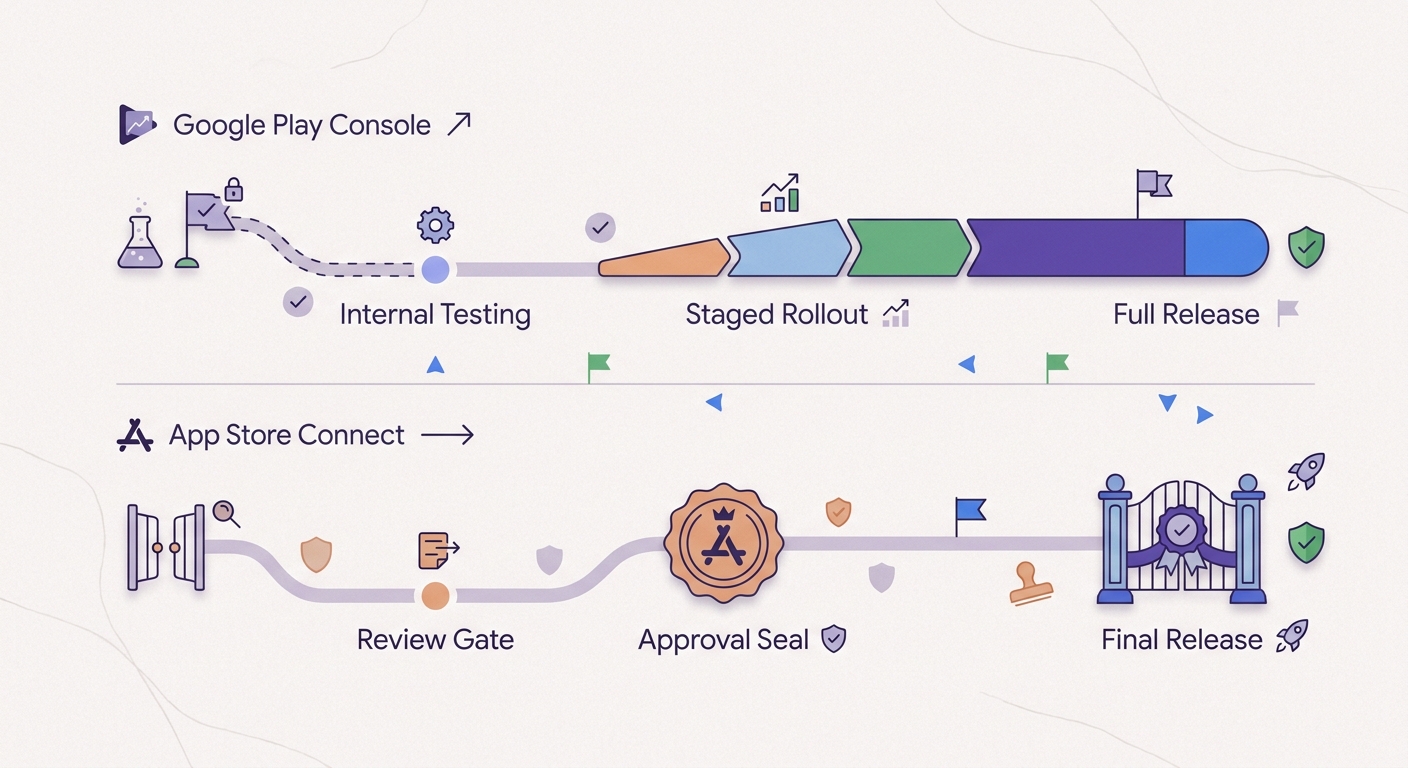
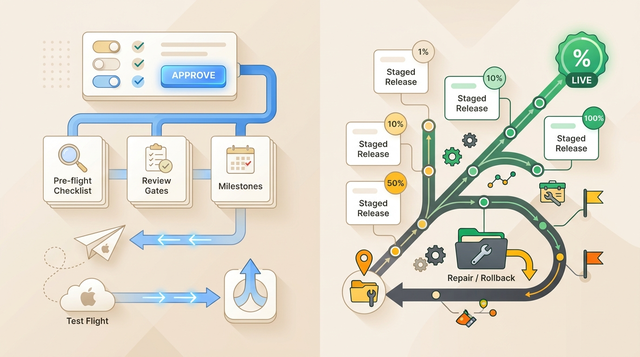
A simple timeline showing how a team can move from internal testing to staged rollout to full release on Google Play Console, contrasted with the slower but more controlled approval-led path associated with App Store Connect.
Practical decision rule for founders
- Prefer App Store Connect when compliance, brand risk, and release quality outweigh launch speed, and you can plan around review variability (Apple).
- Prefer Google Play Console when you need rapid testing and granular rollout control, and you have reliable monitoring plus clear decision ownership to use it well (Google).
- If you are unsure, standardize an iOS-grade checklist first, then add Android rollout controls once your dashboards and on-call coverage are dependable.
Concrete workflow snippet: release checklist plus go-no-go rules
Pre-submit (1-4 hours, usually split across roles)
Confirm store assets, privacy disclosures, and release notes are final, and run a smoke test on the exact build you will submit. Small teams often slip here because design or legal feedback arrives late.
Ship to limited exposure (Android) or controlled timing (iOS)
Android: start at 5-10% staged rollout and annotate the release. iOS: pick a target window that tolerates review variability, and avoid late metadata edits that can restart review.
Expand or stop based on explicit thresholds (2-24 hours of monitoring)
Example: Crashlytics crash-free sessions >= 99.5% and no critical funnel drop before moving from 10% to 50%. If you cannot monitor during the ramp, expand slowly or wait.
Post-release review (30-60 minutes)
Log what happened (issues, review notes, time spent) and update the checklist. This is boring work, but it is how you cut cycle time and incident rate over 3-6 releases.
Release audit for your next launch
Run a 30-minute audit to find one bottleneck per platform (assets, approvals, testing, monitoring, rollback) before you ship.
Run the audit
How to Publish an Emergent-Built Mobile App Successfully reframes the same problem with a slightly different lens - useful before you finalize.