AR in mobile apps is no longer impressive just because it exists. It earns its place when it reduces uncertainty in a real workflow, like helping someone confirm fit, place an item correctly, or finish setup without guessing. The outcome to aim for is simple: fewer failed attempts, faster decisions, and less support back and forth. This covers where AR is working today, what tends to work next, and how to scope a v1 around measurable outcomes instead of a flashy demo.
7 Breakout Android Apps Making Waves in June 2026 goes deeper on the ideas above and adds concrete next steps.
Why does utility AR perform differently from novelty AR?
Category: Outcomes
Statistic: 38%
Label: First-pass approval rate
Context: When metadata is complete upfront
Category: Speed
Statistic: 4 hrs
Label: Median fix time
Context: After a store rejection notice
Category: Efficiency
Statistic: 2.1x
Label: Faster resubmission
Context: With a structured pre-review checklist
| Proof lens | What novelty AR looks like | What utility AR looks like |
|---|---|---|
| User intent | Play, explore | Decide, verify, complete |
| Repeat usage | Usually low | Often medium to high if it reliably saves time |
| Where it fits | Standalone mode | Embedded in an existing flow |
| Impact you can measure | PR spike, shares | Can influence conversion, returns, or support volume, but impact varies a lot by category, placement, baseline rates, and execution quality |
Explanation: The same AR tech behaves very differently depending on intent and placement in the journey.
Interpretation: If AR is optional entertainment, most users will try it once and move on. If AR removes a recurring doubt, it can become a repeat tool.
Reader impact: Before building, name the uncertainty you are removing and the metric you will watch. Otherwise you are likely building novelty, then debating "engagement" forever.
When you move from outline to execution, What Are Agentic AI Apps and How Do You Build One helps close common gaps teams hit here.
When is AR in a mobile app actually useful?
AR earns adoption when it helps users decide with less doubt: previewing a product, confirming fit, placing an item in a room, measuring a space, or getting a camera-guided setup right the first time.
Here is the thing: repeatability matters more than polish. A one-time spectacle might win a share, but utility AR only earns a habit if it shortens the path to a correct action. Treat AR as a hypothesis: the same concept can succeed in one category and flop in another because of device mix, environment, and content quality.
A complementary angle worth comparing lives in How to Start Building Mobile Apps With Zero Experience.
Where is AR actually working in mobile apps today?
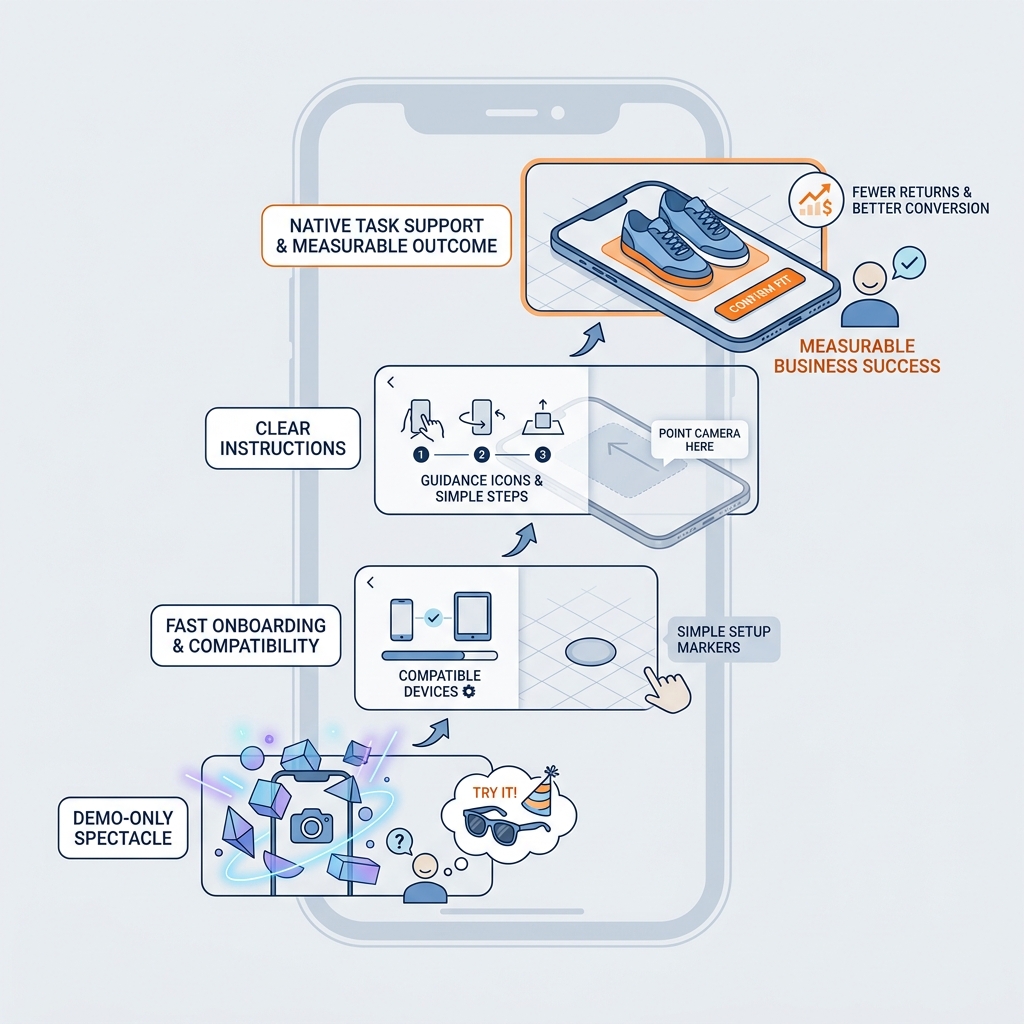
A maturity ladder diagram for AR features in mobile apps, moving from demo-only spectacle to native task support. The ladder highlights checkpoints such as fast onboarding, device compatibility, clear instructions, and a measurable business outcome like conversion lift or reduced returns.
The best use cases reduce uncertainty before a user commits
Retail and ecommerce: preview before checkout
AR try-on and product preview can reduce the gap between a listing photo and real-life fit. It tends to work best when it loads fast, looks credible enough, and sits where decisions happen (PDP, cart, or checkout), not buried in a separate "AR mode."
Home and furniture: spatial context beats specs
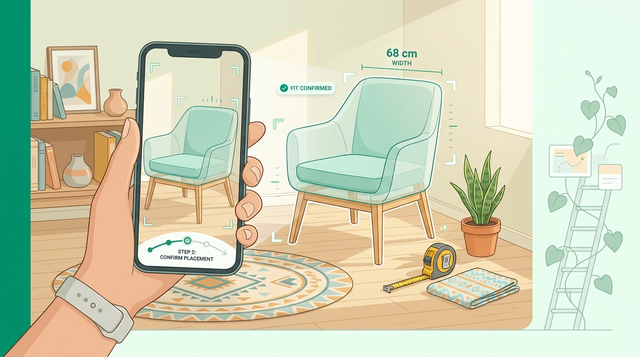
Seeing scale, clearance, and placement in a real room can reduce second-guessing. Expect real-world friction: lighting, clutter, and older devices reduce tracking quality, so you need a clear "good enough" threshold and a strong fallback.
Guided setup and visual support: fewer failed attempts
Overlays can help users identify parts, align steps, or verify a correct state. This works best when mistakes are expensive or frustrating, but it depends on camera conditions and very simple instructions.
Platform reality: AR must feel native (and forgiving)
Camera permission prompts, device compatibility, and load time decide whether AR gets used at all. If AR adds a slow download, a confusing permission request, or a crashy camera session, it can create drop-off and bad reviews even if the concept is solid.
In practice, treat AR as a step in the flow, not a separate destination. Keep users oriented, and always offer a non-AR path so the funnel can keep moving.
What to notice in strong AR products
- Fast onboarding with one clear instruction and immediate feedback
- One obvious job to finish, not five features to explore
- Repeatable intent (decide, verify, complete), not shareable novelty
- A graceful fallback when AR fails (2D view, manual entry, saved measurements)
For tradeoffs, checklists, and edge cases, Build an AI Recommendation Engine for Mobile rounds out this section.
What is next for AR in mobile apps?
The next AR bets are workflow-shaped, not demo-shaped
Directional examples of teams putting AR inside workflows:
- Guided AR assistance for in-the-moment work, like field teams using AR overlays tied to SAP Asset Manager workflows (example: EvoAR).
- Spatial measurement and verification to reduce rework when the alternative is multiple site visits.
- Try-before-you-buy focused on reducing uncertainty, not just adding a fun preview.
- Wayfinding and contextual overlays when the user is already stuck or searching (illustrative examples: RealityDevs case studies).
These links show patterns, not guaranteed outcomes. Results depend on environment, training, content quality, and how tightly AR is integrated into the funnel.
The strongest objection: AR can be expensive, fragile, and easy to overbuild
This criticism is valid. Permissions friction, messy lighting, shaky tracking, and device fragmentation can turn AR into drop-off and support tickets.
Also plan for the operational burden, not just the build:
- 3D asset pipeline ownership: who creates, updates, and QA checks models when products change?
- QA device matrix: even a "small" launch often means testing across 10-30 device and OS combinations.
- Ongoing maintenance: OS releases, SDK updates, and device quirks can break sessions months later.
One failure mode to plan for: a prototype looks great on a few devices, but the pilot stalls because permissions are denied, tracking is unreliable in real homes, or the assets fail QA (scale, materials, file size). Ship smaller than you think, and validate reliability before expanding scope.
What to measure so AR does not become a vibe project
| Funnel point | What to instrument | Why it matters |
|---|---|---|
| Permission prompt | Allow rate, drop-off after prompt | A good AR feature fails if users never grant access |
| Time to first success | Seconds to first stable placement or first correct step | Users churn when AR feels fiddly |
| Reliability | AR session crash rate, tracking lost rate | Fragility shows up as reviews and support load |
| Outcome | Return reason codes, support ticket tags, task completion rate | Connect AR to business impact, not usage alone |
AR flow audit checklist
Audit one camera or AR flow for task completion, drop-off, and support cost, then decide to scale, simplify, or cut.
Audit The Flow
The Last Step AI App Builders Don't Solve: Publishing reframes the same problem with a slightly different lens - useful before you finalize.
If you are building AR now, how do you scope and ship a v1 worth maintaining?
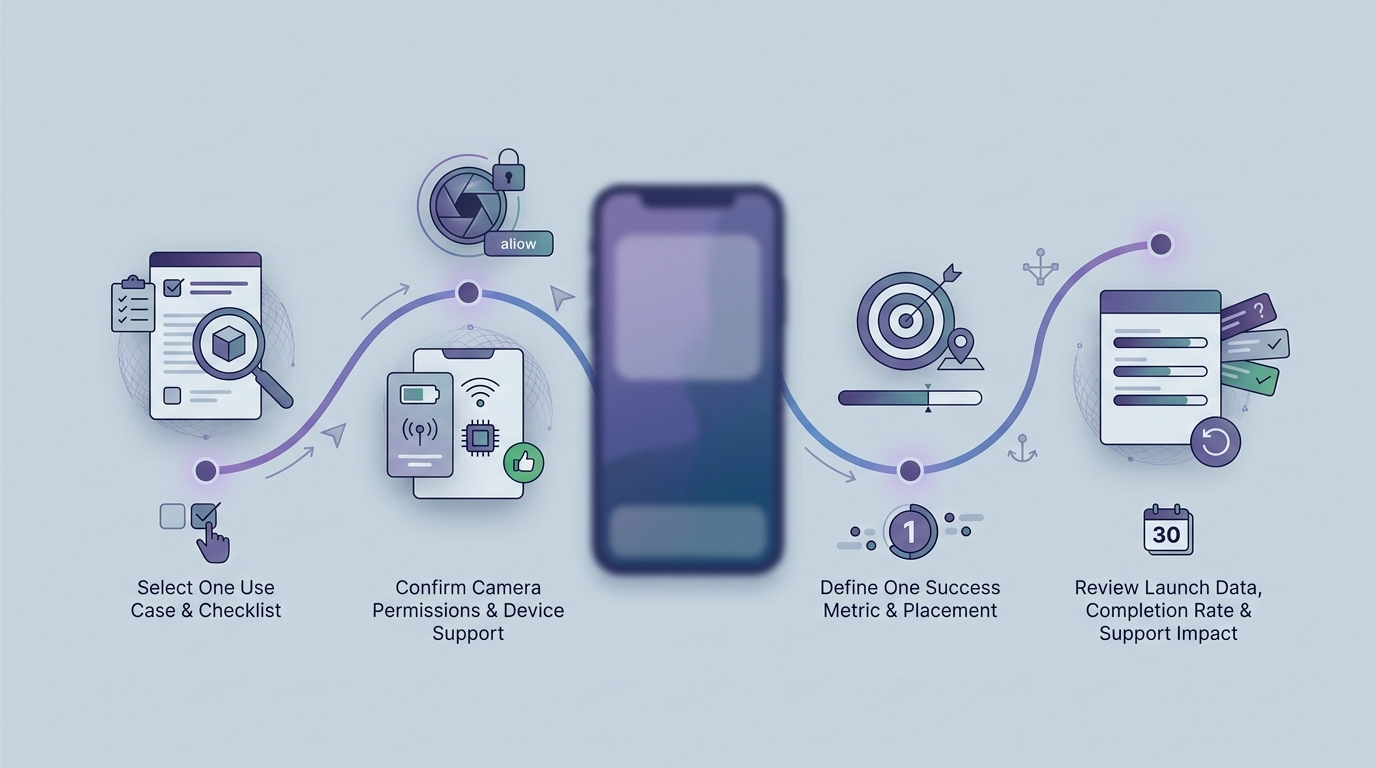
A 30-day timeline for validating one practical AR feature in a mobile app before scaling it. The timeline covers choosing one use case, checking camera permissions and device support, defining the success metric, and reviewing the launch data for completion rate and support impact.
A realistic v1 is rarely a "full AR mode." It is usually one camera step inside an existing flow, shipped to a limited device set, with clear instrumentation and a fallback.
Time-wise, most teams should expect (assuming assets and approvals are reasonably ready):
- 1-3 weeks for a credible prototype (longer if 3D assets are missing or your team is new to the SDK)
- 2-6 weeks to reach a stable pilot, often dominated by content prep, performance work, and QA (device matrix size and stakeholder approvals matter here)
- Ongoing maintenance each release cycle for crashes, device quirks, and asset updates
Pick one job and one success metric
Example: "Reduce size-related returns" or "Improve first-time setup completion." The metric will force tradeoffs, like cutting features that look cool but do not affect the outcome.
Choose the lightest platform approach that works
For commerce previews, consider WebAR or platform viewers first (Android Scene Viewer, iOS Quick Look) before committing to a full native 3D pipeline. For deeper interaction, plan for ARKit and ARCore plus the extra QA and performance work they bring.
Design the AR moment and the fallback together
Write the flow as: entry point, one instruction, success state, and exit back to the main journey. Add a fallback (2D preview, measurement input, photo upload) so users can still complete the task when tracking fails or permissions are denied.
Instrument before you polish
Log events like
ar_permission_shown,ar_permission_granted,ar_session_started,ar_first_success,ar_tracking_lost,ar_session_crash, and the downstream conversion or completion event. Without this, you will not know whether to improve onboarding, performance, or content.Roll out gradually and budget for maintenance
Start with a device and OS slice where tracking is reliable. Plan the ops: who owns assets, who triages crashes, and how updates ship when an OS release breaks a key path.
What to stop doing if AR still looks like a demo
- Stop shipping AR as a standalone feature with no clear path back to the core journey.
- Stop optimizing for shareability and visual polish over time to first success.
- Stop expanding scope before one use case shows reliable usage and a measurable downstream effect.
Scope a v1 you can actually ship
Get help choosing one AR use case, defining success metrics, and mapping a testable v1 that fits your team and device reality.
Plan A V1