AI assistant apps are everywhere in 2026, but picking one that actually saves time (instead of adding another workflow) is harder than it looks. The best choice usually depends less on "the smartest model" and more on your ecosystem, your permissions, and the few tasks you need done weekly. This ranked top 5 takes a buyer's guide view of the tradeoffs so you can shortlist quickly and test without overcommitting.
Early proof - a fast shortlist plus a simple reality check
| App (ranked) | Best for | Response quality | Ecosystem lock-in | Automation depth | Privacy controls |
|---|---|---|---|---|---|
| ChatGPT | General-purpose help | Strong | Low-medium | OK | OK |
| Gemini | Android and Google stack | Strong | Medium-high | OK | OK |
| Claude | Writing and analysis | Strong | Low | Limited-OK | Strong |
| Copilot | Microsoft 365 workflows | OK-Strong | High | Strong (if enabled) | Org-dependent |
| Perplexity | Research with citations | OK-Strong | Low | Limited | OK |
How to read this: Relative, not lab-tested. These labels come from hands-on, everyday tasks (drafting, summarizing, voice, search, and cross-device handoff), and results vary by plan, region, and workplace policy.
Interpretation: Most people will be happier choosing by ecosystem and primary job to be done than by small differences in writing style. Lock-in, admin policy, and privacy settings are often the real dealbreakers.
Reader impact: Many readers can get to a shortlist in 15-30 minutes, then validate with a 45-90 minute hands-on test. If you are in a locked-down workplace (or you want email and calendar actions), expect extra time for permissions and potential IT blockers.
One thing worth noting: setup is part of the cost. If an app needs calendar, email, files, or workplace logins, budget 20-45 minutes for permissions and troubleshooting, and accept that some integrations may simply be unavailable in your org.
AI Music Apps Are Exploding - 5 Worth Trying in June 2026 goes deeper on the ideas above and adds concrete next steps.
Which AI assistant apps made the top 5 in 2026?
Category: Market
Statistic: <50%
Label: ChatGPT share (mid‑2026)
Context: No single assistant dominates - fit matters more
Category: Decision
Statistic: 5 apps
Label: Compare before you pick
Context: Start with the shortlist, then narrow by fit
Category: Checklist
Statistic: 4 checks
Label: Checklist to break ties
Context: Ecosystem, primary task, privacy, integrations
Category: Momentum
Statistic: <50%
Label: ChatGPT market share (mid‑2026)
Context: Competition is tightening across assistants
Category: Prevention
Statistic: 5.2x
Label: More issues caught early
Context: Before formal store review
Category: Overview
Statistic: 5 apps
Label: Top picks at a glance
Context: One “best for” winner per common use-case
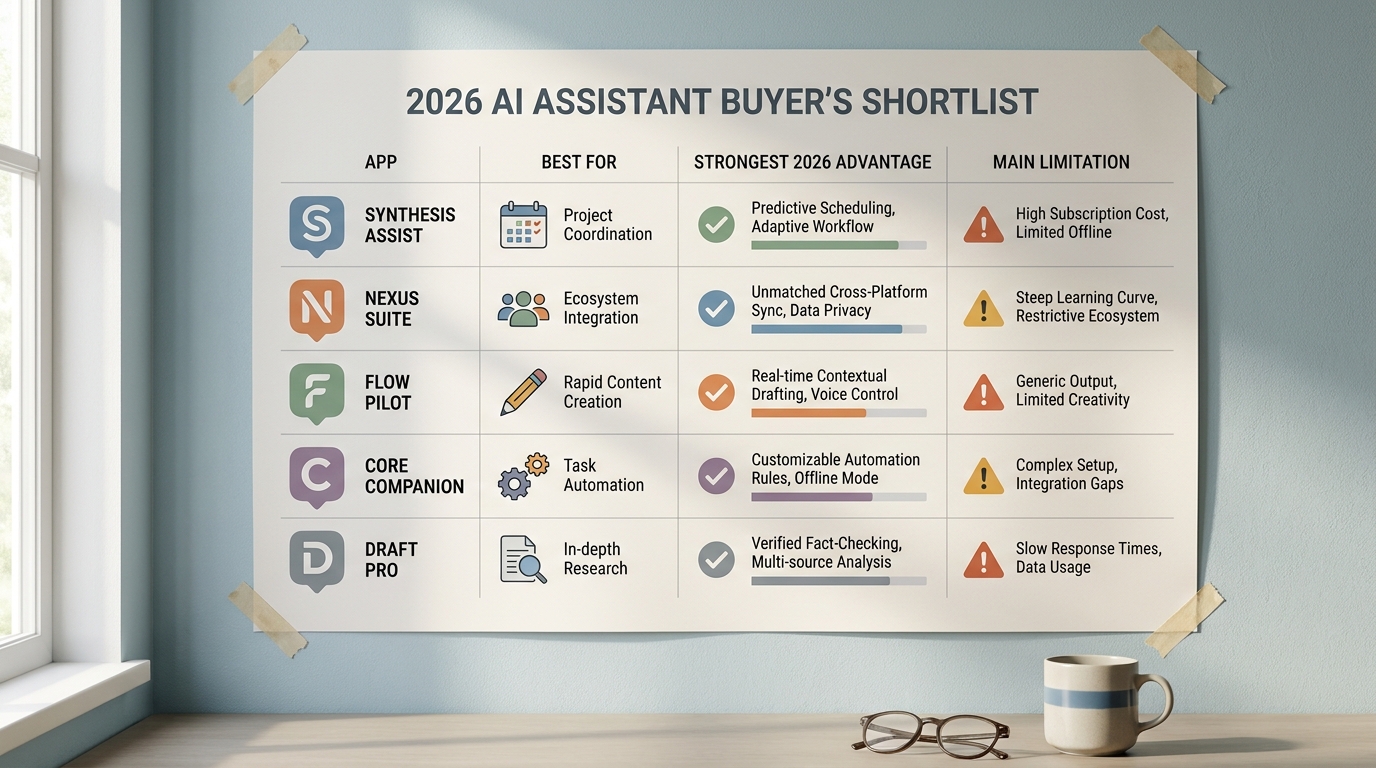
A concise comparison table for the Top 5 AI Assistant Apps in 2026 with columns for app, best for, strongest 2026 advantage, and main limitation to show tradeoffs at a glance.
This top 5 is ranked by day-to-day usefulness, not by feature lists. The focus is whether the app can reliably help with chat and follow-ups, usable drafts, quick search and synthesis, light task support, and cross-device access (phone, desktop, web).
Where adoption trends are mentioned, treat them as context from third-party reporting, not proof that an app is the best fit for your work.
| Screening check | What "good" looks like | Common failure mode |
|---|---|---|
| Follow-up accuracy | Stays on topic across edits and revisions | Context drift after 3-5 turns |
| Usable drafts | Usable after 1-2 edits | Confident tone but wrong details |
| Cross-device handoff | Phone to desktop without re-pasting | Login friction or missing mobile features |
| Voice in real life | Handles interruptions and noise | Latency, misheard names, random stops |
| Privacy controls | Clear toggles and data-use explanations | Settings vary by plan, region, or org policy |
One practical constraint: enterprise policy can override what the app advertises. A common failure mode is email and calendar actions failing because your admin blocks connectors or requires approvals, so you end up with good drafts but no real automation.
When you move from outline to execution, Top AI Coding Assistants for Mobile Developers in 2026 helps close common gaps teams hit here.
What are the best AI assistant picks by use case?
| Use case (quick pick) | App | Fit in one line | Tradeoff to plan for |
|---|---|---|---|
| Best overall assistant | ChatGPT | Strong generalist across devices, good for drafting and iterating. | You still need to verify facts, citations, and compliance-sensitive outputs. |
| Best for Google-first users | Gemini | Best if you live in Google apps and want tighter Android and Workspace handoff. | Can feel less consistent outside the Google stack; some features vary by plan. |
| Best for writing and analysis | Claude | Excellent for clear structure and long-document work. | Less action-oriented; fewer built-in "do it for me" workflows. |
| Best for Microsoft 365 work | Microsoft Copilot | Practical in Outlook, Teams, and Office when your tenant enables it. | Value depends on licensing and admin settings; connectors may be restricted. |
| Best for sourced research | Perplexity | Fast answers with sources for sanity-checking claims. | Not designed to run your whole workflow; citations still need review. |
These are use-case picks, not universal scores. Many 2026 roundups cluster around ChatGPT, Gemini, Claude, and Copilot, with Perplexity often highlighted for search-style help (for example: TechCrunch, The AI Rankings, ZeroTwo).
If you need offline-only privacy, regulated approvals, or strict admin control, start with a specialist tool or a platform-native enterprise deployment before a consumer app. If your work data is sensitive, treat consumer assistants as "draft help" unless your security team explicitly approves otherwise.
Security and admin constraints
If your org blocks connecting email, calendar, or files, plan for a chat-first workflow and keep sensitive data out of prompts.
security requirements
A complementary angle worth comparing lives in New Health and Wellness Apps Released in May 2026.
How do you choose an AI assistant without overcommitting?
Ecosystem fit determines whether the assistant reduces friction or adds it. If you pick the wrong fit, you often end up copy-pasting, re-authing, and losing the time you hoped to save.
Use two filters, in this order:
Ecosystem and permissions
Match your daily email, calendar, and files. Then confirm you are actually allowed to connect them (especially at work).
One weekly job to be done
Pick one repeatable task (like email replies, meeting prep, or summarizing docs) and judge the assistant on that, not on fun demos.
A simple success metric: time-to-usable draft under 5 minutes, with no more than 2 editing passes. Include setup time in the evaluation, because a tool that saves 2 minutes per day but costs you half a day to configure might not be worth it.
One tradeoff to acknowledge: tighter integrations often increase dependency risk. If you change phones, switch jobs, or your admin policy changes, your best workflow can break overnight.
For tradeoffs, checklists, and edge cases, Best Single-Purpose Apps for Getting Things Done in 2026 rounds out this section.
What is a concrete 45-90 minute test you can run this week?
Run the same workflow in your top two apps. Timebox it so you do not turn "choosing a tool" into a project.
Draft a real email reply
Ask for a 120-180 word reply with your constraints (tone, deadline, and 2 bullet next steps). Success is a sendable draft after 1-2 edits.
Turn it into a meeting action
Prompt it to propose 3 time slots and create a 30-minute meeting. Watch for the common failure where it suggests times but cannot schedule due to permissions.
Summarize a doc you already have access to
Ask for a 5-bullet summary plus 3 risks. Success is accurate references to the document, not generic filler.
Do one voice task in a noisy setting
Try a short voice prompt while walking or commuting. Success is correct names, dates, and action items, with tolerable latency.
If setup alone takes an hour, that is a signal about long-term friction. It might still be worth it, but you should go in with eyes open.
Test your top two in one afternoon
Run the same three tasks in both apps and track time-to-usable output, edits required, and any connector or permission failures.
test your finalists
Best Real Estate Apps Launched in 2026 - Ranked reframes the same problem with a slightly different lens - useful before you finalize.